
alajusticia / laravel-logins

Session management in Laravel apps, user notifications on new access, support for multiple separate remember tokens, IP geolocation, User-Agent parser
Fund package maintenance!
Requires
- php: ^8.2
- alajusticia/laravel-expirable: ^2.5
- illuminate/auth: ^10.0|^11.0|^12.0|^13.0
- illuminate/collections: ^10.0|^11.0|^12.0|^13.0
- illuminate/contracts: ^10.0|^11.0|^12.0|^13.0
- illuminate/database: ^10.0|^11.0|^12.0|^13.0
- illuminate/http: ^10.0|^11.0|^12.0|^13.0
- illuminate/queue: ^10.0|^11.0|^12.0|^13.0
- illuminate/session: ^10.0|^11.0|^12.0|^13.0
- illuminate/support: ^10.0|^11.0|^12.0|^13.0
- laravel/prompts: ^0.3
- nesbot/carbon: ^2.67|^3.0
Requires (Dev)
- buggregator/trap: ^1.4
- jenssegers/agent: ^2.6
- laravel/fortify: ^1.21
- laravel/sanctum: ^4.0
- livewire/livewire: ^3.4|^4.2
- mockery/mockery: ^1.6
- orchestra/testbench: ^10.0|^11.0
- phpunit/phpunit: ^11.5.55|^12.5.23
- stevebauman/location: ^7.1
- whichbrowser/parser: ^2.1
Suggests
- ext-mbstring: You must enable the PHP mbstring extension. If the extension is not available, you must install symfony/polyfill-mbstring.
Provides
None
Conflicts
None
Replaces
None
README
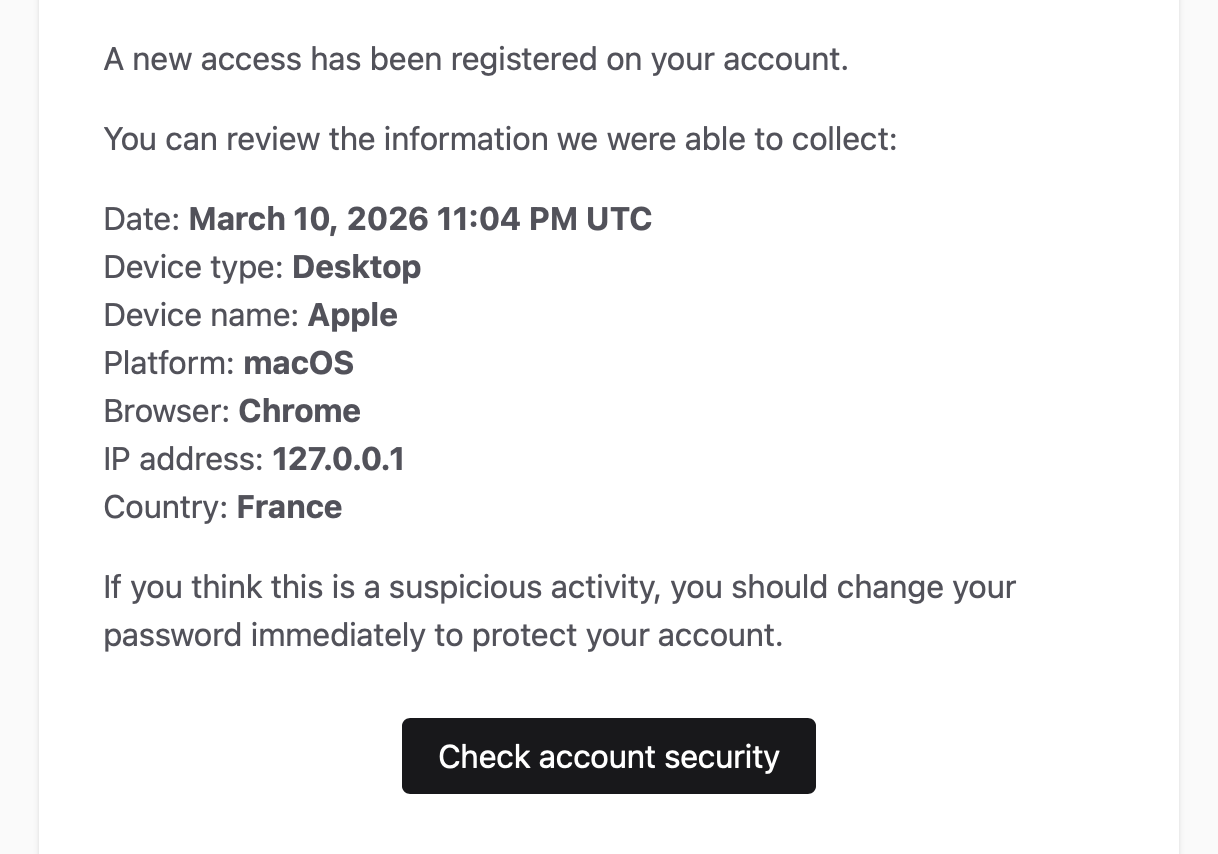
- For each login, record information about the device (device type, device name, OS, browser, IP address) and the context (date and location)
- Display active sessions in the user's account so they can review connected devices
- Notify users by email whenever a new login occurs, including the collected information
- Allow users to sign out a specific device, all devices except the current one, or all devices at once
- Sign out a device without affecting other remembered devices (each remembered session has its own token)
- Optionally track Sanctum tokens, which is useful when authenticating mobile apps, for example
- Starter kit
- Compatibility
- Installation
- Throttling activity updates
- UI components
- Usage
- IP address geolocation
- Events
- Notifications
- Translations
- Purge expired logins
- Stored User-Agent length
- GDPR and Privacy Considerations
- License
Starter kit
Laravel Logins comes already installed and wired up in Inertia Start, the monetization-ready Laravel, Inertia & Vue starter kit I use for every new project.
Along with active sessions and device management, you get authentication with magic links, OAuth login and 2FA, Stripe & Paddle billing, teams with roles and permissions, privacy-first analytics, localization, a complete user dashboard, shadcn-vue components, and more. Everything is fully typed with TypeScript.
Skip the boilerplate and start building your product: inertiastart.com.
Compatibility
-
This package has been tested with Laravel v10 to v13
-
It works with all the session drivers supported by Laravel, except the cookie driver (which saves the sessions only in the client browser) and the array driver
-
It also supports personal access tokens provided by Laravel Sanctum (v3)
Installation
Install the package with composer:
composer require alajusticia/laravel-logins
Publish the configuration file (logins.php) with:
php artisan vendor:publish --tag="logins-config"
Run the logins:install command to run the required database migrations:
php artisan logins:install
When upgrading an existing application, run your migrations so package schema changes are applied.
For example, recent versions widen the logins.user_agent column to TEXT.
Prepare your authenticatable models
In order to track the logins of your app's users, add the ALajusticia\Logins\Traits\HasLogins trait
in your authenticatable models that you want to track:
use ALajusticia\Logins\Traits\HasLogins;
use Illuminate\Foundation\Auth\User as Authenticatable;
// ...

class User extends Authenticatable
{
    use HasLogins;

    // ...
}
Choose and install a user-agent parser
This package relies on a user-agent parser to extract the information.
It supports the two most popular parsers:
- WhichBrowser (https://github.com/WhichBrowser/Parser-PHP)
- Agent (https://github.com/jenssegers/agent) ⚠️ This one doesn't work with Laravel > v10
Before using Laravel Logins, you need to choose a supported parser, install it and indicate in the configuration file which one you want to use.
Configure the authentication guard
This package comes with a custom authentication guard (ALajusticia\Logins\LoginsSessionGuard) that extends the default
Laravel session guard, adding the logic to delete related logins in the logout(), logoutCurrentDevice() and
logoutOtherDevices() methods.
In the guards options of your auth.php configuration file, use the logins driver instead of the session driver:
'guards' => [
    'web' => [
        'driver' => 'logins',
        'provider' => 'users',
    ],

    // ...
],
Configure the user provider
This package comes with a modified Eloquent user provider that retrieves remembered users from the logins table, allowing each session to have its own remember token and giving us the ability to revoke sessions individually.
When using Laravel Logins, you DON'T need to use the Illuminate\Session\Middleware\AuthenticateSession middleware for
the "Logout other devices" feature to work. Each login having its own remember token, we don't have to rehash the user
password or to add overhead to check the password hash at every request using the AuthenticateSession middleware.
In your auth.php configuration file, use the logins driver in the user providers list for the users you want to enable logins:
'providers' => [
    'users' => [
        'driver' => 'logins',
        'model' => env('AUTH_MODEL', User::class),
    ],

    // ...
],
Laravel Sanctum
In addition to sessions, Laravel Logins also supports tracking personal access tokens issued by Laravel Sanctum (go to Compatibility section for information on supported versions).
This feature can be useful if you are authenticating users from external apps, like mobile apps for example.
ℹ️ You don't need to enable this if you only track stateful Sanctum authentications (like with Inertia.js).
To enable it, set sanctum_token_tracking to true in your logins.php configuration file.
If Laravel Sanctum is installed after you've installed Laravel Logins, you will have to run the logins:install
command again to update your installation.
When Sanctum tracking is enabled, the LoggedIn event is dispatched everytime a token is issued. Also, logins related
to tokens are listed and managed the same way we manage sessions. This implies that, when calling logoutAll() method
for example, all sessions AND all personal access tokens will be deleted. This may not be the behavior you want if you
have mixed use cases, and you're also issuing Sanctum personal access tokens for other separated purposes, like API
access. If so, you can define a regular expression in sanctum_token_name_regex option of your logins.php
configuration file, and only the tokens whose name matches the defined pattern will be tracked as "logins":
'sanctum_token_name_regex' => '/^mobile_app_/',
Throttling activity updates
Whenever a login is tracked (session or Sanctum token), the last_activity_at column of the logins table is
refreshed on every authenticated request. On high-traffic apps this causes many database writes just to update
the last-activity timestamp.
You can throttle these updates to reduce database writes significantly. It is optional and enabled in the configuration file:
// config/logins.php
'activity_update' => [
    'interval' => 300,
    'cache_store' => null,
],
interval: the minimum number of seconds between two updates for the same login.0(the default) keeps the original behavior and updates on every request. A value like300updateslast_activity_atat most once every 300 seconds per login.cache_store: the cache store used for throttling.nulluses your default store. Point it at a shared store (Redis, Memcached, database) so the throttle holds across all your workers and servers; a per-process store likearrayorfilewill not throttle reliably.
With throttling enabled, last_activity_at stays accurate to within interval seconds, which is usually enough
for most use cases.
UI components
Logins also includes ready-to-use UI components.
These optional add-ons are designed for projects using the official Laravel starter kits. They provide a working setup out of the box, without requiring you to build your own components.
The following Laravel starter kits are supported (more coming):
If you want to use the UI component, you can publish it running this command:
php artisan logins:publish
Options:
- Use
--starter-kit=vue,--starter-kit=livewire-single-file,--starter-kit=livewire-class-based, or--starter-kit=jetstream-livewireto skip the prompt. - Use
--forceto overwrite an existing published component.
The logins:publish command asks which starter kit you want to target and publishes the reusable Active Sessions component for that stack.
In the latest version of the Laravel starter kits, there is a "Security" page in the user settings area: this is the perfect place to put the Active Sessions component.
The published Livewire components include their own backend logic.
For the Vue component, Laravel Logins includes API endpoints providing the backend logic.
Vue Starter Kit
| Light | Dark |
|---|---|
 |
 |
- Run
php artisan logins:publishand selectLaravel Vue Starter Kit.
The command will published this file:
resources/js/components/Logins.vue
- Register the built-in routes in the
bootmethod of a service provider (for example inapp/Providers/AppServiceProvider.php):
use ALajusticia\Logins\Logins;

public function boot(): void
{
    Logins::registerRoutes();
}
The following endpoints will be registered and protected behind the auth middleware:
GET api/logins
DELETE api/logins/all
DELETE api/logins/others
DELETE api/logins/{loginId}
These routes will be used by the published Logins.vue component.
- Import and use the
Logins.vuecomponent:
<script setup lang="ts">
import Logins from '@/components/Logins.vue';
</script>

<template>
    <Logins />
</template>
Livewire Starter Kit
| Light | Dark |
|---|---|
 |
 |
Publishing the UI component for Livewire copies the reusable component files in your project. The command asks whether you want the single-file or class-based variant:
- Single-file variant:
resources/views/livewire/logins.blade.php
- Class-based variant:
app/Livewire/Logins.phpresources/views/livewire/logins.blade.php
Render the published component wherever it makes sense in your application.
You can, for example, add it at the bottom of the security settings page:
<livewire:logins class="mt-12" />
Jetstream with Livewire
If you're using the previous Livewire starter kit (Laravel Jetstream), you can stop using the AuthenticateSession middleware, as it is not necessary with Logins.
In your jetstream.php configuration file, set auth_session to null:
'auth_session' => null,
In your routes, remove the middleware:
Route::middleware([
    'auth:sanctum',
-    config('jetstream.auth_session'),
    'verified',
])->group(function () {
    // ...
});
Run the logins:publish command and select Laravel Jetstream with Livewire.
This will publish this component:
| Light | Dark |
|---|---|
 |
 |
Files will be copied in app/Livewire/Logins.php and resources/views/livewire/logins.blade.php.
To use the component, replace the LogoutOtherBrowserSessionsForm component of Jetstream, in the profile page
(resources/views/profile/show.blade.php) view, by the Logins component:
<div class="mt-10 sm:mt-0">
-    @livewire('profile.logout-other-browser-sessions-form')
+    @livewire('logins')
</div>
Feel free to modify the component to suit your needs.
Usage
The ALajusticia\Logins\Traits\HasLogins trait provides your authenticatable models with methods to retrieve and manage
the user's logins.
Every time a new successful login occurs or a Sanctum token is created, information about the request will automatically
be saved in the database in the logins table.
Tracking writes are best-effort: if the login record cannot be saved, the authentication request or token creation will still complete.
When a login is tracked successfully, and if a notification class is defined in the logins.php configuration file, a
notification will be sent to your user with the information.
Retrieving the logins
Get all the logins
$logins = request()->user()->logins;
Get the current login
$currentLogin = request()->user()->current_login;
Check for the current login
Each login instance comes with a dynamic is_current attribute.
It's a boolean that indicates if the login instance corresponds to the login related to the current session or current personal access token used.
Revoking logins
Revoke a specific login
Using our custom user provider, you have the ability to log out a specific device, because each session has its own remember token.
To revoke a specific login, use the logout method with the ID of the login you want to revoke.
If no parameter is given, the current login will be revoked.
request()->user()->logout(1); // Revoke the login where id=1
request()->user()->logout(); // Revoke the current login
Revoke all the logins
We can destroy all the sessions and revoke all the Sanctum tokens by using the logoutAll method.
This feature destroys all sessions, even the remembered ones.
request()->user()->logoutAll();
Revoke all the logins except the current one
The logoutOthers method acts in the same way as the logoutAll method, except that it keeps the current
session or Sanctum token alive.
request()->user()->logoutOthers();
IP address geolocation
In addition to the information extracted from the user-agent, you can collect information about the location, based on the client's IP address.
To use this feature, you have to install and configure this package: https://github.com/stevebauman/location.
Then, enable IP address geolocation in the logins.php configuration file.
By default, this is how the client's IP address is determined:
// Support Cloudflare proxy by checking if HTTP_CF_CONNECTING_IP header exists
// Fallback to built-in Laravel ip() method in Request

return $_SERVER['HTTP_CF_CONNECTING_IP'] ?? request()->ip();
You can define your own IP address resolution logic, by passing a closure to the getIpAddressUsing() static method of
the ALajusticia\Logins\Logins class, and returning the resolved IP address.
Call it in the boot() method of a service provider, for example in your App\Providers\AppServiceProvider:
\ALajusticia\Logins\Logins::getIpAddressUsing(function () {
    return request()->ip();
});
Events
LoggedIn
On a new login, you can listen to the ALajusticia\Logins\Events\LoggedIn event.
It receives the authenticated model (in $authenticatable property) and the ALajusticia\Logins\RequestContext object
(in $context property) containing all the information collected about the request:
use ALajusticia\Logins\Events\LoggedIn;
use Illuminate\Support\Facades\Event;

Event::listen(function (LoggedIn $event) {

    // Methods available in RequestContext:
    $event->context->date(); // Returns the date of the login (Carbon object)
    $event->context->userAgent(); // Returns the full, unparsed, User-Agent header
    $event->context->ipAddress(); // Returns the client's IP address
    $event->context->parser(); // Returns the parser used to parse the User-Agent header
    $event->context->location(); // Returns the location (Stevebauman\Location\Position object), if IP address geolocation enabled
    $event->context->tokenName(); // Returns the personal access token name (if Sanctum stateless authentication)

    // Methods available in the parser:
    $this->context->parser()->getDevice(); // The name of the device
    $this->context->parser()->getDeviceType(); // The type of the device (desktop, mobile, tablet or phone)
    $this->context->parser()->getPlatform(); // The name of the platform/OS
    $this->context->parser()->getBrowser(); // The name of the browser
})
Notifications
The notification sent to your users when new access to their account occurs is defined by the
new_login_notification option in the logins.php configuration file.
Laravel Logins comes with a ready-to-use notification (ALajusticia\Logins\Notifications\NewLogin), enabled by default,
or you can pass your own notification class.
Temporarily disable notifications
If you want to disable notifications for a user for the current request, you can set the notifyLogins public property
(from the HasLogins trait) of your authenticatable model to false before logging in the user:
$user->notifyLogins = false;

Auth::login($user);
Disable notifications globally
To prevent this package from sending any new login notification, set the new_login_notification option to false:
'new_login_notification' => false,
No listener is registered at all in this case, so no notification will be sent for any user.
Do this as well if you prefer to handle the notification yourself: listen to the LoggedIn event and apply your own logic (for instance, to notify users only on unknown devices, or to respect a per-user preference stored in your database).
Translations
This package includes translations for English, Spanish and French.
If you want to customize the translations or add new ones, you can publish the language files by running this command:
php artisan vendor:publish --tag="logins-lang"
Purge expired logins
This packages uses Laravel Expirable to make the Login model expirable.
To purge expired logins, you can add the ALajusticia\Logins\Models\Login class to the purge array of the
expirable.php configuration file:
    'purge' => [
        \ALajusticia\Logins\Models\Login::class,
    ],
Stored User-Agent length
Laravel Logins stores the raw User-Agent header in the logins.user_agent column.
The column is TEXT, but the stored value is capped to 1024 bytes by default to keep audit data bounded.
You can customize the max length in the logins.php configuration file:
'user_agent_max_length' => 1024,
Set this option to null if you want to store the full User-Agent header.
GDPR and Privacy Considerations
Laravel Logins helps applications track and manage authentication sessions so users can review and terminate access from other devices. Because this functionality involves storing session metadata, it is important to consider both security and privacy aspects when using this package.
Stored Information
Depending on your configuration and implementation, the package may store authentication metadata such as:
- User identifier
- IP address
- Browser / device information (user agent)
- Login timestamp
- Last activity timestamp
This information is used solely to allow users to review their active sessions and revoke access from other devices.
Some of these elements (such as IP addresses or device information) may be considered personal data under privacy regulations such as the General Data Protection Regulation (GDPR).
Responsibility
This package provides only the technical functionality required to manage login sessions.
The application integrating this package is responsible for ensuring compliance with applicable privacy laws and regulations.
Laravel Logins does not collect or transmit data externally. All data is stored locally within your application's database.
Privacy Best Practices
If you use this package in a production environment, especially within jurisdictions governed by privacy regulations (such as the EU), consider applying the following best practices:
- Inform users in your Privacy Policy that login session information may be recorded for security purposes.
- Limit retention of old session records and periodically remove outdated entries.
- Delete related session records when a user account is deleted.
- Restrict database access to authorized services only.
Tracking login sessions can typically be justified under the legitimate interest of protecting user accounts and preventing unauthorized access.
Security Benefits
The features provided by Laravel Logins contribute to account security by allowing users to:
- View recent login activity
- Identify unknown devices or sessions
- Revoke access from other devices
These capabilities help users detect suspicious activity and protect their accounts.
Disclosure of Security Issues
If you discover a security vulnerability within this package, please report it responsibly by opening a private security advisory on GitHub or contacting the maintainer.
Please do not disclose security vulnerabilities publicly until they have been addressed.
Legal Disclaimer
This package provides technical tools only and does not constitute legal advice.
Developers integrating this package should consult appropriate legal guidance to ensure their applications comply with applicable privacy regulations.
License
Open source, licensed under the MIT license.