
nafigator / bash-helpers

Collections of useful functions for usage in Bash scripts.
Requires
None
Requires (Dev)
None
Suggests
None
Provides
None
Conflicts
None
Replaces
None
This package is auto-updated.
Last update: 2026-09-23 05:29:51 UTC
README
bash-helpers

Collection of useful functions for usage in Bash scripts
See CONTRIBUTING.md for development setup and PR guidelines.
Usage
Without installation
#!/usr/bin/env bash

source <(curl -s https://raw.githubusercontent.com/nafigator/bash-helpers/1.1.5/src/bash-helpers.sh)

inform 'Bash helpers ready!'
Preinstalled
#!/usr/bin/env bash

. /usr/local/lib/bash/includes/bash-helpers.sh

inform 'Bash helpers ready!'
Installation
- Put bash libs into
/usr/local/lib/bash/includesdir. - Source
bash-helpers.shin executable script:. /usr/local/lib/bash/includes/bash-helpers.sh
Example
[ -d /usr/local/lib/bash/includes ] || sudo mkdir -p /usr/local/lib/bash/includes
sudo curl -o /usr/local/lib/bash/includes/bash-helpers.sh https://raw.githubusercontent.com/nafigator/bash-helpers/master/src/bash-helpers.sh
sudo chmod +x /usr/local/lib/bash/includes/bash-helpers.sh
Via functions
#!/usr/bin/env bash

download_bash_helpers() {
	printf "Installing bash-helpers\n"
	[[ ! -d /usr/local/lib/bash/includes ]] || sudo mkdir -p /usr/local/lib/bash/includes

	sudo curl -so /usr/local/lib/bash/includes/bash-helpers.sh https://raw.githubusercontent.com/nafigator/bash-helpers/master/src/bash-helpers.sh
	sudo chmod +x /usr/local/lib/bash/includes/bash-helpers.sh

	return 0
}

init_bash_helpers() {
	[[ -e /usr/local/lib/bash/includes/bash-helpers.sh ]] || download_bash_helpers

	if [[ ! -x /usr/local/lib/bash/includes/bash-helpers.sh ]]; then
		printf "Insufficient permissions for bash-helpers execute\n"; return 1
	fi

	. /usr/local/lib/bash/includes/bash-helpers.sh

	return 0
}

init_bash_helpers || exit 1
Via composer
composer require nafigator/bash-helpers
Features:
-
Defines human-readable functions for colors and formatting:
- black()
- red()
- green()
- yellow()
- blue()
- magenta()
- cyan()
- white()
- gray()
- bold()
- clr()
Examples:
printf "$(bold)$(red)ATTENTION$(clr) Save $(cyan)failure$(clr)"

NOTE: For logging purpose colors may be disabled by global
INTERACTIVEvariable:INTERACTIVE=
-
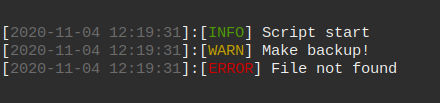
Functions for nicely formatted messages
error,inform,warning.Examples:
 inform 'Script start'
 warning 'Make backup!'
 error 'File not found'
-
Libs including.
Example:
 include google/client || exit 1
 include mysql/query-builder || exit 1
 include logger; status 'Logger including' $? || exit 1
-
Status messages.
Example:
 test -d /usr/local/nonexistent
 status 'Check /usr/local/nonexistent dir' $?
 test -d /usr/local/bin
 status 'Check /usr/local/bin dir' $?

-
Checking dependencies.
Example:
check_dependencies yarn rust || exit 1

-
Debug messages and statuses.
Example:
 debug 'This message is hidden'
 status_dbg 'This status is hidden' $?
 DEBUG=1
 debug 'Visible because of DEBUG variable'
 test -d /nonexists
 status_dbg 'Visible because of DEBUG variable' $?
 test -d /var/log
 status_dbg 'Visible because of DEBUG variable' $?

Configuration
The library is configured via environment variables and by overriding a few functions.
Environment variables
| Variable | Default | Description |
|---|---|---|
INTERACTIVE |
1 if stdin and stdout are TTY, otherwise empty |
Enables ANSI color output. Set to empty (INTERACTIVE=) to disable colors (e.g. for logs). |
DEBUG |
unset | Enables debug() and status_dbg() output. Set to any non-empty value (e.g. DEBUG=1). |
VERSION |
unset | Your script version. Used by print_version(). Define it in your main script. |
Examples:
# Redefine to disable colors
INTERACTIVE=

# Redefine to enable debug output
DEBUG=1

# Redefine version in your script for print_version
VERSION=1.2.3
Overriding functions
Two functions are meant to be redefined in your script to match your CLI:
usage_help()— prints help text. Redefine to show your own options.print_version()— prints version. Redefine if you need custom output (it uses$VERSIONand$BASH_HELPERS_VERSIONby default).parse_options()— parses options. Redefine if you have extended set of options.
Example:
usage_help() {
  echo "Usage: my-script [OPTIONS]"
  echo "  -v, --version  Show version"
  echo "  -h, --help     Show this help"
}

print_version() {
  echo "my-script $VERSION"
}
Include directory
include() loads files from a fixed path:
/usr/local/lib/bash/includes
If you need a different location, redefine include() in your script.
Notes
INTERACTIVEandDEBUGare read at call time, so you can change them during script execution.VERSIONmust be set before callingprint_version().- Color functions (
red,bold, etc.) respectINTERACTIVEautomatically.
Dependencies
Required
| Dependency | Version | Purpose |
|---|---|---|
bash |
≥ 3.2 | local -r, printf, [[ ]], getopts and other 3.x features used across helpers |
POSIX utilities |
— | printf, date, readlink, basename — used by format_date, inform, warning, error, debug, usage_help, print_version |
Optional
Installed only if you use the corresponding function.
| Dependency | Used by | Purpose |
|---|---|---|
bc |
float() |
Arbitrary precision arithmetic for decimal conversion |
sed |
float() |
Normalizes decimal separator (, → .) |
git |
git_config_bool() |
Reads boolean values from git config |
curl |
Installation snippets in this README | Downloads bash-helpers.sh |
Function → dependency map
| Function | Depends on |
|---|---|
black … clr |
printf (builtin) |
format_date |
date, printf (builtin) |
error, inform, warning, debug |
date, printf (builtin) |
status, status_dbg |
date, printf (builtin) |
check_dependencies |
date, command -v (builtin) |
float |
sed, bc |
include |
— (pure bash) |
usage_help, print_version |
basename, readlink |
git_config_bool |
git |
parse_options |
getopts (builtin) |
Checking at runtime
Use the bundled helper to verify dependencies before running your script:
check_dependencies bash date git || exit 1
Notes
- All helpers assume a POSIX-like environment (Linux, macOS, BSD). Windows is supported only via WSL or MSYS2/Cygwin.
bcis not installed by default on minimal images (e.g.alpine,debian:slim). Install it withapk add bc/apt-get install -y bcif you rely onfloat().INTERACTIVEandDEBUGare not external dependencies — they are environment variables consumed by the library. See Configuration
Message statuses
[ OK ] - success status
[FAIL] - fail status
[ ?? ] - debug message
[ ++ ] - success debug status
[ -- ] - fail debug status
Versioning
This software follows "Semantic Versioning" specifications. All function signatures declared as public API.
Read more on SemVer.org.