
shopware / platform


The Shopware e-commerce core
Package info
pkg:composer/shopware/platform
Requires
- php: ~8.2.0 || ~8.3.0 || ~8.4.0 || ~8.5.0
- composer-runtime-api: ^2.1
- ext-ctype: *
- ext-curl: *
- ext-dom: *
- ext-fileinfo: *
- ext-filter: *
- ext-gd: *
- ext-intl: *
- ext-json: *
- ext-libxml: *
- ext-mbstring: *
- ext-openssl: *
- ext-pdo: *
- ext-pdo_mysql: *
- ext-session: *
- ext-simplexml: *
- ext-sodium: *
- ext-xml: *
- ext-xmlreader: *
- ext-zip: *
- ext-zlib: *
- async-aws/core: ^1.22
- cocur/slugify: ^4.7.0
- composer/class-map-generator: ^1.7
- composer/composer: ^2.9.3
- composer/semver: ^3.4.0
- doctrine/dbal: ~4.4.0
- doctrine/inflector: ^2.0
- dompdf/dompdf: ~3.1.6
- dragonmantank/cron-expression: ^3.3
- ezyang/htmlpurifier: ^4.16
- guzzlehttp/guzzle: ^7.5.0
- guzzlehttp/promises: ^2.5
- guzzlehttp/psr7: ^2.4
- horstoeko/zugferd: ^1.0.104
- lcobucci/jwt: ^5.5
- league/flysystem: ^3.13.0
- league/flysystem-local: ^3.29.0
- league/flysystem-memory: ^3.10.3
- league/mime-type-detection: ^1.13.0
- league/oauth2-server: ^9.3
- mcp/sdk: ^0.8.1
- meyfa/php-svg: ^0.16.1
- monolog/monolog: ^3.3.1
- nikic/php-parser: ^5.8.0
- nyholm/psr7: ^1.5
- opensearch-project/opensearch-php: ^2.6.0
- pentatrion/vite-bundle: ^8.1
- php-http/discovery: ^1.20
- phpseclib/phpseclib: ^3.0
- psr/cache: ^3.0.0
- psr/clock: ^1.0.0
- psr/container: ^2.0.2
- psr/event-dispatcher: ^1.0.0
- psr/http-client: ^1.0.3
- psr/http-factory: ^1.0.1
- psr/http-message: ^1.1 || ^2.0
- psr/http-server-middleware: ^1.0
- psr/log: ^3.0.0
- psr/simple-cache: ^3.0.0
- ramsey/uuid: ^4.7
- scssphp/scssphp: v1.12.0
- setasign/fpdi: ^2.3.7
- setasign/tfpdf: ^1.33
- shopware/conflicts: 0.6.3
- shyim/opensearch-php-dsl: ^1.1.4
- squirrelphp/twig-php-syntax: ^1.13.0
- symfony/asset: ~7.4.0
- symfony/cache: ~7.4.12
- symfony/cache-contracts: ~3.6.0
- symfony/clock: ~7.4.0
- symfony/config: ~7.4.0
- symfony/console: ~7.4.0
- symfony/debug-bundle: ~7.4.0
- symfony/dependency-injection: ~7.4.0
- symfony/deprecation-contracts: ~3.6.0
- symfony/doctrine-messenger: ~7.4.0
- symfony/dotenv: ~7.4.0
- symfony/error-handler: ~7.4.0
- symfony/event-dispatcher: ~7.4.0
- symfony/event-dispatcher-contracts: ~3.6.0
- symfony/filesystem: ~7.4.0
- symfony/finder: ~7.4.0
- symfony/framework-bundle: ~7.4.0
- symfony/http-client: ~7.4.0
- symfony/http-client-contracts: ~3.6.0
- symfony/http-foundation: ~7.4.0
- symfony/http-kernel: ~7.4.12
- symfony/intl: ~7.4.0
- symfony/lock: ~7.4.0
- symfony/mailer: ~7.4.12
- symfony/mcp-bundle: ~0.14.1
- symfony/messenger: ~7.4.12
- symfony/mime: ~7.4.12
- symfony/monolog-bridge: ~7.4.12
- symfony/monolog-bundle: ~3.11.0
- symfony/options-resolver: ~7.4.0
- symfony/password-hasher: ~7.4.0
- symfony/polyfill-mbstring: >=1.34.0
- symfony/polyfill-php83: >=1.34.0
- symfony/polyfill-php84: >=1.34.0
- symfony/polyfill-php85: >=1.34.0
- symfony/polyfill-php86: >=1.34.0
- symfony/process: ~7.4.0
- symfony/property-access: ~7.4.0
- symfony/property-info: ~7.4.0
- symfony/proxy-manager-bridge: ~6.4.8
- symfony/psr-http-message-bridge: ~7.4.0
- symfony/rate-limiter: ~7.4.0
- symfony/routing: ~7.4.12
- symfony/runtime: ~7.4.12
- symfony/scheduler: ~7.4.0
- symfony/security-core: ~7.4.12
- symfony/serializer: ~7.4.0
- symfony/service-contracts: ~3.6.0
- symfony/stopwatch: ~7.4.0
- symfony/string: ~7.4.0
- symfony/translation: ~7.4.0
- symfony/translation-contracts: ~3.6.0
- symfony/twig-bridge: ~7.4.12
- symfony/twig-bundle: ~7.4.0
- symfony/uid: ~7.4.9
- symfony/ux-twig-component: ~2.35.0
- symfony/validator: ~7.4.0
- symfony/var-exporter: ~7.4.0
- symfony/yaml: ~7.4.12
- twig/intl-extra: ^3.26.0
- twig/string-extra: ^3.24.0
- twig/twig: ^3.29.0
- zircote/swagger-php: ^6.4
Requires (Dev)
- ext-tokenizer: *
- ext-xmlwriter: *
- bamarni/composer-bin-plugin: ^1.8.2
- doctrine/sql-formatter: ^1.5.4
- dominikb/composer-license-checker: ^2.5
- ergebnis/phpunit-slow-test-detector: ^2.4
- friendsofphp/php-cs-fixer: 3.95.15
- league/flysystem-async-aws-s3: ^3.29.0
- league/flysystem-google-cloud-storage: ^3.10.3
- opis/json-schema: ^2.3.0
- phpat/phpat: 0.12.5
- phpbench/phpbench: ^1.6.1
- phpdocumentor/reflection-docblock: ^5.6.4
- phpdocumentor/type-resolver: ^1.7.1
- phpstan/extension-installer: ^1.4.3
- phpstan/phpdoc-parser: ^2.0.0
- phpstan/phpstan: 2.3.1
- phpstan/phpstan-deprecation-rules: 2.0.5
- phpstan/phpstan-phpunit: 2.1.1
- phpstan/phpstan-strict-rules: 2.1.0
- phpstan/phpstan-symfony: 2.1.0
- phpunit/phpunit: ^11.5.19
- predis/predis: ^2.2
- rector/type-perfect: 2.2.0
- shipmonk/composer-dependency-analyser: ^1.8
- shopware/dev-tools: ^1.3
- shopwarelabs/phpstan-shopware: 0.2.5
- smalot/pdfparser: ^2.2.2
- symfony/browser-kit: ~7.4.0
- symfony/doctrine-bridge: ~7.4.14
- symfony/dom-crawler: ~7.4.12
- symfony/phpunit-bridge: ~7.4.0
- symfony/var-dumper: ~7.4.0
- symfony/web-profiler-bundle: ~7.4.12
- symplify/phpstan-rules: 14.10.0
Suggests
- league/flysystem-async-aws-s3: Required to use the Flysystem S3 driver (^3.10.3)
- league/flysystem-google-cloud-storage: Required to use the Flysystem Google cloud driver (^3.10.3)
- shopware/dev-tools: For development tools, profiler, faker, etc
Provides
None
Conflicts
None
Replaces
- shopware/administration: v6.7.16.0
- shopware/core: v6.7.16.0
- shopware/elasticsearch: v6.7.16.0
- shopware/storefront: v6.7.16.0
- dev-trunk / 6.7.x-dev
- 6.7.16.x-dev
- v6.7.16.0
- 6.7.15.x-dev
- v6.7.15.1
- v6.7.15.0
- 6.7.14.x-dev
- v6.7.14.2
- v6.7.14.1
- v6.7.14.0
- 6.7.13.x-dev
- v6.7.13.1
- v6.7.13.0
- 6.7.12.x-dev
- v6.7.12.2
- v6.7.12.1
- v6.7.12.0
- 6.7.11.x-dev
- v6.7.11.1
- v6.7.11.0
- 6.7.10.x-dev
- v6.7.10.2
- v6.7.10.1
- v6.7.10.0
- 6.7.9.x-dev
- v6.7.9.1
- v6.7.9.0
- 6.7.8.x-dev
- v6.7.8.2
- v6.7.8.1
- v6.7.8.0
- 6.7.7.x-dev
- v6.7.7.1
- v6.7.7.0
- 6.7.6.x-dev
- v6.7.6.2
- v6.7.6.1
- v6.7.6.0
- 6.7.5.x-dev
- v6.7.5.1
- v6.7.5.0
- 6.7.4.x-dev
- v6.7.4.2
- v6.7.4.1
- v6.7.4.0
- 6.7.3.x-dev
- v6.7.3.1
- v6.7.3.0
- 6.7.2.x-dev
- v6.7.2.2
- v6.7.2.1
- v6.7.2.0
- 6.7.1.x-dev
- v6.7.1.2
- v6.7.1.1
- v6.7.1.0
- 6.7.1.0-dev
- v6.7.0.1
- v6.7.0.0
- v6.7.0.0-rc5
- v6.7.0.0-rc4
- v6.7.0.0-rc3
- v6.7.0.0-rc2
- v6.7.0.0-rc1
- 6.7.0.0-dev
- 6.6.x-dev
- v6.6.10.31
- v6.6.10.30
- v6.6.10.29
- v6.6.10.28
- v6.6.10.27
- v6.6.10.26
- v6.6.10.25
- v6.6.10.24
- v6.6.10.23
- v6.6.10.22
- v6.6.10.21
- v6.6.10.20
- v6.6.10.19
- v6.6.10.18
- v6.6.10.17
- v6.6.10.16
- v6.6.10.15
- v6.6.10.14
- v6.6.10.13
- v6.6.10.12
- v6.6.10.11
- v6.6.10.10
- v6.6.10.9
- v6.6.10.8
- v6.6.10.7
- v6.6.10.6
- v6.6.10.5
- v6.6.10.4
- v6.6.10.3
- v6.6.10.2
- v6.6.10.1
- v6.6.10.0
- 6.6.10.0-dev
- v6.6.9.0
- v6.6.8.2
- v6.6.8.1
- v6.6.8.0
- v6.6.7.1
- v6.6.7.0
- v6.6.6.1
- v6.6.6.0
- v6.6.5.1
- v6.6.5.0
- v6.6.4.1
- v6.6.4.0
- v6.6.3.1
- v6.6.3.0
- v6.6.2.0
- v6.6.1.2
- v6.6.1.1
- v6.6.1.0
- v6.6.0.3
- v6.6.0.2
- v6.6.0.1
- v6.6.0.0
- v6.6.0.0-rc7
- v6.6.0.0-rc6
- v6.6.0.0-rc5
- v6.6.0.0-rc4
- v6.6.0.0-rc3
- v6.6.0.0-rc2
- v6.6.0.0-rc1
- 6.5.x-dev
- v6.5.8.19
- v6.5.8.18
- v6.5.8.17
- 6.5.8.17-dev
- v6.5.8.16
- v6.5.8.15
- v6.5.8.14
- v6.5.8.13
- v6.5.8.12
- v6.5.8.11
- v6.5.8.10
- v6.5.8.9
- v6.5.8.8
- v6.5.8.7
- v6.5.8.6
- v6.5.8.5
- v6.5.8.4
- v6.5.8.3
- v6.5.8.2
- v6.5.8.1
- v6.5.8.0
- v6.5.7.4
- v6.5.7.3
- v6.5.7.2
- v6.5.7.1
- v6.5.7.0
- v6.5.6.1
- v6.5.6.0
- v6.5.5.2
- v6.5.5.1
- v6.5.5.0
- v6.5.4.1
- v6.5.4.0
- v6.5.3.3
- v6.5.3.2
- v6.5.3.1
- v6.5.3.0
- v6.5.2.1
- v6.5.2.0
- v6.5.1.1
- v6.5.1.0
- 6.5.0.0
- 6.5.0.0-rc4
- 6.5.0.0-rc3
- 6.5.0.0-rc2
- 6.5.0.0-rc1
- 6.4.x-dev
- 6.4.20.2
- 6.4.20.1
- 6.4.20.0
- 6.4.19.0
- 6.4.18.1
- 6.4.18.0
- 6.4.17.2
- 6.4.17.1
- 6.4.17.0
- 6.4.16.1
- 6.4.16.0
- 6.4.15.2
- 6.4.15.1
- 6.4.15.0
- 6.4.14.0
- 6.4.13.0
- 6.4.12.0
- 6.4.11.1
- 6.4.11.0
- 6.4.10.1
- 6.4.10.0
- 6.4.9.0
- 6.4.8.2
- 6.4.8.1
- 6.4.8.0
- 6.4.7.0
- 6.4.6.1
- 6.4.6.0
- 6.4.5.1
- 6.4.5.0
- 6.4.4.1
- 6.4.4.0
- 6.4.3.1
- 6.4.3.0
- 6.4.2.1
- 6.4.2.0
- 6.4.1.2
- 6.4.1.1
- 6.4.1.0
- 6.4.0.0
- 6.4.0.0-RC1
- 6.3.5.4
- 6.3.5.3
- 6.3.5.2
- 6.3.5.1
- 6.3.5.0
- 6.3.4.1
- 6.3.4.0
- 6.3.3.1
- 6.3.3.0
- 6.3.2.1
- 6.3.2.0
- 6.3.1.1
- 6.3.1.0
- 6.3.0.2
- 6.3.0.1
- 6.3.0.0
- v6.2.3
- v6.2.2
- v6.2.1
- v6.2.0
- v6.2.0-RC1
- v6.1.6
- v6.1.5
- v6.1.4
- v6.1.3
- v6.1.2
- v6.1.1
- v6.1.0
- v6.1.0-rc4
- v6.1.0-rc3
- v6.1.0-rc2
- v6.1.0-rc1
- v6.0.0+ea2
- dev-feat/exp-studio/detail-page
- dev-feat/app-no-validate-deprecation
- dev-refactor/app-manifest-validation-consolidation
- dev-fix/shop-id-memo-after-check
- dev-feat-telemetry-label-extensibility
- dev-feat/admin-app-validation-errors
- dev-fix/waiting-on-manual-label
- dev-codex/cheapest-price-blob
- dev-fix/capture-refund-state-events
- dev-art-board-view
- dev-fix/order-details-mobile-text-zoom
- dev-funny-ishizaka-cc7611
- dev-set-order-state-primary-delivery
- dev-storefront-mails-documents-every-shipment
- dev-feat/app-services-strict-validation
- dev-refactor/app-compatibility-requirement-validators
- dev-perf/admin-chart-locales-on-demand
- dev-feat/product-document-validation
- dev-fix/service-source-stale-revision-files
- dev-danger-known-test-case-bases
- dev-delivery-note-of-single-delivery
- dev-refactor/app-validation-error-codes
- dev-swagent/busy-stonebraker-07735c
- dev-codex/order-viewer-skip-draft
- dev-fix/verify-user-modal-sso
- dev-refactor/import-export-file-collection
- dev-feat/product-document-storefront
- dev-fix/sw-docs-impact-allowed-domains
- dev-fix/product-stream-preview-presentation-variant
- dev-fix/21534-integration-tests-whose-guard-no-ci-lane
- dev-codex/storefront-deprecation-guard-eslint
- dev-fix/14665-sanitizer-double-encoding
- dev-feat/admin-require-deprecation-guard-rule
- dev-feat/admin-deprecation-guard-sweep
- dev-fix/unused-media-grace-period
- dev-feat/robots-txt-ai-usage-preferences
- dev-codex/product-documents-04-variants
- dev-codex/product-documents-03-languages
- dev-claude/test-annotations-merge-base
- dev-codex/product-documents-02-management
- dev-feat/staging-shop-id-strategy
- dev-fix/invalidate-media-cache-tags-on-replace
- dev-codex/product-documents-01-upload
- dev-feat/product-documents-admin-01-card
- dev-feat/framework-attribute-many-to-many-reverse
- dev-perf/admin-discovery-search-ids-for-id-only-reads
- dev-feat/experience-studio-storybook-blocks
- dev-test/ats-741-platform-precheck
- dev-feature/product-documents
- dev-feat/product-document-immutable-product
- dev-ci/faster-admin-jest
- dev-fix/elasticsearch-grouping-script-parameters
- dev-fix/core-user-creation-token-revocation
- dev-build/allow-phpunit-13
- dev-cart-delivery-shipping-method-route
- dev-delivery-aware-flow-events
- dev-order-delivery-position
- dev-ci/lint-github-scripts
- dev-22591-admin-make-public-api-breaks-statically-analyzable
- dev-cart-restore-keep-extensions-99a2f8
- dev-feat/admin-shared-extension-dev-port
- dev-fix/admin-meteor-app-dev-path-collision
- dev-claude/test-regression-sweep
- dev-integration/mcp-iteration-4
- dev-integration/mcp-iteration-4-rebuild-2026-11-06
- dev-feat/framework/mcp-list-versions-bus
- dev-feat/framework/mcp-cache-hints
- dev-feat/framework/mcp-legacy-string-result-rule
- dev-21992-restructure-product-detail-prices-card
- dev-codex/fix-date-only-timezone
- dev-refactor/shared-hmac-signer
- dev-ci/refactor-release-info-generator
- dev-refactor/openapi-array-assembly
- dev-feat/admin-native-script-hmr
- dev-docs/mcp-oauth-adr
- dev-feat/mcp-phpstan-rules
- dev-fix/mcp-rate-limit-principal-key
- dev-codex/twig-deprecated-block-metadata
- dev-refactor/framework/mcp-tools-return-result
- dev-feat/framework/mcp-stateless-era
- dev-test/framework/mcp-dual-era-tests
- dev-build/mcp-sdk-0.9-bundle-0.15
- dev-refactor/mcp-renderer-offload
- dev-feat/framework/mcp-tool-annotations
- dev-feat/framework/mcp-toolset-descriptions
- dev-feat/mcp-oauth-discovery
- dev-fix/mcp-session-principal-binding
- dev-feat/experience-studio
- dev-feat/refactor-private-app-handling
- dev-fix/category-seo-url-clear-reset
- dev-blocked-errors-reference-delivery-0f447b
- dev-feat/storybook-blocks
- dev-delivery-shipping-methods-extension
- dev-order-mail-flow-criteria-event-tests
- dev-delivery-transaction-payload
- dev-feat/admin-feature-branch
- dev-feat/admin-no-manual-deprecation-notices-lint-rule
- dev-feat/admin-no-manual-deprecation-notices
- dev-feat/admin-extension-jest-register-feature-flags
- dev-feat/admin-deprecations-platform-only
- dev-feat/composer-refresh
- dev-fix/framework/request-aware-asset-urls
- dev-test/replace-env-test-behaviour-in-unit
- dev-22428-codemods-on-deprecation-registry
- dev-fix/mcp-app-prompt-result
- dev-test/drop-event-dispatcher-behaviour-from-unit
- dev-claude/duplicate-product-tests
- dev-feat/product-document-demodata
- dev-refactor/eslint-deprecation-rules
- dev-codex/pr-preparation-review-check
- dev-delivery-rule-scope-931124
- dev-feat/product-document-archive
- dev-feat/product-document-file-replace-cache
- dev-feat/product-document-title-from-file-name
- dev-swagent/n-plus-one-static-analysis-877acf
- dev-22428-cover-remaining-6-8-admin-breaks
- dev-fix/admin-product-stream-custom-fields
- dev-test-order-shopware-port-69ed55
- dev-admin-order-shipment-deliveries-48e31c
- dev-prototype/art-board-view
- dev-claude/eslint-test-doc-annotations-9c6d30
- dev-cart-guards-cover-every-delivery
- dev-delivery-position-splitter-e564b4
- dev-experiment/mini-modules-sweep-replay-22270
- dev-experiment/mini-modules-sweep-replay-22254
- dev-experiment/mini-modules-sweep-replay-22289
- dev-feat/cookie-legacy-provider-bridge
- dev-test/ats-pr-745-cleanup
- dev-feat/admin-shopware-modules-skip-private
- dev-feat/admin-composables-public
- dev-experiment/mini-modules-concerns-narrow
- dev-feat/display-name-instead-of-joined-names
- dev-feat/optional-person-name-company-accounts
- dev-feat/settings-new-badge
- dev-fix/storefront-hot-proxy-status-headers
- dev-fix/storefront-hot-mode-core-twig-watch
- dev-fix/postpone-product-stream-builder-removal
- dev-feat/sso-step-up-verified-scope
- dev-fix/promotion-applied-exclusions
- dev-experiment/mini-modules-concerns-pilot
- dev-draft/inline-fixtures-to-stub
- dev-fix/waiting-on-threads-before-second-review
- dev-integration/mcp-iteration-4-rebuild-2026-11-04
- dev-fix/admin-lazy-media-replace-extend
- dev-fix/acceptance-promotion-rule-cleanup
- dev-fix/admin-override-file-rediscovery
- dev-feat/webhook-settings-signing-secret
- dev-feat/webhook-settings-list
- dev-feat/sign-app-integration-webhooks
- dev-feat/webhook-owner-type
- dev-refactor/webhook-identity-type
- dev-fix/bump-symfony-7.4.23
- dev-perf/admin-framework-search-ids-for-id-only-reads
- dev-perf/admin-defer-sync-components
- dev-experiment/mini-modules-full-sweep
- dev-perf/fundamentals-search-ids-for-id-only-reads
- dev-ci/codeowners-cancel-runs-on-push
- dev-fix/21705-seo-url-template-unregistered-route
- dev-feat/admin-eager-component-import-lint
- dev-fix/12166-dynamic-groups-strike-prices
- dev-fix/indexer-queuer-full-run
- dev-feat/line-items-added-event
- dev-experiment/mini-modules-codemod-shapes
- dev-feat/open-api-dto-generator
- dev-chore/allow-php86
- dev-feat/storefront-component-script-hmr
- dev-integration/storefront-dev-server
- dev-feat/storefront-twig-hot-reload
- dev-fix/storefront-vite-dev-server-hmr
- dev-chore/keep-result-subclasses-in-entity-search-result-hierarchy
- dev-feat/checkout-draft-route
- dev-experiment/mini-modules-pilot
- dev-feat/customer-self-service-return-management
- dev-experiment/mini-modules-replay-21734
- dev-experiment/mini-modules-blind-21734
- dev-experiment/mini-modules-funnel
- dev-experiment/mini-modules-shopware-modules
- dev-experiment/mini-modules-replay-22132
- dev-experiment/mini-modules-component-refactor
- dev-experiment/mini-modules-foundation
- dev-fix/migrate-sw-loader
- dev-experiment/mini-modules-order-replay-21802
- dev-experiment/mini-modules-order-refactor
- dev-experiment/mini-modules-foundation-21802
- dev-feat/cookie-consent-logging
- dev-feat/product-document-language-files
- dev-fix/sw-review-routing-fixture-internal-classes
- dev-test/ats-741-precheck
- dev-feat/digital-goods-tax-calculation
- dev-feat/product-document-detail-route
- dev-feat/sw-loader-codemod
- dev-fix/repair-cloned-order-address-references
- dev-fix/admin-hydrator-cycle
- dev-demo/storefront-twig-hmr-playground
- dev-codex/fix-json-extensions-accessor
- dev-adr/2026-10-06-checkout-preview-route
- dev-fix/clone-deferred-child-references
- dev-fix/write-outcome-document-config-infixes
- dev-feat/product-documents-admin-prototype
- dev-experiment/mini-modules-replay-21802-stacked
- dev-experiment/mini-modules-refactor
- dev-codex/admin-vite-integration-2026-10-30
- dev-experiment/mini-modules-replay-21802
- dev-experiment/mini-modules-base
- dev-fix/category-type-strict-choice
- dev-fix/media-folder-child-count
- dev-feat-telemetry-app-identifiers
- dev-swagent/limit-system-store-token
- dev-test/bundle-asset-version-strategy
- dev-swagent/fix-teaser-indexer-bulk-update
- dev-feat-telemetry-app-contributions
- dev-docs/branch-release-calendar
- dev-fix/write-outcome-promotion-discount
- dev-fix/order-address-replacement-stale-fields-backport-6.6.x
- dev-fix/write-outcome-rule-condition
- dev-refactor/write-outcome-custom-field-set-protection
- dev-refactor/write-outcome-service-write-protection
- dev-refactor/write-outcome-system-default-profile
- dev-refactor/write-outcome-used-promotion-delete
- dev-fix/write-outcome-customer-language
- dev-fix/write-outcome-media-file-extension
- dev-refactor/write-outcome-payment-method-delete
- dev-feat/product-document-delete-with-default-file
- dev-fix/seo-url-template-unregistered-route
- dev-pickware/bug/fix-override-configs-mutated-between-builds-backport-6.6.x
- dev-fix/20142-version-discard-change-set-6-6-x
- dev-chore/storefront/ga4-rebuild-preview
- dev-feat/intra-eu-tax-calculation
- dev-fix-mcp-allowlist-role-integration-editor
- dev-feat/admin-extension-test-command
- dev-fix/non-transitional-email-idn
- dev-feat/admin-extension-jest-meta-glob-transformer
- dev-feat/admin-extension-jest-composer-install
- dev-feat/admin-extension-jest-config
- dev-feat/webhook-admin-list
- dev-740-nps-01-06-fe-add-the-nps-card-to-the-admin-shell
- dev-feat/experience-studio-layout-drafts
- dev-fix/display-inconsistent-between-product-assignment-types
- dev-codex/storefront-deprecation-guard-fixes
- dev-update-ats-snapshots-docker-757d5edf
- dev-feat/framework/mcp-sync-tool
- dev-21855-restructure-product-prices-card
- dev-fix/admin-super-call-chain
- dev-feat/admin-extension-jest-version-check
- dev-feature/issue-20115-numberrange-pattern-collision-v2
- dev-services-page-ux-improvements
- dev-13719-dropdowns-stay-at-fixed-absolute-position-when-scrolling-inside-the-page
- dev-fix/mcp-debug-command-optional-required
- dev-audit/empty-usages
- dev-feat/admin-api-explorer
- dev-experiment/php-complexity-architecture-checks
- dev-fix/order-address-selection-sync
- dev-swagent/fix-n1-service-enablement
- dev-swagent/fix-n1-inventory
- dev-18301/data-mapping-backup
- dev-docs/app-shop-lineage-recovery
- dev-fix/admin-units-detail-loading
- dev-feat-app-system-health-check
- dev-feat/app-feature-storage-cookies
- dev-profile-vat-active-billing-fb5f27
- dev-release/6.6.10.30
- dev-test/ats-728-customer-group-banner-locator
- dev-feat/security-release-dashboard-widget
- dev-docs/admin-agent-reference-implementations
- dev-feat/admin-lint-no-smoke-test
- dev-feat/admin-replace-vm-nexttick
- dev-fix/admin-units-detail-reference
- dev-feat/admin-lint-gate
- dev-update-ats-snapshots-docker-36e19f9d
- dev-ci/install-dependencies-in-docker
- dev-fix/21645-app-seo-url-test-scope
- dev-fix/csv-formula-injection-export
- dev-test/ats-727-theme-assign-fail-fast
- dev-feat/20946-agentic-commerce-dashboard-card
- dev-fix/21517-canonical-seo-url-route
- dev-test/acceptance-product-create-and-duplicate
- dev-feat/webhooks-health-pr2-suspended-recovery
- dev-feat/webhooks-health-pr3-disabled-operator
- dev-feat/webhooks-health-pr4-health-api
- dev-feat/webhooks-health-pr5-tests-deprecation
- dev-feat/webhooks-health-pr1-degraded-spine
- dev-fix/storefront/ga4-discount-value
- dev-fix/storefront/ga4-wishlist-categories
- dev-chore/storefront/ga4-preview
- dev-feat/storefront/ga4-select-item
- dev-fix/storefront/normalize-ga4-events-to-gtm-ecommerce
- dev-integration/mcp-iteration-3
- dev-fix/store-api-media-schema-nullable
- dev-adr/ignore-missing-include
- dev-fix/setup-transform-errors-vite-dev-reporting
- dev-test/sql-statement-budget-demo
- dev-feat/content-system-translation
- dev-feat-presign-url-improvements
- dev-fix/store-api-schema-missing-fields
- dev-chore/storefront/ga4-combined-preview
- dev-test/fix-rule-builder-detail-visual
- dev-update-ats-snapshots-docker-e07cac93
- dev-do-never-merge-this
- dev-fix/filter-disabled-options-15812
- dev-chore/bump-ats-12.22.0-platform-backport-6.6.x
- dev-test/intra-eu-tax-calculation
- dev-fix/13098-seo-template-product-meta-description
- dev-codex/admin-tooling-typescript6
- dev-codex/admin-registry-without-ts5
- dev-codex/admin-build-without-ts5
- dev-codex/admin-typescript7-trial
- dev-fix/rule-builder-create-tag-cleanup-backport-6.6.x
- dev-feat/request-criteria-parsed-event
- dev-feat/plugin-management-service-interface
- dev-fix/entities-on-sales-channel-of-base-backport-6.7.15.x
- dev-ntr/poc-scroll-navigation
- dev-feat/agentic-commerce-settings-page
- dev-chore/bump-ats-12.21.2-6.6.x
- dev-test/cart-error-unit-tests-inventory
- dev-fix/admin-dev-server-discovers-override-files
- dev-feat/admin-composables-i18n-router
- dev-claude/sfc-proxy-refs-experiment-4dd1d4
- dev-fix/checkout-confirm-order-button
- dev-stabilize-checkout-digital-product-major-backport-6.7.15.x
- dev-fix/order-context-shipping-location
- dev-fix/20559-retain-category-twig-functions
- dev-chore/update-dbal-2026-10
- dev-fix/mcp-session-registry-shared-pool
- dev-fix/dynamic-product-group-main-variant
- dev-fix/rule-category-breadcrumbs
- dev-feat/available-combination-query-event
- dev-fix/17830-seo-url-non-ascii-path
- dev-test/ats-pr-716
- dev-cursor/integration-verified-oauth-scope-e247
- dev-docs/content-system-api-agents-split
- dev-ci/acceptance-update-from-self
- dev-ci/phpunit-13-gate-core
- dev-chore/bump-ats-12.21.1
- dev-codex/fix-landing-page-select-flake
- dev-phpstan/shared-twig-render-rule
- dev-ci/try-php-86
- dev-claude/migrate-to-shopware-virtual-modules
- dev-fix/digital-product-max-order-quantity-backport-6.7.14.x
- dev-codex/adr-four-part-version-markers
- dev-refactor/shim-base-state
- dev-copilot/fix-issue-20975
- dev-fix/oauth-consent-after-sso-login
- dev-codemod/shortcuts
- dev-feat/use-shortcut
- dev-20267-administration-inheritance-icon-is-shown-twice-at-release-date-backport-6.7.15.x
- dev-codex/ludtwig-unignore-diagnostic
- dev-swagent/fix-n1-document-rendering
- dev-feat/storefront-dbsc
- dev-swagent/batch-product-stream-criteria
- dev-feat/experience-studio-a11y-ai-experiment
- dev-feat/experience-studio-copilot-layout-tools
- dev-codex/parent-major-feature-flags
- dev-fix/product-stream-too-many-tables-10770
- dev-codex/verify-twig-deprecation-gates
- dev-codex/gate-deprecated-twig-blocks
- dev-component-image-grid
- dev-19019-storefront-striptags-paragraph-spacing
- dev-codex/structured-twig-input-deprecations
- dev-poc/native-setup-refactor
- dev-docs/adr-optional-contact-person
- dev-codex/include-submitted-backport-reviewers-backport-6.6.x
- dev-feat/administration/finish-axios-v1-migration
- dev-fix/privacy-notice-text-modal-20360-backport-6.7.14.x
- dev-feat/fuzz-testing
- dev-feat/reference-price-block-backport-6.7.15.x
- dev-sw-bugfixer/issue-20508-vue-compiler-dom-dependency
- dev-codex/signed-administration-acl-token-adr
- dev-codex/narrow-stock-availability-locks
- dev-fix/admin-customer-link-href-6714
- dev-fix/remove-stale-service-files
- dev-fix/20062-private-download-streaming
- dev-codex/admin-deprecation-guards
- dev-feat/admin-blocks-vue-devtools
- dev-fix-metrics-config-merge-arifacts-backport-6.7.14.x
- dev-temp/es-logging
- dev-fix/flow-builder-create-button-acl-race
- dev-feat/GH-20048
- dev-codex/sfc-shim-compatibility
- dev-feat/admin-introduce-stryker-mutation-testing
- dev-fix/admin-bulk-document-download-filename
- dev-fix/bulk-document-download-filename
- dev-fix/20296-account-order-hide-unavailable-product-links
- dev-native-setup/mutable-block-state
- dev-fix/admin-theme-resync-after-bfcache-restore
- dev-claude/axios-v0-deprecation-bcf5ed
- dev-feat/oauth-client-management
- dev-qa/garan-label-fixes
- dev-swagent/danger-desc-dummy-template
- dev-swagent/danger-desc-dummy-short
- dev-swagent/danger-desc-dummy-empty
- dev-fix/8575-release-promotion-on-order-cancel
- dev-shopware-issue-19871-1f7cb0-backport-6.6.x
- dev-update-ats-snapshots-docker-745ffb47
- dev-claude/fix-major-deprecated-jest-tags
- dev-fix/general-page-spacing
- dev-update-ats-snapshots-docker-d41986e9
- dev-claude/axios-v0-removal-bcf5ed
- dev-claude/jest-deprecation-helper-cfb4f7
- dev-feat/try-type-php
- dev-fix/document-buyer-name-fallback
- dev-update-ats-snapshots-docker-168f85b4
- dev-update-ats-snapshots-docker-0880ef4c
- dev-copilot/trunk
- dev-fix/19373-order-price-definition-recovery
- dev-test/two-major-lanes
- dev-feat/bumnp-acceptance-test-suite-3.19.0
- dev-feat/standalone-test-suite
- dev-ci/add-customer-support-notification
- dev-chore/deprecate-type-name-in-document-base-config-sales-channel-table
- dev-test/global-asset-check
- dev-claude/color-inference-issue-754180
- dev-fix/7185-custom-field-label-search
- dev-update-ats-snapshots-docker-98e517ef
- dev-feat/business-customer-company-name
- dev-cursor/air-gapped-config-toggle-93b3
- dev-ci/phpunit-12-preview-always
- dev-codemod/published-data
- dev-feat/use-published-data
- dev-codemod/meta-info
- dev-feat/use-meta-info
- dev-codemod/created-before-mount
- dev-no-set-data-migration
- dev-no-set-data-lint-rule
- dev-codemod/provide
- dev-codemod/route-guards
- dev-fix/resolve-root-inline-alias-plugin-version
- dev-fix/admin-shortcut-teardown-uid
- dev-temp/force-ui-shell-update-2026-modal
- dev-codex/fix-document-send-document-modal
- dev-feat/content-system-resolvedby-placeholders
- dev-feat/reversible-plugin-migrations
- dev-bump-ats-12.18.3
- dev-chore/codeowners-admin-build-infra
- dev-fix/15649-reset-listing-search
- dev-fix/19902-category-form-description-overlap
- dev-test-assign-to-locator
- dev-fix/dal-inherited-to-many-association-filter
- dev-sw-bugfixer/issue-19608-payment-method-preselect
- dev-sw-bugfixer/issue-19743-order-state-select-clearable-x
- dev-fix/announce-danger-alerts-assertively
- dev-navbar-arrow-fix-backport-6.6.x
- dev-fix-focus-when-closing-nav-using-keyboard-backport-6.6.x
- dev-fix/eu-label-sub-30-months-validation-backport-6.7.14.x
- dev-feat/product-listing-result-exposes-source
- dev-cursor/translator-catalogue-cache-false-3f16
- dev-fix/19456-line-item-collapse-accessibility-backport-6.6.x
- dev-bp-6.6.x-c9b9fb6
- dev-fix/19037-state-machine-transition-lost-update
- dev-sw-bugfixer/issue-19661-customer-detail-link-new-tab
- dev-feat/content-system-pdp-breadcrumb
- dev-ci/unblock-bc-baseline-mcp-advisory-backport-6.7.13.x
- dev-fix/shop-configurator-currency-name-icu-backport-6.7.13.x
- dev-update-ats-snapshots-docker-2b5e54f0
- dev-update-ats-snapshots-docker-c8698a6e
- dev-feat/extension-bulk-operations
- dev-fix/mt-number-field-intrinsic-width
- dev-fix/ui-shell-rework-follow-ups
- dev-fix/listing-page-limit-from-executed-criteria
- dev-fix/product-listing-result-owns-page-limit
- dev-update-ats-snapshots-docker-3cb41396
- dev-update-ats-snapshots-docker-bc32e13f
- dev-shopware-context-handoff-99c27f
- dev-update-ats-snapshots-docker-4c250a20
- dev-update-ats-snapshots-4c250a20763
- dev-codex/fix-services-loading
- dev-update-ats-snapshots-docker-c7943645
- dev-codex/diagnose-cancel-order-modal
- dev-ci/codeql-label-opt-in
- dev-ci/remove-codeql
- dev-feat/es-admin-indexing-lifecycle
- dev-test/coverage-annotate-content-discovery
- dev-adr/decouple-price-calculation-basis-from-tax-display
- dev-fix/product-price-inheritance
- dev-codex/cache-config-reader-memoization
- dev-test/bump-ats-for-order-test-stabilization
- dev-codex/serial-cancel-order-ats
- dev-swagent/shopware-issue-17392-5d4dc1
- dev-swagent/wizardly-mcnulty-dcb561
- dev-19366/missing-filter
- dev-codex/bugbash-4642
- dev-copilot/triage-needs-labels
- dev-fix/cheapest-price-unavailable-variants-16239
- dev-feat/native-block-shim-for-twig-components
- dev-test/skip-flaky-visual-tests-flowbuilder-media
- dev-test/form-field-renderer-label-help-inheritance
- dev-19056-snippet-validate-issue-with-the-swagcommercial-plugin
- dev-codex/fix-s3-empty-file-size
- dev-claude/sfc-codemod-listing-19336
- dev-claude/sfc-codemod-medium-mixins-19331
- dev-ci/codeowners-pending-status-demo
- dev-claude/composable-mixin-alternatives-3b3750
- dev-feat/codemod-native-setup
- dev-feat/app-feature-storage-modules
- dev-claude/issue-12974-regression-c33c96
- dev-feat/es-prune-outdated-indices
- dev-update-ats-snapshots-docker-9ee14915
- dev-fix-admin-npm-audit
- dev-feat/qops-success-manager-skill
- dev-chore/administration/bump-axios-0.33.0
- dev-feat/remove-welcome-text-in-dashboard
- dev-fix/es-mapping-update-reindex-on-analyzer-change-backport-6.7.13.x
- dev-swagent/batch-import-primary-key-resolve
- dev-test/fix-account-visual-test
- dev-ci/verify-release-content-status
- dev-swagent/deprecate-product-available-stock-47b797
- dev-feat-metrics-dal-write
- dev-fix/component-scss-load-paths
- dev-test/release-info-section-gate
- dev-test/coverage-warnings-trivial-checkout
- dev-docs/release-docs-skill-branch-conventions
- dev-feat/19080-google-merchant-listing-properties
- dev-demo/search-improvements
- dev-feat/search-live-search-explain
- dev-fix/shipping-price-matrix-calculation-select
- dev-sw-bugfixer/issue-19031-duplicate-customer-number-import
- dev-copilot/fix-duplicate-customer-number-import-tool
- dev-tmp/feat/extension-bulk-operations
- dev-test-metrics-integration-b1
- dev-dx/fix-code-guidelines-aug-26
- dev-codex/migrate-deprecated-class-constructors
- dev-feat/api-criteria-exclude-fields
- dev-feat/optimize-product-indexing-to-avoid-unnecessary-table-refresh
- dev-swagent/fix-n-plus-one-queries
- dev-ci/nightly-major-integration
- dev-plugin-create-typescript-admin-module
- dev-feat/app-feature-storage-consents
- dev-fix/magnifier-zoom-cutoff-14498
- dev-codex/cart-behavior-parameter-removal
- dev-ci/codeowners-private-repo-fetch
- dev-feat/product-documents
- dev-feat/dx/vs-code-search-improvements
- dev-claude/security-advisory-review-d1fee3
- dev-feat/17798-bcchange-3-migration
- dev-update-ats-snapshots-2f76d443285
- dev-feat/GH-18557
- dev-feat/product-export-skip-unused-heavy-fields
- dev-ci/phpstan-chunks
- dev-claude/opensearch-performance-analysis-57mcie
- dev-demo/nightly-seed-base
- dev-docs/release-docs-skill-changelog-format
- dev-ts-eslint-support-for-plugins
- dev-feat/release-notes-check-improvements
- dev-fix/phpstan-deprecated-member-detection
- dev-fix/18169-popover-topbar-overlap
- dev-codex/fix-product-export-preview-acl-backport-6.6.x
- dev-fix/missing-admin-endpoint-acl
- dev-native-setup/01b-options-api-override-local-state
- dev-feat/mcp-toolsets-expose-tool-titles
- dev-fix/flaky-test-create-custom-field
- dev-test/kernel-test-suite-placement
- dev-test/remove-reflection-from-tests
- dev-copilot/sw-triage-issue-18726
- dev-feat/mcp-improvements-v2-combined
- dev-fix/options-base-composition-override
- dev-chore/rector-entity-search-result-get-entities
- dev-test-metrics-integration
- dev-claude/shopware-issue-18582-0hvymo
- dev-chore/update-danger-for-php-routing
- dev-fix/core/update-dompdf-3.1.6
- dev-codex/event-driven-commercial-downstream
- dev-fix/invalid-address-types-backport-6.7.13.x
- dev-chore/mcp-ungate
- dev-chore/bump-conflicts-0.6.2-6.7.13.0
- dev-codex/fix-pr-5727
- dev-test/package-attribute-migration-devops-tests
- dev-test/package-attribute-integration-tests
- dev-test/package-attribute-unit-tests
- dev-codex/fix-set-scope-promotion-rule-restoration
- dev-codex/document-env-config-limitations
- dev-temporary-test-branch-new-admin-package-contract-v2
- dev-test/verify-auto-confirm-terms
- dev-ntr/snippets/dialog-engb
- dev-prototype/page-builder-agent-mode
- dev-fix/16668-prevent-text-editor-alignment-spans
- dev-fix/9495-meteor-empty-state-migration
- dev-test/pu12-coverage-exclude-core-test
- dev-reposhopware/shopware-sw-search-bar__container
- dev-feat-improved-metrics-coverage
- dev-feat/17798-bcchange-5-test-deprecations
- dev-native-setup/03-transform-override
- dev-native-setup/02-transform-base
- dev-fix/twig-3-28-compatibility-backport-6.7.11.x
- dev-fix/dump-class-schema-php-parser-5-8-backport-6.7.12.x
- dev-fix/dump-class-schema-php-parser-5-8-backport-6.5.x
- dev-fix/dump-class-schema-php-parser-5-8
- dev-codex/bc-exclude-twig-token-parser-backport-6.6.x
- dev-codex/bc-exclude-twig-token-parser-backport-6.7.12.x
- dev-test/importmap-asset-resolution
- dev-feat/webhooks-phase2-pr5-deprecation
- dev-feat/webhooks-phase2-pr4-health-api
- dev-feat/webhooks-phase2-pr3-suspended-recovery
- dev-feat/webhooks-phase2-pr2-endpoint-health
- dev-feat/webhooks-phase2-pr1-scaffolding
- dev-feat/admin-auth-core
- dev-feat/search-phrase-match-boost
- dev-fix/mcp-allowlist-nullish-privilege-crash-backport-6.7.11.x
- dev-fix/mcp-allowlist-nullish-privilege-crash-backport-6.7.12.x
- dev-rfc/bug-reproduction-pipeline
- dev-export-stream-mapping-pr2
- dev-fix/md-formatting
- dev-codex/admin-info-browser-cache
- dev-issue-11047
- dev-fix/assign-trait
- dev-update-ats-snapshots-c65626cbec8
- dev-test/wait-for-all-elements-are-loaded
- dev-chore/test-sw-impact-ci-checks
- dev-backup/native-setup-accidental-merge-2026-06-29
- dev-update-ats-snapshots-aedcaaa685f
- dev-feat/content-system-style-options
- dev-test/mockit-administration
- dev-codex/tagged-service-contract-rule
- dev-14091-swagplatformsecurity---a-discrepancy-between-manifestjson-and-the-compiled-js-path-leads-to-a-server-crash-when-a-plugin-is-deactivatedactivated
- dev-codex/backport-17697-dal-write-events-system-scope-6.6
- dev-14824-investigate-and-migrate-sw-data-grid-to-mt-data-table-v2
- dev-codex/fix-english-privacy-wording
- dev-codex/dal-write-events-system-scope
- dev-fix/ios-smart-payment-button-terms-validation
- dev-copilot/list-merged-prs-style-changes
- dev-services-reinstall-flag
- dev-claude/slack-session-3bpkot
- dev-14824-investigate-and-migrate-sw-data-grid-to-mt-data-table
- dev-feat/script-setup-sfc-syntax-sugar
- dev-codex/pr-16707-adjacency-fixes
- dev-ci/update-semantic-pull-request-action
- dev-test/check-new-dependency-reference-in-playwright
- dev-copilot/test-shopware-acceptance-suite
- dev-codex/hide-order-purchase-prices
- dev-codex/shared-guidance-files
- dev-feat/mcp-server-storefront-per-command-paths
- dev-codex/nightly-slack-health-report
- dev-codex/mcp-auth-client-repository-interface
- dev-ci/temp-change-prepare-release
- dev-ci/make-frw-deactivation-more-stable
- dev-feat/store-api-domain-language
- dev-ci/revert-upstream-merge-queue-resolution
- dev-fix/missing-app-secret-on-uninstall
- dev-feat/fix-issue-ai-workflow
- dev-copilot/fix-playwright-traces-upload-role-arn
- dev-feat/content-layout-rendering
- dev-ci/fix-downstream-ats
- dev-deploy/search-improvements
- dev-feat/content-system
- dev-test/ats-checkout-with-promotion-discount-rule
- dev-fix/variant-regeneration-preserves-existing-16252
- dev-codex/fix-sales-channel-tracking-session-lock
- dev-rfc/fix-verify
- dev-test/stabilize-order-detail-details-tab-visual-test
- dev-17041/admin-smart-bar-mobile-actions
- dev-docs/elasticsearch-search-architecture
- dev-feat/services-native-consent
- dev-feat/product-documents-frontend
- dev-feat/declarative-mail-templates
- dev-feat/bugfixer-for-automatic-prs
- dev-bugfixer/issue-17263-nightly-npm-audit-failures
- dev-fix/include-product-export-sales-channel-id-for-rule-evaluation
- dev-8484/content-system-prototype
- dev-copilot/triage-issues-17260-17273
- dev-business-events/checkout
- dev-business-events/inventory
- dev-business-events/after-sales
- dev-14822-migrate-sw-tabs-to-mt-tabs-meteor-component-library-with-codemod
- dev-feat/lazy-ghost-entities
- dev-test/mockit-createmock-to-createstub
- dev-fix/850-iframe-renderer
- dev-chore/add-release-info-dev-6.7.12.0
- dev-dev-6.7.11.0
- dev-dev-6.7.10.x
- dev-fix/resolve-slot-config-on-category-entity-loaded
- dev-bulk-operations-extensions
- dev-copilot/shopware-triage-bugs
- dev-copilot/triage-issue-17091
- dev-copilot/triage-issue-17155
- dev-feat/deployment-readiness-check
- dev-7086/product-listing/mark-img-as-decorative
- dev-7086/product-listing/mark-img-as-decorative-6.6
- dev-feat/document-portal
- dev-feat/ucp-server-foundation
- dev-agents-md
- dev-chore/import-export-v2-prototype
- dev-fix/allow-extending-entity-search-result
- dev-fix/issue-15812-group-aware-property-filter
- dev-claude/amazing-volta-6Wmqx
- dev-fix/product-stream-value-growth
- dev-cleanup/coverage-ignore-framework
- dev-cleanup/coverage-ignore-checkout
- dev-cleanup/coverage-ignore-after-sales
- dev-cleanup/coverage-ignore-discovery
- dev-fix/media-ui
- dev-fix/downstream-dont-persist-credentials
- dev-codex/check-admin-acl-association-privileges
- dev-fix/dynamic-product-groups-multiple-properties-with-and-filter
- dev-fix/webhook-claimnext-lock-scope
- dev-poc/tour/implement-tour
- dev-fix/decouple-storefront-routing-from-core
- dev-footer-vat-seo-url
- dev-swagent/keen-poincare-667c47
- dev-copilot/check-update-test-failure
- dev-ci/migration-mysql-8.4-lane
- dev-ux-gallery-component
- dev-feat/add-legacy-if-else-helpers-to-codemod
- dev-poc/replace-dom-pdf-with-tc-lib-pdf
- dev-refactor/replace-native-time-usage
- dev-storefront-components-saas-test
- dev-fix/product-export-expose-seo-category
- dev-fix/6304-scale-unit-same-base-selling
- dev-codex/restore-bootstrapper-plugin-path-fallback
- dev-test/complete-payment-after-failed-payment
- dev-fix/redirect-response-to-login-on-xhr
- dev-ci/visual-tests-docker
- dev-copilot/triage-issue-priorities
- dev-copilot/assign-teams-to-issues
- dev-fix/update-sales-channel-context-after-switching-backport-6.6.x
- dev-sw-tabs-migration-to-mt-tabs
- dev-chore/test-danger-agentic-commerce-warning
- dev-fix/admin-store-session-expired-duplicate-notification
- dev-14822-migrate-sw-tabs-to-mt-tabs-meteor-component-library
- dev-feat/webhooks-rework/add-observability-and-metrics-essentials
- dev-refactor/centralize-form-field-logic
- dev-fix/fallback-on-parent-language-snippets-translation
- dev-fix/admin-order-datetime-timezone-conversion
- dev-codex/fix-11648-hide-variant-sort-leak
- dev-codex/fix-16014-advanced-prices-variant-surcharge
- dev-codex/fix-9805-custom-field-sort-parent-value
- dev-codex/fix-15099-product-feed-generation-lock-v2
- dev-codex/fix-16318-property-option-position-sorting
- dev-fix/export-temporary-url-file-download-missing-filename-backport-6.7.11.x
- dev-copilot/find-duplicates-for-issue-14532
- dev-codex/fix-11882-property-option-sanitize
- dev-15998-inheritance-below-log-in-and-sign-up-cannot-be-revoked-v2-backport-6.7.9.x
- dev-15998-inheritance-below-log-in-and-sign-up-cannot-be-revoked-v2-backport-6.7.8.x
- dev-chore/search-improve-demo-1st
- dev-16573-admin-add-local-plugin-compatibility-validation-for-converted-sfc-components
- dev-16487-admin-inheritance-switch-not-available-for-switch-and-checkbox-components-in-theme-config-fields
- dev-chore/update-data-allow-list
- dev-fix/404-page-caching
- dev-feat/customer-group-api
- dev-fix/headless-imitation-detection-16419
- dev-fix/post-api-search-pagination
- dev-test/shopware-skill-demo
- dev-feat/exp-studio-ux-gallery
- dev-storefront-components-test
- dev-feat/shim-for-twig-to-vue-native-vif-velse-cases
- dev-16272-commercial-cms-related-migration-may-fail-if-default-cms_section_version_id-is-inconsistent
- dev-codex/fix-4413-reset-canonical-seo-url
- dev-codex/fix-13796-reject-percent-canonical-seo
- dev-codex/fix-13664-idealo-description-entities
- dev-codex/fix-5121-seo-url-path-info-index
- dev-codex/fix-15902-product-stream-slider-closeout
- dev-codex/fix-16240-add-column-fallback
- dev-codex/fix-15099-product-export-atomic-write
- dev-codex/fix-12647-product-export-storefront-context
- dev-codex/fix-15357-external-media-non-ascii-urls
- dev-codex/fix-16207-single-image-gallery-sizes
- dev-codex/fix-16208-manufacturer-logo-link
- dev-codex/fix-15397-custom-field-media-json-path
- dev-codex/fix-15608-newsletter-confirm-idempotent
- dev-codex/fix-16232-register-shipping-salutation
- dev-codex/fix-16233-translator-fallback-non-prod
- dev-codex/fix-16245-sales-channel-customer-address-api-alias
- dev-codex/fix-16275-twig-feature-unknown-flag
- dev-test/ats-12-10-0-in-66
- dev-worktree/issue-16073
- dev-fix/4799-media-manager-private-download
- dev-fix/5357-migrated-variant-option-order
- dev-fix/price-display-compliance-12956
- dev-fix/migration-mysql-fk-13039
- dev-8498-customfield-inheritance-not-working-v2
- dev-fix/exclude-clearance-variant-when-get-cheapest-price
- dev-fix/missing-reference-content-with-one-row-advanced-pricing
- dev-refactor/psr-clock-injection-examples
- dev-fix/6184-inherited-manufacturer-filter
- dev-fix/4642-variant-list-price-from-prefix
- dev-15998-inheritance-below-log-in-and-sign-up-cannot-be-revoked
- dev-fix/robots-txt-duplicate-entries
- dev-6797-go-back-to-variant-overview-link-missing-if-seo-is-saved
- dev-worktree/issue-6992
- dev-fix/15632-tune-minimum_should_match-for-precision
- dev-ci/danger-block-native-time-reads
- dev-15632-tune-minimum_should_match-for-precision
- dev-fix/import-export-importer-html-tag-as-text
- dev-fix/npm-audit-vulnerability
- dev-chore/block-downstream-pr
- dev-chore/validate-ats-tax-price-branch
- dev-7790/deprecate-available-stock-and-rule
- dev-chore/array-shape-code-style
- dev-feat/product-color-token-migration
- dev-feat/sw-settings-search-color-token-migration
- dev-feat/sw-settings-units-color-token-migration
- dev-feat/essential-characteristics--color-token-migration
- dev-feat/seo-color-token-migration
- dev-feat/manufacturer-color-token-migration
- dev-feat/show-short-name-of-currency
- dev-feat/experience-builder-poc
- dev-codex/bugbash-6797
- dev-codex/bugbash-8060
- dev-codex/bugbash-8491
- dev-feat/commerce-template-fix
- dev-15925-admin-whole-admin-reloads-when-switching-location-using-meteor-admin-sdk
- dev-fix/dynamic-product-groups-sorting-on-newest
- dev-13826-advanced-search-manufacturer-boosting-does-not-work
- dev-chore/prototype-document-generation-refactor
- dev-codex/triage-issue-13656
- dev-test/GH-8267
- dev-cursor/administration-docs-sync-f830
- dev-feature/import-export-v2-codex
- dev-cursor/development-environment-setup-5818
- dev-riga/temp
- dev-ux-media-gallery
- dev-ux-media-gallery-backup
- dev-chore/remove-ats-hacks
- dev-change-modal-design
- dev-feat/filter-rules
- dev-claude/fix-sorting-on-newest
- dev-ci/auto-create-saas-pr-backport-6.7.8.x
- dev-poc/bundle-strict-config-types
- dev-oauth-token-revoke-test
- dev-test/trunk
- dev-update-ats-snapshots-32dd00c8fd
- dev-poc/native-bridge-mcp
- dev-cursor/administration-docs-sync-423f
- dev-cursor/administration-docs-sync-210f
- dev-cursor/administration-docs-synchronization-5f44
- dev-cursor/administration-docs-sync-bde6
- dev-cursor/administration-docs-sync-e4f7
- dev-ntr/snippet/zugferd
- dev-chore/update-release-info
- dev-fix/audits-feb-2026
- dev-feat/generation-type-based-openapi
- dev-8484/storefront-components-backup
- dev-15520-digital-products-downloadaccess-not-possible-repair-subscriber
- dev-cursor/administration-documentation-sync-4ac8
- dev-fix/missing-list-price-treat-as-zero
- dev-poc/dto-generation-example
- dev-refactor-sw-highlight-text-rendering-backport-6.6.x
- dev-fix/dispatch-app-activated-event-on-reinstall
- dev-test/visual-flaky-test-sales-channel
- dev-fix/remove-use-of-allow-empty
- dev-fix-grecaptcha-form-validation-feedback-backport-6.6.x
- dev-15263/cmsslider-visual-test
- dev-fix-invalidate-pdp-on-stock-changes
- dev-saleschannel-cookie-isolation
- dev-6-6-10-13/global-opensearch
- dev-11252/apply-opensearch-globally-in-admin-squash
- dev-8484/storefront-content-system
- dev-14144-fix-linked-prices-not-updating-on-save
- dev-spacing-system
- dev-feat/dynamic-enum-provider-for-schema-generator-cont
- dev-fix/app-loading-screen
- dev-test/add-tests-for-customer-addresses
- dev-14144-fix-price-field-update-on-blur
- dev-ntr/snippet-command/implement-tos-check
- dev-test/add-addresses-tests
- dev-13451-breaking-changes-in-es-indexes-backport-6.6.x
- dev-chore/update-jest-30-admin
- dev-feat/admin-eslint-9
- dev-feat/content-system-seo-url-routing
- dev-test/fail-fast-with-product-filter-test
- dev-chore/update-jest-30
- dev-chore/update-eslint-9-flat-config
- dev-feat/update-bootstrap-to-538
- dev-poc/mail-template-validation
- dev-update-ats-snapshots-1a4b3044c1
- dev-test/additional-accessability-check-in-playwright-suite
- dev-15046-3dme---implement-changes-for-model-editor-button
- dev-fix/variant-search
- dev-15013-3dme---implement-sidebar-frontend
- dev-update-ats-snapshots-ff9d851f8c
- dev-test/only-authorized-users-can-change-store-consent
- dev-14705-evaluate-how-breaking-changes-can-be-reduced-to-a-minimum-during-migration
- dev-test/pra-accept-both-consents-from-modal
- dev-prototype/experience-theme
- dev-fix/custom-field-inheritance-admin-ui
- dev-feat/dive-background-color-support-backport-6.7.6.x
- dev-feat/enforce-bool-in-conditions
- dev-refactor/entity-definition-tagging
- dev-meteor-plugins-handle-hmr
- dev-chore/improve-order-edit-tests-backport-6.7.8.x
- dev-openapi/improve-customer-addresses-schemas
- dev-feat/db-id-fingerprint
- dev-14463/change-payment-method
- dev-14513-3dme---save-changes-to-the-db
- dev-debug/65-extension-file-upload
- dev-refactor/entity-attribute-compilation-typing
- dev-feat/db-table-helper
- dev-hotfix/set-default-is-false-for-internal-column-in-product-stream
- dev-chore-introduce-webhook-client
- dev-14494-3dme---build-canvas-ui-for-gizmo-control
- dev-copilot/fix-filter-deactivation-issue
- dev-update-ats-snapshots-e7added79e
- dev-14449/product-stream-has-the-capability-to-mark-items-as-internal-build
- dev-14453-quote-management-quote-checkout-confirm-page-does-not-handle-digital-products-correctly
- dev-fix/orphaned-cache-directories
- dev-feat/run-mariadb-101115-on-nightly-jobs
- dev-update-ats-snapshots-24fea0bf7d
- dev-update-ats-snapshots-332810526d
- dev-14476-3dme---build-model-editor-frontend
- dev-chore/correct-check-loginRequired
- dev-feature/app-openapi-schema-support
- dev-14208-3dmvspike-model-editor-functionalities
- dev-fix/sales-channel-language
- dev-fix/set-includes-fields-for-entity-encoder-doesnt-work
- dev-feat/app-url-validation
- dev-14347-meteor-admin-sdk-freezes-when-opening-tab-with-card-and-iframe
- dev-13726-changed-productlistingloader-shows-random-product-variant-instead-of-the-main-variant
- dev-13371/merchant-ocr-mail
- dev-feature/online-cancelation-request
- dev-feat/use-outbox-pattern-for-webhooks
- dev-test/bump-ats-to-120401-backport-6.6.x
- dev-test/bump-ats-to-120400
- dev-fix/14130-snippet-inheritance
- dev-feat/demo-bundles
- dev-debug-ats-failure
- dev-13596-domain-aware-for-store-api-requests
- dev-feature/product-bundle-demo
- dev-ci/blue-green-6-6-6-7-6-8-6-6
- dev-ci/quote-backport-branch-name
- dev-update-ats-snapshots-e69409e871
- dev-fix-order-detail-visual-test
- dev-update-ats-snapshots-27f6e9560a
- dev-feat/webhook-correlation
- dev-test/bump-ats-to-120203-backport-6.6.x
- dev-imp/move-sw-settings-usage-data-general-to-view-folder
- dev-feat/requested-permissions-admin-2
- dev-feat/product-analytics-auth
- dev-feat/product-analytics-auth-with-fetch-interception
- dev-feat/tos-continue
- dev-ci/use-generated-release-notes-backport-6.7.6.x
- dev-shyim-patch-1
- dev-fix/prevent-cache-hash-guessing
- dev-code-coverage
- dev-update-ats-snapshots-a457f19549
- dev-feat/use-fork-of-bc-check
- dev-test-bump-acceptance-test-packages
- dev-bp-6.6.x-524eef1
- dev-update-ats-snapshots-a197c95ac5
- dev-build/precheck-ats-version
- dev-8446/twig-ux-components
- dev-hotfix-for-empty-state-centering-from-meteor-release
- dev-update-ats-snapshots-21a8cb400f
- dev-audit-check
- dev-bump-ats-12.1.3-backport-6.6.x
- dev-prototype/embeddable-products
- dev-merge-back-6-7-4-1-20251112-1317-backport-6.7.5.x
- dev-bump-ats-12.1.2
- dev-chore/document-healthcheck
- dev-update-ats-snapshots-c0c0c226ec
- dev-13461/fix-struct-encoding-with-mixed-arrays
- dev-update-ats-snapshots-b875c022d7
- dev-ci/improve-downstream-backport-6.7.4.x
- dev-9340/poc-presign-url-for-upload
- dev-feat/vite-storefront
- dev-12995/template-corrupted
- dev-test/language-agnostic-for-acceptant-test
- dev-update-ats-snapshots-5f46091e63
- dev-fix/docker-compose-backport-6.6.x
- dev-update-ats-snapshots-a00e9a8aeb
- dev-update-ats-snapshots-885108b023
- dev-update-ats-snapshots-02a0b7c8f0
- dev-chore/add-flow-execution-asynchronous-adr
- dev-fix/phpstan-execution
- dev-update-ats-snapshots-5646065996
- dev-feat/add-action-button-in-media-sidebar-backport-6.7.3.x
- dev-ats-update-snapshots-include-exclude-adjustment
- dev-fix/cms-for-third-party
- dev-test/update-installation
- dev-chore/debug-document-invoice-data
- dev-feat/llm-development-files-storefront-app
- dev-ci-test-cache-file
- dev-next-40286/wishlist-merge-user-functionalities
- dev-11526/fix-scss-validator-backport-6.6.x
- dev-update-ats-snapshots-89bbc0a17d
- dev-fix/google-recaptcha-cookie-loading
- dev-update-ats-snapshots-65a8b6f04e
- dev-feat/update-product-stream-mapping-for-relevant-fields-only
- dev-12433-elasticsearch-indexing-fails-when-sales-channelwithout-system-default-langauge-is-present-backport-6.7.3.x
- dev-fix/seo-url-optimization
- dev-feature/add-mail-template-health-check
- dev-feat/update-specific-snapshot
- dev-8446/content-api-v2
- dev-fix/missing-product-rule-filter-backport-6.7.3.x
- dev-fix/promotion-product-sets-cart-change
- dev-ci/add-6-6-x-to-milestone-automation
- dev-feat/update-services-namespace-code-owner
- dev-fix/immediately-download-media-after-renaming
- dev-feat/shop-id-change-suggestion-modal-6.6.x-backport
- dev-cms/source-flag
- dev-chore/add-loop-variant-should-be-hoisted
- dev-chore/add-database-write-in-loop-rule
- dev-fix/flow-builder-visual-test
- dev-feat/improved-app-url-change-detection-backport-6.6.x
- dev-feature/async-flow-actions
- dev-fix/measurements-text
- dev-fix/language-not-available-exception-when-create-order-in-admin
- dev-improve-media-upload
- dev-async-plugin-imports
- dev-11322-apply-full-text-search-for-searchable-fields
- dev-feat/cache-search-ranking-fields
- dev-test/improve-flaky-documents-test
- dev-feat/store-app-admin-snippets-with-locale-code
- dev-ci-fix-changed-ats-tests-job
- dev-remove-command-shortcut-key-backport-6.7.1.0
- dev-fix-detached-button-element-captchaV2
- dev-test-fix-ats-ProductFilter-test-on-saas
- dev-feat/api-rate-limiter
- dev-fix/product-cloning-variant-listing-config-is-delete-on-original-product-backport-6.7.0.0
- dev-test-fix-GoogleReCaptchaV2.spec
- dev-fix-icon-display
- dev-ci/add-saas-preview-environments-backport-6.7.0.0
- dev-a11y-add-jul15
- dev-next-40303/test-product-filter-backport-6.6.x
- dev-fix/product-filter-failed-test
- dev-fix/use-user-language-for-measurement-unit
- dev-fix/unable-to-fall-back-to-parent-language-on-product-entity-backport-6.7.0.0
- dev-fix/address-modal-button-not-visible-backport-6.7.0.0
- dev-fix/delete-correct-expired-store-session-backport-6.7.0.0
- dev-10513/fix-issue-seo-url-not-generate-anymore-backport-6.7.0.0
- dev-fix/grant-app-permissions-if-consent-is-given
- dev-8471/es-should-work-correctly-with-ScoreQuery-backport-6.7.0.0
- dev-feat/increase_product_weight_precision
- dev-7725/refactor-unit-dtos
- dev-fix/demo-data-generate-property-group
- dev-visual-tests-in-integration-matrix-20250625-1546
- dev-chore/remove-extra-space-inside-variant-overview
- dev-test-implement-measurement-system
- dev-chore/improve-generic-collection-types
- dev-fix/adjust-time-range-component
- dev-feat/add-changelog-for-measurement-system
- dev-feat/upgrade-sw-link-to-mt-link
- dev-bp-6.7.0.0-4147438
- dev-ui-frame-and-dark-mode
- dev-bp-6.7.0.0-73de3bd
- dev-bp-6.6.x-470c3ed
- dev-bp-6.6.x-813a909
- dev-bp-6.6.x-ed9d37c
- dev-fix/9466-close-button-not-centered
- dev-bp-6.6.10.0-1f5f895
- dev-bp-6.5.x-c5ae8ac
- dev-bp-6.6.10.0-c5ae8ac
- dev-poc/text-element-content-schema-idea
- dev-bp-6.7.0.0-8b8ccd8
- dev-fix/ddev-url-mapping
- dev-feat/bulk-editing-products
- dev-feature/query-timeout
- dev-ci-fix-mariadb-in-nightly
- dev-bp-6.7.0.0-bb6a4f4
- dev-fix/fix-measurement-system-migration
- dev-feat/adjust-bulk-edit-products-screen-to-fit-the-new-product-cards
- dev-chore/update-baseline
- dev-chore/update-position-identifiers
- dev-feat/settings-measurement
- dev-feat/ai-release-notes
- dev-fix/product-mode-setting-gap
- dev-rfc-proposal-documentation
- dev-feat/product-measurement-card
- dev-poc/admin-async-components-registration
- dev-feature/attribute-entity-validation
- dev-remember-me-spacing
- dev-fix/acceptance-test-wishlist
- dev-feat/update-scssphp-2-0-1
- dev-devin/1744188618-fix-seo-urls-for-landing-pages-test
- dev-fix-category-tree-not-supporting-nodes-in-disabled-parent-nodes
- dev-bp-6.6.x-e45e35a
- dev-bug/ar-viewer-init
- dev-ci-start-redis-in-integration-tests
- dev-write-snippet-eslint-rule
- dev-bp-6.7.0.0-35fba56
- dev-feat/requested-permissions-admin
- dev-next-40077/popup-builder
- dev-chore-merge-back-6.7.0.0-rc1
- dev-feat/introduce-language-info-to-context
- dev-next-35616/improve-platform-compatibility-for-commercial-linting
- dev-next-40166/should-have-a-mechanism-to-automatically-login-on-storefront-page-when-opened-it-by-a-logged-in-customer-in-shopware-frontend
- dev-ci-remove-labeler
- dev-bp-6.6.x-86ef92d
- dev-ana-119/add-shopware-analytics-in-saas-feature-flag
- dev-next-41084/fix-advanced-selection-modal-inusable
- dev-bump-ats-v11_12_1
- dev-feat/php-at
- dev-fix/a11y-arialabel-filter-offcanvas
- dev-ntr/bump-acceptance-test-suite-minor-to-11-10-1
- dev-lapple-march2
- dev-next-36291/add-context-compare-shopware-version
- dev-next-40826/improving-bulk-edit-for-b2b-toggles
- dev-ci-remove-6.6.x-prefix-from-bp-prs
- dev-next-40064/adjust-card-component-position-name-6.6
- dev-fixed-6-7-deprecations-without-team-annotations
- dev-chore-fix-release-json
- dev-next-40591/add-fallback-layer
- dev-bp-6.6.x-e1bb39b
- dev-next-40282/add-and-remove-products-to-wishlist
- dev-bp-6.6.x-108c8bc
- dev-bp-6.6.x-9400966
- dev-bp-6.6.x-0b7e4a0
- dev-feat-replace-external-links
- dev-chore/remove-deprecated-field
- dev-next-40274/acceptance-test-contact-form
- dev-ntr/bump-acceptance-test-suite-minor-to-11-5-0
- dev-next-40179/product-sales-channel-activation
- dev-fix/openapi-schema-improvements
- dev-chore-ci-add-conventional-commits-danger-rule
- dev-chore/framework-migration-code-cleanup
- dev-configurable-downstream-ref-20250120-0925
- dev-next-39102/image-gallery-improvements
- dev-next-38356/visual-test-for-shipping-listing-page
- dev-ci/native-return-type-phpstan-rule
- dev-sw-40151/fix-custom-field-type-select
- dev-reduce-line-item-css
- dev-next-39367/zugferd-renderer-refactor
- dev-next-38035/allow-enabling-and-disabling-stock-management-via-system_config
- dev-next-39907/migrate-sw-shipping-detail-store-to-pinia
- dev-next-18106/smtp-oauth-support
- dev-next-40012/migrate-order-store-to-pinia
- dev-test-mariadb
- dev-next-39784/customer-changes-email-and-password
- dev-next-39787/google-analytics-tracking-entry-available-in-consent-manager
- dev-next-37995/customer-can-add-review-for-product-more-than-one-time-via-store-api
- dev-next-40033/ability-to-set-pseudo-modal-root-content
- dev-next-39292/bulk_edits_on_customer
- dev-remove-saas-branch-creation
- dev-test-gh-migration
- dev-next-40045/add-promo-code-input-placeholder
- dev-next-39966/use-jsdoc-blocks
- dev-next-38399/add-category-landing-page
- dev-next-38399/add-new-categories-landing-page
- dev-next-38399-add-new-categories-landing-page
- dev-next-38339-categories-add-landing-page
- dev-feat/NEXT-3940-1visual-test-workflow
- dev-next-39165/fix-openapi-lint
This package is auto-updated.
Last update: 2026-11-09 16:45:41 UTC
README
Build the commerce experience you imagine.
A complete open-source commerce foundation.
The freedom to shape your brand, your workflows, and your next idea.
Find your starting point · Try Shopware · Run locally · Developer docs
Your vision should shape your software. Not the other way around.
A distinctive brand needs more than a familiar checkout. It needs room to tell its story, express its personality, and turn a good idea into an experience customers remember.
Shopware gives you a complete commerce foundation and the source code to make it your own. Start with a working storefront, catalog, cart, checkout, and administration. Then build the product advisor, configurator, integration, or buying journey your business calls for.
| Why Shopware | What that means for your project |
|---|---|
| Make the experience unmistakably yours | Combine Shopping Experiences, custom themes, or an API-driven frontend. |
| Build on a complete foundation | Focus on what makes your business different rather than rebuilding commerce basics. |
| Keep control of your next move | Extend the MIT-licensed core, choose compatible hosting, and decide how external services use your data. |
| Build with your preferred coding agent | Let agents inspect code and propose changes while you review, test, and deploy them. |
See what makes Shopware different
These conceptual illustrations show possibilities, not recordings of the administration or promises of one-click features.
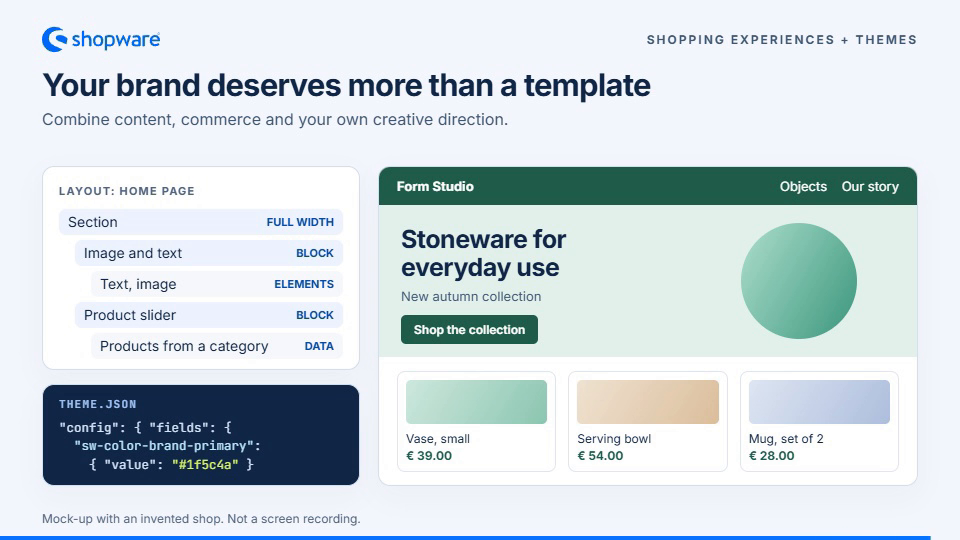
A brand people remember
Bring product discovery and your brand's story together with Shopping Experiences, themes, and custom frontends.
Static view · Explore Shopping Experiences
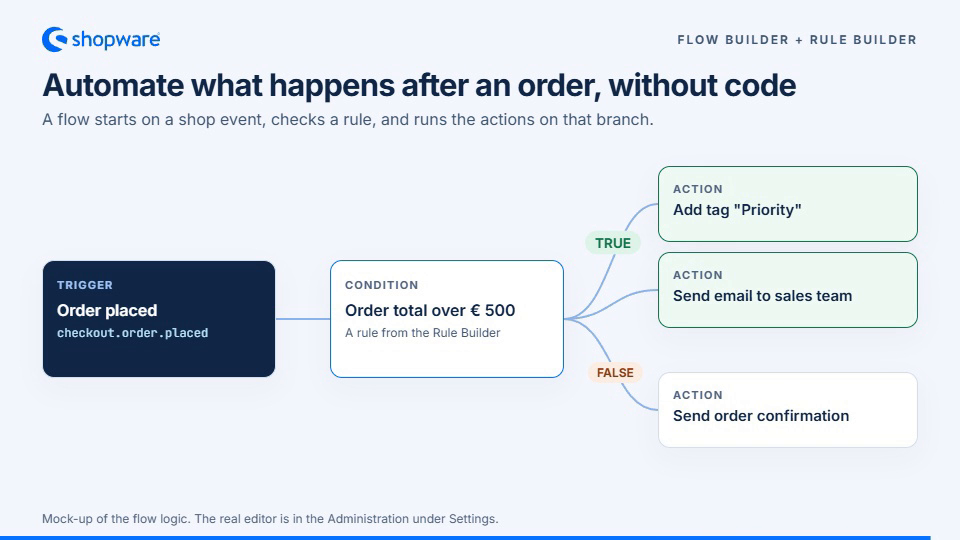
Commerce that works the way you do
Connect events, rules, and actions to automate repetitive workflows and make more time for customers and new ideas.
Static view · Explore Flow Builder
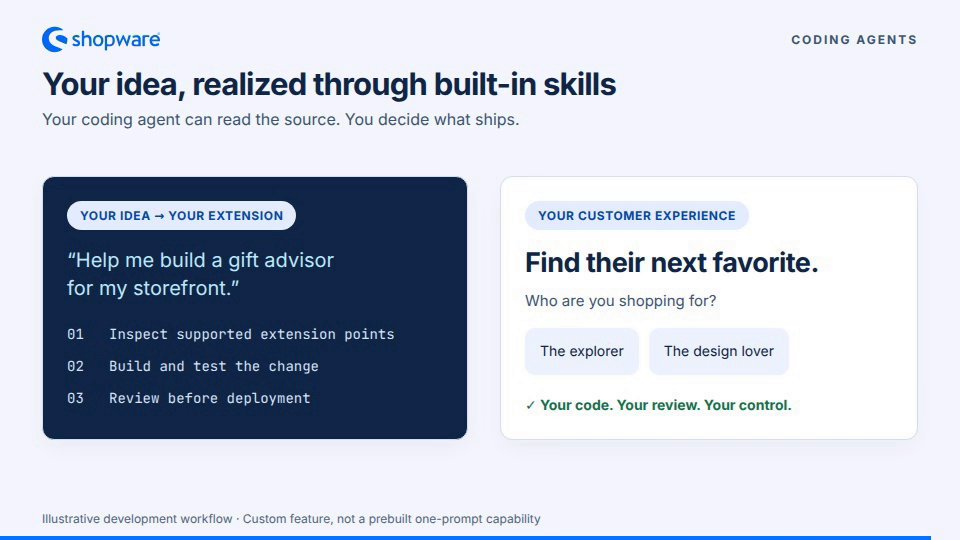
Open code. Your ideas. Your choice of agent.
Use your preferred coding agent to explore the implementation, develop extensions, and run tests. You remain in control of code review and deployment.
Static view · Agent instructions
Choose your starting point
Different projects need different first steps. Pick the path that fits what you want to do.
| I want to… | Start here | What to expect |
|---|---|---|
| Explore Shopware | Create a demo store | Try a hosted shop without local installation. The demo has limitations. |
| Build my own shop | Run Shopware locally | Create a development project with the Shopware CLI and Docker. |
| Build an extension or theme | Explore extension guides | Choose between apps, plugins, themes, and API-based frontends. |
| Contribute to Shopware core | Read the contribution guide | Follow the upstream contribution workflow, which differs from a merchant project. |
Curious about an experimental alternative? A community browser playground runs a Shopware demonstration using WebAssembly. It is a separate experiment, not the official hosted demo or production hosting. Optional agent features may require your own API key and provider charges.
Why developers choose Shopware
Build the interesting part. Keep the commerce foundation. Shopware is a PHP application based on Symfony, with a Vue.js administration, a Twig storefront, and APIs and extension points throughout the platform.
| Part | Technology |
|---|---|
| Backend | PHP, Symfony, Doctrine DBAL |
| Storefront | Twig, Bootstrap |
| Administration | Vue, TypeScript |
| Data | MySQL or MariaDB; Shopware Data Abstraction Layer |
| Integrations | Store API and Admin API |
Exact supported versions depend on the Shopware release. See the installation requirements.
Shopware supports different extension models:
| Approach | Use it for | Deployment note |
|---|---|---|
| Theme | Change storefront presentation and templates | Supported implementation differs by hosting model. |
| App | Integrate external services using APIs and webhooks | Runs outside the Shopware core. |
| Plugin | Add in-process PHP/Symfony behavior | Requires a compatible self-hosted deployment. |
| Headless frontend | Build a custom shopping experience with the Store API | Uses the shop's sales-channel APIs. |
Compare extension options · Explore Shopware Frontends
Run Shopware locally
Pick your system. Create your project. Open your shop. The official Shopware CLI offers a guided Docker-based development environment.
1. Install Docker and the Shopware CLI
macOS
Install Docker Desktop and, with Homebrew available, run:
brew install --cask shopware/tap/shopware-cli
See other CLI installation options if needed.
Linux
Install Docker Engine, the Compose plugin, and the CLI using the official instructions.
Windows
Enable Docker Desktop with WSL 2 integration. Install the CLI inside your Linux environment and run the following commands in the WSL terminal, not PowerShell.
2. Create and start a project
shopware-cli project create my-shop
cd my-shop
shopware-cli project dev
The interactive dashboard guides setup and shows environment details, logs, and health checks. The first start includes downloads and installation.
3. Open your shop
With the default configuration, visit the storefront or administration. Use the actual URLs and credentials shown by your CLI if your setup differs.
Try creating a product, assigning it to the storefront sales channel, and opening it in the shop.
Useful commands and troubleshooting
shopware-cli project dev status
shopware-cli project logs
shopware-cli project dev stop
shopware-cli project dev
See the development environment reference for configuration and troubleshooting.
Watch the official setup walkthrough · Full CLI documentation
This is a development setup, not production hosting. To contribute to Shopware itself, use the upstream contribution setup.
Extend Shopware your way
Choose the extension point that fits your project. For example, a storefront theme or plugin can override a Twig block without replacing the entire template:
{% sw_extends '@Storefront/storefront/component/buy-widget/buy-widget.html.twig' %}

{% block buy_widget_price %}
    {{ parent() }}
    <p class="delivery-note">Ships within 24 hours</p>
{% endblock %}
This is an illustrative snippet; follow the theme guides for a complete implementation. For integrations, use the Admin API or Store API, depending on the task.
Build with your preferred coding agent
Open source makes implementation details available to both developers and their tools. Coding agents can read project code, agent instructions, and development skills to help create and test extensions.
A useful first task:
Read the project's agent instructions and identify the Shopware version.
Help me build a small plugin for a gift-message feature.
First explain the supported extension points and the data flow.
Do not edit vendor files or core source. Propose a minimal implementation,
include a meaningful test, and show me how to disable the plugin again.
Review and test generated changes before deployment. A coding agent working with project files is different from an administrative agent connected to a running shop. Learn about the Shopware MCP server and the separate Agentic Commerce project; access depends on configuration and permissions.
Open source, with clear choices
The Shopware core is MIT-licensed. You can inspect, modify, and self-host it under that license. Hosting, commercial plans, Shopware Account and Store services, extensions, and external AI or payment providers may have separate terms and costs. Review the Community Edition Fair Usage Policy and current plans when choosing a deployment model.
Build with the community
You don't need to write a major feature to contribute. Improve a guide, reproduce a bug, translate Shopware, add a test, or share what you built.
- Ask and share: Community Hub · Discord · Forum
- Contribute code: Contribution guide
- Report issues: GitHub Issues
- Suggest improvements: Feedback portal
- Report security concerns privately: Security policy
- Follow new releases: Releases
Like what we're doing? Give us a star! ⭐
Thanks to all our contributors
Your next idea deserves room to grow.
Try Shopware · Run locally · Read the docs · Join the community