
uxcode-fr / image-optimizer
Converts PNG/JPG images to AVIF, WebP and JPG in multiple sizes via Imagick.
Maintainers

Requires
- php: >=8.1
- composer-runtime-api: ^2.0
- ext-imagick: *
- symfony/console: >=6.0
- symfony/finder: >=6.0
README
Converts PNG/JPG images to AVIF, WebP and JPG in multiple sizes.
Works with Laravel, Symfony, and vanilla PHP projects.
Why use it?
Modern web performance starts with images. They typically account for 50–80% of a page's total weight — and they are the first thing Lighthouse, PageSpeed Insights, and Core Web Vitals will flag.
Next-gen formats
AVIF and WebP deliver the same visual quality as JPEG at a fraction of the size:
| Format | Typical size vs JPG |
|---|---|
| JPG | baseline |
| WebP | ~30% smaller |
| AVIF | ~50% smaller |
The browser automatically picks the best format it supports via <picture> / srcset. JPG is kept as a universal fallback.
Responsive images & HiDPI
Serving a 1200px image on a 300px thumbnail wastes bandwidth and slows down the page. With this tool you define the exact widths you need per image category, and @2x / @3x variants are generated automatically for Retina and HiDPI screens — so every device downloads only what it needs.
PageSpeed & Lighthouse impact
Optimizing images directly improves the metrics that matter most:
- LCP (Largest Contentful Paint) — the main image loads faster
- Total Blocking Time — less network contention
- Serve images in next-gen formats — the most common PageSpeed recommendation, resolved
- Properly size images — resolved by generating the right widths
- Efficiently encode images — resolved by tunable per-format quality
Build-time, zero runtime cost
Images are generated once at build time — no on-the-fly processing, no extra server load, no CDN dependency. The output is plain static files you deploy like any other asset.
Prerequisites
Requires the PHP Imagick extension on your system.
# Ubuntu / Debian
sudo apt install -y php-imagick

# macOS
brew install imagemagick && pecl install imagick
Installation
composer require --dev uxcode-fr/image-optimizer
Configuration
Laravel
php artisan vendor:publish --tag=image-optimizer-config
Symfony / vanilla PHP
cp vendor/uxcode-fr/image-optimizer/config/image-optimizer.php config/image-optimizer.php
config/image-optimizer.php
return [
    'source'      => 'resources/images',
    'destination' => 'public/img',

    'quality' => [
        'avif' => 60,
        'webp' => 82,
        'jpg'  => 85,
    ],

    'formats'   => ['avif', 'webp', 'jpg'],
    'densities' => [1, 2],

    'folders' => [
        'product' => [200, 280],   // generates -200, -200@2x, -280, -280@2x variants
        'author'  => [48, 128],
        'article' => null,         // convert only, no resize
    ],
];
Via composer.json (fallback)
{
  "extra": {
    "image-optimizer": {
      "source": "resources/images",
      "destination": "public/img",
      "quality": { "avif": 60, "webp": 82, "jpg": 85 },
      "formats": ["avif", "webp", "jpg"],
      "densities": [1, 2],
      "folders": {
        "product": [200, 280],
        "author": [48, 128]
      }
    }
  }
}
Usage
# Process all images
vendor/bin/image-optimizer

# Process only one folder
vendor/bin/image-optimizer --folder=product

# Force regeneration of existing images
vendor/bin/image-optimizer --force

# Delete generated images with no matching source
vendor/bin/image-optimizer --clean
Output example
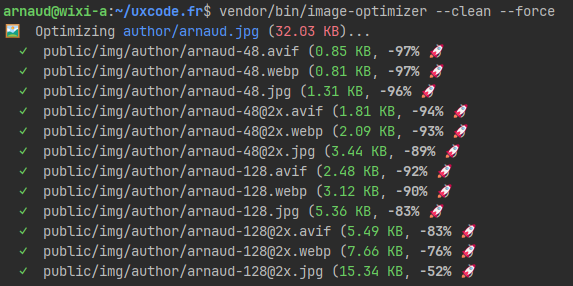
🖼️   Optimizing product/hero.png (245 KB)...
  ✓  public/img/product/hero-200.avif (12 KB, -95% 🚀)
  ✓  public/img/product/hero-200.webp (18 KB, -93% 🚀)
  ✓  public/img/product/hero-200.jpg (22 KB, -91% 🚀)
  ✓  public/img/product/hero-200@2x.avif (38 KB, -84% 🚀)
  ✓  public/img/product/hero-200@2x.webp (52 KB, -79% 🚀)
  ✓  public/img/product/hero-200@2x.jpg (61 KB, -75% 🚀)

🖼️   Optimizing author/avatar.png (18 KB)...
  –  public/img/author/avatar-48.avif (skipped)
  –  public/img/author/avatar-48.webp (skipped)
  –  public/img/author/avatar-48.jpg (skipped)

6 image(s) generated, 3 skipped, 0 deleted.
HTML usage examples
<picture> with multiple formats and sizes
<picture>
  <source
    type="image/avif"
    srcset="
      /img/product/hero-200.avif   1x,
      /img/product/hero-200@2x.avif 2x
    "
    media="(max-width: 400px)"
  >
  <source
    type="image/avif"
    srcset="
      /img/product/hero-280.avif   1x,
      /img/product/hero-280@2x.avif 2x
    "
  >
  <source
    type="image/webp"
    srcset="
      /img/product/hero-200.webp   1x,
      /img/product/hero-200@2x.webp 2x
    "
    media="(max-width: 400px)"
  >
  <source
    type="image/webp"
    srcset="
      /img/product/hero-280.webp   1x,
      /img/product/hero-280@2x.webp 2x
    "
  >
  <img
    src="/img/product/hero-280.jpg"
    alt="Product"
    width="280"
    height="186"
    loading="lazy"
  >
</picture>
The browser picks the first <source> it supports, from top to bottom — AVIF first, then WebP, then JPG as a universal fallback.
Simple srcset (single format, multiple widths)
<img
  src="/img/product/hero-280.jpg"
  srcset="
    /img/product/hero-200.webp 200w,
    /img/product/hero-280.webp 280w
  "
  sizes="(max-width: 400px) 200px, 280px"
  alt="Product"
  loading="lazy"
>
Avatar (fixed size, HiDPI only)
<picture>
  <source type="image/avif" srcset="/img/author/avatar-48.avif 1x, /img/author/avatar-48@2x.avif 2x">
  <source type="image/webp" srcset="/img/author/avatar-48.webp 1x, /img/author/avatar-48@2x.webp 2x">
  <img src="/img/author/avatar-48.jpg" alt="Author" width="48" height="48" loading="lazy">
</picture>
Laravel Blade
<picture>
  <source
    type="image/avif"
    srcset="{{ asset('img/product/hero-200.avif') }} 1x, {{ asset('img/product/hero-200@2x.avif') }} 2x"
    media="(max-width: 400px)"
  >
  <source
    type="image/avif"
    srcset="{{ asset('img/product/hero-280.avif') }} 1x, {{ asset('img/product/hero-280@2x.avif') }} 2x"
  >
  <img src="{{ asset('img/product/hero-280.jpg') }}" alt="Product" width="280" loading="lazy">
</picture>
Configuration options
| Key | Default | Description |
|---|---|---|
source |
resources/images |
Source folder (PNG/JPG), relative to project root |
destination |
public/img |
Output folder, relative to project root |
quality |
['avif'=>60, 'webp'=>82, 'jpg'=>85] |
Compression quality per format (1–100) |
formats |
['avif', 'webp', 'jpg'] |
Output formats — any subset of avif, webp, jpg |
densities |
[1, 2] |
Pixel density multipliers (1 = base, 2 = @2x…) |
folders |
[] |
Per-folder width list (null = convert only) |
Obsolete image cleanup
Pass --clean to delete generated files that no longer have a matching source image (only for folders declared in folders).
License
MIT — Copyright 2026 uxcode.fr