
getodden / mail

Responsive, slot-based email builder and compiler for Laravel: modular blocks, MJML/HTML import, merge tags, AMP, plain-text fallback, and pre-send audits.
Requires
- php: ^8.3
- ext-dom: *
- ext-libxml: *
- guzzlehttp/guzzle: ^7.8.2 || ^8.0
- laravel/framework: ^12.0 || ^13.0
- symfony/html-sanitizer: ^7.2 || ^8.0
- tijsverkoyen/css-to-inline-styles: ^2.2.5
Requires (Dev)
- filament/forms: ^5.0
- larastan/larastan: ^3.0
- laravel/pint: ^1.32
- orchestra/testbench: ^10.0 || ^11.0
- pestphp/pest: ^3.8 || ^4.0 || ^5.0
- pestphp/pest-plugin-laravel: ^3.0 || ^4.0 || ^5.0
Suggests
- ext-zip: Required to export template packages as ZIP archives
- filament/forms: Required to use the visual drag-and-drop EmailSlotBuilder component (^5.0)
Provides
None
Conflicts
None
Replaces
None
README
A modular, Outlook-bulletproof email building, auditing, and compilation engine for Laravel applications.
Build an email from 31 responsive blocks (in code, in a Filament form, or in a drag-and-drop editor), audit it before it goes out, and compile it to inlined HTML, AMP for Email, MJML, or plain text. It is a plain Laravel package: the compiler is PHP, with no Node step at send time.
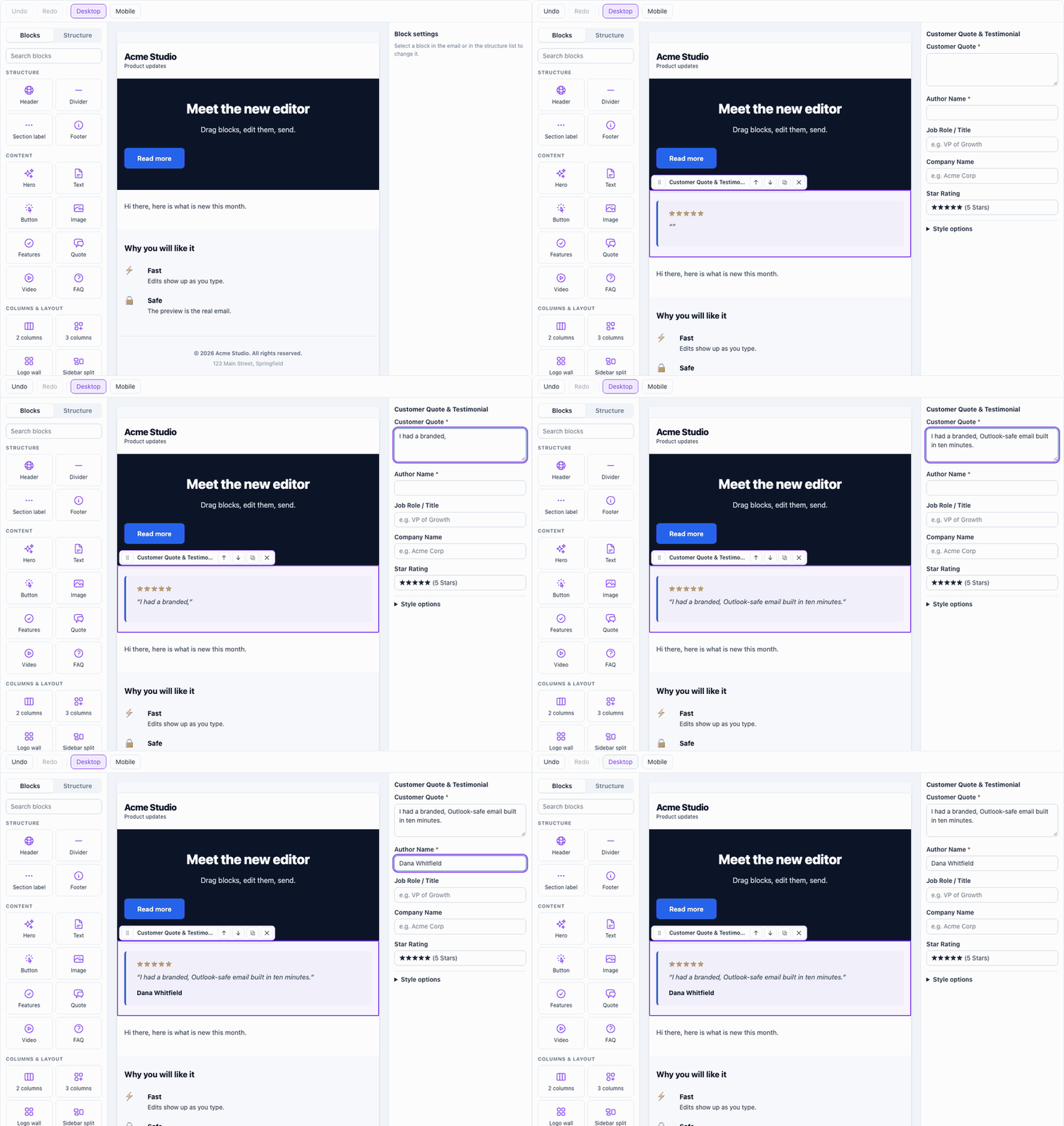
Try the editor in your browser: it is the one in this package, with nothing saved or sent.
Requires PHP 8.3+ and Laravel 12 or 13. Maintained by CaskStack, LLC.
Status: All 31 slot types are rendered by the compiler, described in the slot schema, and editable in both the Filament builder and the drag-and-drop editor.
Key Features
- 31 Modular Responsive Slots: Pre-built responsive components that collapse smoothly to 100% width on mobile devices, with Microsoft Outlook MSO conditional table compatibility.
- Universal Compilation Engine: Compile modular slots or structured
EmailDocumentinstances into inlined responsive HTML (EmailSlotCompiler) or interactive AMP for Email (AmpEmailCompiler). - Liquid-Style Personalization: Fast token interpolation supporting uppercase, lowercase, capitalize, date formatting, currency, number, pluralize, default values, and inline conditionals (
{% if condition %}...{% else %}...{% endif %}). - Deliverability & Spam Auditor: Automatic pre-flight auditing scoring unsubscribe links, image alt text, subject lines, mailing address, Gmail clipping, Outlook rendering and WCAG contrast, and live DNS deliverability checks (SPF, DMARC, BIMI).
- Multi-Device Screenshot Simulation: Adapter interface for testing email rendering across Outlook Windows (120 DPI), Apple Mail iOS 17 Dark Mode, macOS Sonoma, and Gmail Android.
- Theme & Typography Engine: Built-in design system presets (Corporate Slate, Midnight Indigo, Emerald SaaS, Warm Sunset, Monochrome Minimal) with automatic Google Fonts web font imports and Outlook fallback font stacks.
- Bidirectional Ingestion: Export templates to HTML, Plain Text, MJML, or ZIP packages—and reverse-parse external raw HTML or standard MJML into native modular slots.
- WCAG 2.1 AA Contrast Auditor: Exact mathematical relative luminance algorithm evaluating text and button contrast compliance.
- Enterprise Transport: Send via
TemplateMailablewith RFC 8058 1-click unsubscribe headers, custom attachments, and automatic CID (Content-ID) inline image embedding. - Filament Visual Builder: Full Filament builder schema component with audience targeting and conditional visibility rules.
- Drag-and-Drop Editor: A framework-free web component with a palette, a live preview rendered by the real compiler, undo and redo, and keyboard and screen reader support for every action.
Installation
composer require getodden/mail
Publish configuration and views (optional):
php artisan vendor:publish --tag=mail-builder-config
php artisan vendor:publish --tag=mail-builder-views
Configuration
config/mail-builder.php sets the default layout theme (width, fonts, colors) and the footer identity used when a slot doesn't provide one:
MAIL_BUILDER_COMPANY_NAME="Acme Inc."   # defaults to APP_NAME
MAIL_BUILDER_ADDRESS="123 Example St, Springfield"
raw_html_max_bytes (default 100000) is the largest a rich text or raw HTML field may be, and max_document_bytes (default 1500000) is the largest the slots of one email may add up to; see Security.
CAN-SPAM and similar laws require a physical mailing address in marketing email, so set MAIL_BUILDER_ADDRESS or pass address to each footer slot.
Quick Start
1. Building and Compiling an Email
use Odden\MailBuilder\MailBuilder;
use Odden\MailBuilder\Enums\SlotType;

// Fluent EmailDocument API
$doc = MailBuilder::document(
    subject: 'Welcome to the Platform, {{ contact.first_name }}!',
    previewText: 'Get started with your new account in 3 easy steps.'
);

$doc->append(SlotType::Header, [
    'brand_name' => 'Acme Corp',
    'logo_url' => 'https://example.com/logo.png',
]);

$doc->append(SlotType::Hero, [
    'title' => 'Accelerate Your Workflow',
    'subtitle' => 'Everything you need to deliver world-class projects.',
    'button_text' => 'Get Started',
    'button_url' => 'https://example.com/onboarding',
]);

$doc->append(SlotType::TwoColumn, [
    'left_title' => 'Cloud Infrastructure',
    'left_body' => 'Deploy high-availability services across 30+ edge regions.',
    'right_title' => 'RevOps Analytics',
    'right_body' => 'Real-time pipeline tracking and automated revenue forecasting.',
    'reverse_stack_on_mobile' => true,
]);

$doc->append(SlotType::AppBadges, [
    'heading' => 'Download Our Mobile App',
    'app_store_url' => 'https://apps.apple.com/app/acme',
    'google_play_url' => 'https://play.google.com/store/apps/acme',
]);

$doc->append(SlotType::Footer, [
    'company_name' => 'Acme Inc.',
    'address' => '548 Market St, San Francisco, CA',
    'unsubscribe_url' => '{{ unsubscribe_url }}',
]);

// Compile to responsive inlined HTML
$html = MailBuilder::compile($doc);

// Extract plain text fallback
$plainText = MailBuilder::plainText($doc);
2. Personalization & Merge Tags
Personalization supports dot-notation object paths, Liquid filters, and inline conditionals:
$template = "Hello {{ contact.first_name | capitalize }}! Member since {{ contact.created_at | date: 'F Y' }}. Balance: {{ account.balance | currency: 'USD' }}. {% if contact.is_vip %}Your VIP bonus is ready.{% else %}Upgrade today.{% endif %}";

$interpolated = MailBuilder::interpolate($template, [
    'contact' => [
        'first_name' => 'alexandra',
        'created_at' => '2026-03-15 10:00:00',
        'is_vip' => true,
    ],
    'account' => [
        'balance' => 1250.00,
    ],
]);
Built-in tags are {{unsubscribe_url}}, {{current_year}}, and {{web_view_url}}. Register your application's own tags so they appear in the Filament builder's tag picker and in previews:
use Odden\MailBuilder\MergeTags\MergeTagRegistry;

// In a service provider's register() method
$this->callAfterResolving(MergeTagRegistry::class, function (MergeTagRegistry $registry): void {
    $registry->register('Customer', [
        '{{customer.first_name}}' => 'Customer first name',
        '{{customer.plan}}' => 'Subscription plan',
    ], [
        // Sample values used when previewing templates
        'customer' => ['first_name' => 'Alex', 'plan' => 'Pro'],
    ]);
});
Available Filters:
capitalize,title,lower,upper,trimdate: 'Format'(PHPdate()formatting)currency: 'USD'number: 2(decimal places)pluralize: 'item', 'items'truncate: 50default: 'fallback value'raw(see below)
Escaping. TemplateMailable (the transactional send) HTML-escapes every value that comes from the data you pass in, where it lands
in the message's HTML: a name or a note a customer typed cannot add markup or a link to your email. Text you wrote in the template,
including a default fallback, is left as written. If a value really is markup you trust (an order table you built), say so in the
template: {{ order_table | raw }}. The plain-text part and the subject are text and are not escaped; the subject is always one line,
and unsubscribe_url / listUnsubscribeUrl must be an http(s) or mailto address to become a List-Unsubscribe header.
The raw filter is honored only for a template string you wrote. TemplateMailable accepts it when you pass an HTML string, and
ignores it (the value is escaped) when you pass a document or slot arrays, because a tenant user authored those. The same goes for
compileDocument() with interpolate: true, which always escapes and never honors raw. MailBuilder::interpolate() and
MergeTagInterpolator::interpolate() ignore raw unless you pass allowRaw: true; never do that for HTML a tenant user authored.
MailBuilder::interpolate($content, $context) does not escape (callers that escape their own values rely on that); pass
escape: true to escape.
Conditionals ({% if %}) work in text and in body_text, one block at a time: blocks must be balanced and cannot be nested, or the email is rejected. They are not supported in the raw html slot; see Security. To show content to part of the audience, prefer the slot's visibility rules.
3. Ingestion (HTML & MJML Import)
Import external templates into editable modular slots:
// Ingest raw HTML
$docFromHtml = MailBuilder::importHtml($rawHtml, 'Imported Newsletter');

// Ingest standard MJML
$docFromMjml = MailBuilder::importMjml($mjmlCode, 'Imported Campaign');

// Compile imported documents directly
$compiledHtml = MailBuilder::compile($docFromMjml);
4. Deliverability, Performance & Accessibility Audits
// 1. Run Pre-flight Deliverability & Spam Audit
$audit = MailBuilder::audit($html);
if ($audit->hasBlockingIssues()) {
    // Inspect $audit->checks (each with a status of pass, warning or fail) and $audit->score (0-100)
}

// 2. WCAG 2.1 AA/AAA Color Contrast Audit
$contrast = MailBuilder::wcagContrast('#2563eb', '#ffffff');
// Returns: ['ratio' => 4.56, 'aa_normal' => true, 'rating' => 'AA']

$themeAudit = MailBuilder::auditContrast($themeArray);

// 3. Render Performance Benchmark
$benchmark = MailBuilder::benchmarkRender($html);
// Returns: dom_nodes_count, nested_table_depth, 3G/4G/5G download times

// 4. Sender Domain DNS Validation
$dns = MailBuilder::validateDns('yourdomain.com');
// Checks: SPF, DMARC (p=reject/quarantine), and BIMI
5. Sending Emails via TemplateMailable
use Odden\MailBuilder\Mail\TemplateMailable;
use Illuminate\Support\Facades\Mail;

Mail::to('user@example.com')->send(
    new TemplateMailable(
        template: $doc,
        data: [
            'contact' => ['first_name' => 'Sarah'],
            'unsubscribe_url' => 'https://example.com/unsubscribe/token',
        ],
        subjectLine: 'Exclusive Offer for {{ contact.first_name }}',
        embedCidImages: true // Embeds local & base64 images as MIME CID parts
    )
);
6. Filament Visual Builder Integration
Requires filament/forms ^5.0. To integrate the modular slot builder into any Filament Resource:
use Odden\MailBuilder\Filament\Components\EmailSlotBuilder;

public static function form(Schema $schema): Schema
{
    return $schema->components([
        EmailSlotBuilder::make('slots'),
    ]);
}
7. Slot schema (for editors)
Each slot type can describe itself: which fields its data takes, how to label and edit them, and the default of each. The Filament form is generated from this description, and a drag-and-drop editor can read it as JSON, so the two always agree with the slot's view.
use Odden\MailBuilder\Enums\SlotType;
use Odden\MailBuilder\Schema\SlotSchemaRegistry;

$schema = SlotSchemaRegistry::for(SlotType::Hero);   // every slot type has a schema
$schema->defaults();                                  // the data of a new hero slot
$schema->basicFields();                               // the fields of the basic form

return response()->json(SlotSchemaRegistry::toArray()); // everything an editor needs: a "version", the described slots, and a "labels" map that names every slot type
A field has a key, a type (text, textarea, rich_text, url, image, color, select, toggle, number, tags, items), a label, required, a default, and, where they apply, placeholder, help, options and the item fields of a list. Fields marked advanced are read by the slot's view but kept out of the basic form: an editor shows them as style options.
All 31 slot types are described, so the editor and the Filament blocks can edit every one of them (see Supported Slot Types). Tests check that every described field is read by its slot's view, so the description cannot drift from what is rendered.
8. Drag-and-drop editor
An editor for the slots, built as a web component with no framework: <odden-mail-editor>. It shows the email as it will be sent, with a palette of blocks, a structure list, and a settings panel for the selected block. Drag a block from the palette onto the email, or drag a block to move it. Every action also has a button and a keyboard shortcut, and changes are announced to screen readers. Undo and redo (Ctrl or Cmd + Z, Shift + Z) cover everything.
The editor edits the slot document as data and never touches HTML. The server renders the preview with the same compiler that builds the email, so what you see is what is sent, and the preview cannot be broken by editing. Every slot type is editable (see the slot schema above). A slot of a type the editor does not know, such as one from a newer version, is kept as it is: you can move, duplicate and delete it, and its preview is rendered.
1. Turn on the routes. The editor needs two routes, a slot schema and a preview. They are off by default, because anyone who can reach them can render email HTML. Switch them on in config/mail-builder.php and set your own middleware:
'editor' => [
    'routes' => [
        'enabled' => true,
        'prefix' => 'admin/mail-editor',
        'middleware' => ['web', 'auth'],   // your authentication and authorization
    ],
],
2. Publish the editor files (plain JavaScript modules and one stylesheet, no build step):
php artisan vendor:publish --tag=mail-builder-assets
3. Use the element:
<script type="module" src="/vendor/mail-builder/editor/odden-mail-editor.js"></script>

<odden-mail-editor id="editor"
    schema-url="/admin/mail-editor/schema"
    preview-url="/admin/mail-editor/preview"></odden-mail-editor>

<script type="module">
    const editor = document.getElementById('editor');

    editor.value = { subject: 'News', slots: [{ type: 'hero', data: { title: 'Hello' } }] };
    editor.addEventListener('change', (event) => console.log(event.detail));   // the new document
</script>
valueis the document, in the shapeEmailDocument::fromArray()takes:{subject?, preview_text?, theme?, slots: [{type, data, visibility?}]}. Keys other thanslotsare kept untouched.- The
changeevent carries the new document. With anameattribute the element also keeps a hidden input in sync with the JSON, for a plain form post. - The element's own
changeevent is aCustomEvent; the browser's nativechangeandinputevents from the fields inside the editor do not leave it, so a surrounding form never sees them. - The page needs
<meta name="csrf-token">for Laravel's CSRF check; the editor sends it asX-CSRF-TOKEN. - To talk to the server some other way, set
editor.adapter = { loadSchema(), preview(document) }.
The preview is rendered into a sandboxed iframe with scripts disabled, so a slot that holds HTML cannot run code in your admin page.
To try it while developing the package: vendor/bin/testbench serve, then open the home page.
9. The editor as a Filament field
MailEditor puts the drag-and-drop editor in a Filament form. It is a drop-in for EmailSlotBuilder::make('slots'): the state is the same list of slots ({type, data}), so it saves to the same column.
use Odden\MailBuilder\Filament\Components\MailEditor;

MailEditor::make('slots')
    ->label('Email content')
    ->theme(['container_width' => 640]);   // optional: the theme of the preview (see `mail-builder.defaults`)
The theme can also be a closure, evaluated for every preview, so the preview follows the form. For example, with the theme's fields in the same form under theme.*:
MailEditor::make('slots')->theme(fn (Get $get): array => $get('theme') ?? []);
The field's theme wins over a theme sent by the browser.
- No routes and no extra setup for the preview. The field renders the preview itself, through Livewire, so it runs under the panel's own authentication and authorization. (The routes in section 8 are for use outside Filament.)
- Publish the assets with Filament's own command, the first time and after an update:
php artisan filament:assets. - State from either shape. A column holding Filament's keyed Builder items or a plain list both load, and the field saves a plain list. Slots of a type the field does not know are kept as they are.
- It follows the form. When the form changes the state itself, for example an action that applies a preset with
$set('slots', ...), the editor shows the new content. - A disabled field is shown but cannot be edited.
Supported Slot Types (31 Total)
| Slot Type | Key | Description |
|---|---|---|
| Header & Logo | header |
Branding bar with logo, web-view link, and optional date |
| Hero Banner | hero |
Headline, badge pill, subtext, and bulletproof CTA button |
| Text & Content | body_text |
Editorial rich text with merge tags and alignments |
| CTA Button | button |
Bulletproof Outlook VML action button |
| 2-Column Grid | two_column |
Side-by-side cards with reverse mobile stacking (rtl) |
| 3-Column Grid | three_column |
Three responsive feature cards |
| 4-Column Wall | four_column |
Partner logo trust wall or compact icon links |
| Asymmetric Split | asymmetric_columns |
1/3 + 2/3 editorial sidebar split |
| Feature List | features |
Bulleted list with icons, bold titles, and descriptions |
| Event Details | event |
Event card with date, time, location, description, and a registration button |
| Image Gallery | gallery |
Two or three column image grid with captions and links that stacks on mobile (renders at most 12 images) |
| Testimonial | testimonial |
Quote callout with star rating and author attribution |
| Stat Box | stat_box |
Key metric numbers and percentage badges |
| Divider Line | divider |
Horizontal rule or spacer with configurable height |
| Labeled Divider | labeled_divider |
Horizontal line with centered text badge (e.g. "OR") |
| Social Links | social_links |
Multi-channel social icon bar |
| App Badges | app_badges |
Official Apple App Store and Google Play buttons |
| Data Table | data_table |
Multi-column comparison table with zebra striping |
| Image Banner | image_banner |
Responsive banner image with alt text and link |
| Video Card | video_card |
Thumbnail with play button overlay linking to video |
| Pricing Grid | pricing_grid |
Multi-tier pricing cards with featured plan highlight |
| Rating Scale | rating_bar |
1-Click NPS or CSAT survey buttons (1-10 or 1-5 scale) |
| Countdown Urgency | countdown_timer |
Urgency banner with deadline and offer CTA |
| Accordion / FAQ | accordion |
Stacked Q&A cards for policies and instructions |
| Dynamic Feed | dynamic_feed |
Product recommendation grid with live JSON hydration |
| Order Receipt | order_receipt |
Itemized invoice summary with taxes and subtotals |
| RSS Article Feed | rss_feed |
Syndicated blog digest with publication dates |
| Product Catalog | product_catalog |
Ecommerce cards with compare-at pricing and buy CTAs |
| Coupon Code | coupon_code |
Promo voucher card with dashed border and expiry |
| Footer & Compliance | footer |
CAN-SPAM / GDPR address, optional required notice or warning, and unsubscribe link |
| Custom Raw HTML | html |
Bespoke HTML code component |
Custom Slot Types
Register your own slot type with the SlotRegistry singleton. A registered slot compiles, exports, validates, previews, appears in SlotSchemaRegistry::toArray(), and gets a block in the Filament EmailSlotBuilder.
use Odden\MailBuilder\Enums\SlotGroup;
use Odden\MailBuilder\Schema\CustomSlotType;
use Odden\MailBuilder\Schema\FieldType;
use Odden\MailBuilder\Schema\SlotField;
use Odden\MailBuilder\Schema\SlotRegistry;
use Odden\MailBuilder\Schema\SlotSchema;

final class SpotlightSlot implements CustomSlotType
{
    public function key(): string
    {
        return 'spotlight';
    }

    public function label(): string
    {
        return 'Product Spotlight';
    }

    public function shortLabel(): string
    {
        return 'Spotlight';
    }

    public function description(): string
    {
        return 'Highlights one product.';
    }

    public function group(): SlotGroup
    {
        return SlotGroup::Commerce;
    }

    public function view(): string
    {
        return 'emails.slots.spotlight';
    }

    public function schema(): SlotSchema
    {
        return new SlotSchema($this, 'star', [
            new SlotField('headline', FieldType::Text, 'Headline', required: true),
            new SlotField('blurb', FieldType::RichText, 'Blurb'),
        ]);
    }
}

app(SlotRegistry::class)->register(new SpotlightSlot);
- Keys. A key matches
/^[a-z][a-z0-9_]*$/, cannot collide with a built-in slot type, and can be registered once. The schema must be built for the same key.register()throwsInvalidArgumentExceptionotherwise. - Registry methods.
register(),get(),has(),keys(),all()andflush(). - Unescaped fields. A view that prints a field unescaped must declare the field
FieldType::RichText, or passrawHtml: trueto itsSlotField, so the value goes throughRawHtmlSanitizer. - Plain text. Implement
Odden\MailBuilder\Schema\ProvidesPlainTextand itsplainText(array $data): stringmethod to control the slot's plain-text output. Without it, the plain-text fallback extracts text from the compiled HTML. - Lookups.
SlotSchemaRegistry::forKey($key)returns the schema for a built-in or custom key.EmailSlot::fromArray()resolves a custom key through the registry.
Security
Tenant users can author what this package renders, so untrusted input is sanitized in three places. None of it relies on the author's markup being well formed.
- Schema layer. Before a view renders,
SlotDataSanitizercleans each slot's data from the slot's schema, for built-in and custom slots alike. The plain-text fallback reads the same sanitized data, so the text never shows a URL or an image the HTML dropped. - Output layer. After merge tags are interpolated and CSS is inlined,
HtmlUrlScrubberrewrites everyhref,xlink:href,src,action,formaction,background,posteranddataattribute in the final HTML (quoted or unquoted, inside conditional comments and VML tags too), dropssrcset, and drops an animationvalueslist that holds an unsafe URL. The AMP compiler sanitizes its slots' data and raw content the same way and runs the scrubber on its output. Entities are decoded first, sojavascript:is caught. A value that passes is left byte for byte as written. This layer is a safety net behind the allowlist sanitizer, because it is built from patterns. It fails closed: when the regex engine gives up,scrub()throwsOdden\MailBuilder\Exceptions\UnscrubbableHtmlExceptionand never returns the page unscrubbed. - Send layer. A tag such as
{{ link }}or{{ x | default(javascript:alert(1)) }}only resolves whenTemplateMailableinterpolates, after the compiler's scrub.TemplateMailabletherefore runsHtmlUrlScrubberagain on the interpolated HTML, for slot templates and for HTML string templates alike.
The rules:
- URL and image fields. A value that starts with a URI scheme must be one of the schemes in
mail-builder.url_schemes. The default list ishttp,https,mailto,tel,sms,webcal,webcals,whatsapp,skype,geo,itmsanditms-apps. Add your own app scheme to the list, and the raw HTML sanitizer keeps links with it too. Image fields allow onlyhttp,https,mailto,tel,cidanddata:image/png|jpeg|jpg|gif|webp|avif|bmp;base64,, never SVG, whatever the list says. Anything else, such asjavascript:,vbscript:ordata:text/html, becomes#(an empty string for images). Relative paths, fragments, protocol-relative URLs,{{merge_tags}}and a host with a port such asexample.com:8080/xorlocalhost:8000/xpass unchanged. Nesteditemsfields are checked too. - Color fields. Only hex colors,
rgb(),rgba(),hsl(),hsla()(letters such as120degare allowed inside the parentheses) and plain color keywords are accepted. Any other value is dropped so the view's default applies, which stops a color from injecting extra CSS declarations. An empty color is dropped too, so it falls back to the default instead of rendering as blank. Theme values whose key ends in_colorare checked the same way. - Number and select fields. A number field is cast to an int or float and a non-numeric value is dropped. A select value must be one of the field's options, otherwise it is dropped. A list field that is not an array is dropped.
- Raw HTML. The
body_textandhtmlslots print author HTML. Every field the schema marks as rich text, and thehtmlslot's code field, goes throughRawHtmlSanitizer, an allowlist sanitizer built onsymfony/html-sanitizer(^7.2 || ^8.0). It parses the markup the way a browser does and writes it back out, so an unbalanced quote cannot hide a link from it. A custom slot that prints a field unescaped should declare it asFieldType::RichText, or passrawHtml: trueto itsSlotField.- Two profiles.
RawHtmlSanitizer::sanitize($html, $profile)takes'html'(the default, used for thehtmlslot and anyrawHtml: truefield) or'rich'(used for everyFieldType::RichTextfield, such asbody_text, and for the AMP compiler, the plain-text fallback and the exporter). Both profiles share the rules below, except thatrichallows no table elements:table,thead,tbody,tfoot,tr,tdandthare unwrapped and their text is kept. Layout belongs in thehtmlslot or in slots. - Kept.
table,thead,tbody,tfoot,tr,tdandth(profilehtmlonly),div,span,p,br,hr,a,img,h1toh6,ul,ol,li,strong,b,em,i,u,s,small,sup,sub,del,ins,mark,blockquote,center,font,preandcode. Attributes arestyle,class,width,height,align,valign,bgcolor,border,cellpadding,cellspacing,colspan,rowspan,nowrap,role,dir,lang,altandtitle, plushrefandtargetona,srconimg,backgroundontableandtd(profilehtml), andcolor,faceandsizeonfont. - Removed with their contents. Any other element, including
script,style,svg,math,iframe,object,embed,meta,link,base,title,textareaandselect. Form wrappers and sectioning elements (form,label,button,section,article,figureand similar) are unwrapped and their text is kept. - Removed from every tag. Event handler attributes,
srcdoc,xlink:href,id,name, and any attribute not listed above.HtmlUrlScrubberalso strips everyon*attribute from the final HTML as a second line of defense. - Comments are dropped. That includes MSO conditional comments (
<!--[if mso]>...<![endif]-->) written in these slots, so Outlook-only markup does not survive in a raw slot. The built-in slots emit their own Outlook and VML markup. - Links and images. A link keeps only a scheme from
mail-builder.url_schemes. An image keeps onlyhttp,https,cid, a relative path, or a base64data:image/png,jpeg,jpg,giforwebpvalue, so an image pasted into the editor still embeds. Otherdata:URIs, SVG included, are dropped. Thebackgroundattribute ontableandtdkeeps only anhttporhttpsaddress. A relative link is kept. - Styles. A
styleattribute is kept, but every declaration that containsexpression(,javascript:,behavior,-moz-binding,@import,image-set((orimage(,src(,element(,paint(,cross-fade(), a backslash escape or a comment is removed. So is everyurl(with two exceptions:backgroundandbackground-imagemay hold oneurl()whose address is a singlehttp://orhttps://literal, written bare or in single or double quotes, with no whitespace, escape, comment, parenthesis or merge tag inside it (background:#000 url(https://cdn.example.com/hero.jpg) no-repeatworks).<style>elements are removed, so raw slots cannot carry a stylesheet. - Merge tags. In text,
{{ tag | filter }}passes through byte for byte. Inside a tag's markup, such ashref,srcorstyle, a{{ }}tag is kept only when it matches{{ path | filter }}: a dotted path of letters, digits,_and., then any number of filters, each with at most one argument that is a bare word ([A-Za-z0-9_.-]) or a quoted string without quotes,<,>,&, backslash or line breaks. A double-quoted argument is rewritten with single quotes. A tag that does not match is dropped, a{% %}tag is always dropped, and stray braces in a tag are dropped, so a tag cannot close an attribute or open another one. Quotes inside a kept tag are not turned into entities, so<a href="{{ prefs_url | default('https://example.com/prefs') }}">comes out as written. Whatever a tag resolves to is checked by the send layer. - Block merge tags. The interpolator evaluates
{% if %}...{% endif %}by deleting text, even across tags, and an HTML parser moves text out of tables. So thehtmlprofile does not support block merge tags. Every{% ... %}tag and every Handlebars style{{#if}},{{#each}},{{#unless}},{{else}}and{{/if}}tag is removed together with everything it wraps (if,for,unless,each,with,block,macro,filter,call,raw,autoescapeandspaceless), and an unbalanced block tag is removed alone, so content meant for one audience is never shown to another. Variable tags still work. To show content to part of the audience, use the slot's visibility rules. For a list of items, use theorder_receiptslot. Therichprofile keeps{% if %}blocks in text, and removes table tags first so a block that wraps a table row still wraps its text. - Block merge tags elsewhere. Every text, textarea, tags and rich text field, in nested
itemstoo, and the email's subject and preview text, must have balanced block tags that are not nested. A block is{% if %},{% for %},{% unless %},{% each %}or{% with %}and their{{#if}},{{#each}},{{#unless}}forms, with an optional{% else %}or{{else}}. An opener with no closer, a closer or else with no block, a closer for another kind of block, a block inside another block, or any other{% %}tag, throwsOdden\MailBuilder\Exceptions\InvalidMergeTagStructureException(anInvalidArgumentExceptionwith the field key and the problem codesunbalanced_opener,unbalanced_closer,mismatched_closer,nested_blockandunknown_block_tag) and the content is never rendered. The editor preview turns it into a validation error onslots.{index}.data.{field}(subjectorpreview_textfor those), with a message in plain English such as "A block tag such as {% if %} is never closed" or "Block tags cannot be nested inside each other". The rich text value is checked as written and again after sanitizing.BlockMergeTags::validate($text)returns the codes for your own forms. - Conditionals fail closed. The interpolator reads
{% if key %},{% else %}and{% endif %}with a stack, not a pattern, so balanced nesting evaluates correctly even though authoring rejects it. Anything malformed hides content instead of showing it. An{% if %}that is never closed hides everything from its tag to the end of the text, a block with two{% else %}tags is hidden, a stray{% else %}or{% endif %}is dropped, and a condition that is not a plain context key ({% if a == b %}) is false. Tags are matched without regard to case. - Document size cap. The slots of one email may add up to
mail-builder.max_document_bytes(default 1500000 bytes) of HTML.EmailSlotCompiler::compileDocumentthrowsOdden\MailBuilder\Exceptions\DocumentTooLargeException, anInvalidArgumentException, as soon as the slots pass it and before CSS is inlined, so a pile of near-cap fields cannot exhaust memory. The editor preview turns it into a validation error onslots. - Size cap. A field over
mail-builder.raw_html_max_bytes(default 100000 bytes) is refused withOdden\MailBuilder\Exceptions\RawHtmlTooLargeException, anInvalidArgumentException, before any parsing. The editor preview turns it into a validation error on the slot. Build a large email from slots instead of pasting it into one field. - Normalization. The sanitizer writes canonical HTML: attribute values are quoted,
=,+and@in text and attributes are written as numeric entities, and<tbody>is added to tables as browsers do.
- Two profiles.
- Plain text. The plain-text fallback prints a link only when it passes the same URL rules, and prints just the link text otherwise.
- Exports.
TemplatePackageExporterchecks URLs with the URL rules, theme colors with the color rules, and body text withRawHtmlSanitizer, and escapes the subject, font family and slot type it writes into MJML. The ZIP'sindex.htmlis scrubbed. - Inline images.
CidImageEmbeddernever attaches an SVG or anydata:image outside the raster types above. It blanks thesrcinstead. - Preview. The editor preview does not fetch
feed_urlfeeds, so it never makes a request from the server for content a browser sent. It shows the slot's configured static items.
What the raw sanitizer drops from pasted marketing HTML, so you know before you paste a template from another tool:
<style>blocks and<link>web fonts. Inline the CSS first, or use the theme's font settings.- MSO conditional comments and VML (
<!--[if mso]>,<v:roundrect>,<o:p>), which Outlook layouts rely on. idandnameattributes, and with them in-page anchors.figureandfigcaption, which are unwrapped, along withsection,article,header,footer,navand other sectioning elements.- Forms, inputs, buttons, SVG and iframes.
- Block merge tags in the
htmlslot, with the content they wrap. - Nested or unbalanced block merge tags in any other text field, which are rejected instead of rendered. Use one block at a time and the slot's visibility rules to target an audience.
- Any one field over the size cap, and a whole email over the document cap.
A large pasted template is better built from slots, which carry their own Outlook-safe markup and are not limited by the cap. Use MailBuilder::importHtml() to turn HTML into slots.
The supported symfony/html-sanitizer range is ^7.2 || ^8.0. On PHP 8.3 the sanitizer uses the Masterminds HTML5 parser instead of PHP 8.4's native one. The test suite runs on one PHP version, so the Masterminds path is untested here.
What stays with the host app:
- Trusted HTML. An HTML string given to
TemplateMailableis a whole document you wrote, so it is not run throughRawHtmlSanitizer. Only its URLs are scrubbed after interpolation. Do not pass tenant-authored HTML that way. Import it withMailBuilder::importHtml(), which turns it into slots that are sanitized. - Preview iframe. When a host app shows the compiled HTML in an iframe, use
sandboxwithoutallow-scripts.allow-same-originon its own does not let scripts run. Never combineallow-scriptswithallow-same-origin, because the framed page could then remove its own sandbox. - Your own interpolation. If you fill merge tags yourself instead of through
TemplateMailable, callHtmlUrlScrubber::scrub()on the result. Handle the exception it can throw by not sending the email. - Click tracking. If you rewrite links to a redirect endpoint, validate the target at the endpoint. The endpoint must accept only
httpandhttps(or your own list) and must not redirect to a URL that failed those rules.
Upgrading from 2.x
Version 3.0.0 changes what the compiler keeps from raw HTML and rich text, tightens merge tag rules, and adds a required symfony/html-sanitizer dependency. Read the upgrade checklist in CHANGELOG.md before you update.
Testing
composer install
composer test      # Pest, via Orchestra Testbench
composer analyse   # PHPStan level 8 with Larastan
npm run test:js    # the editor's model and history (Node's built-in test runner)
Feed blocks
The rss and dynamic_feed blocks fetch JSON from the feed_url stored in the email, when the email is compiled. Because that URL is content, the fetch is guarded: the host must resolve only to public addresses (private, loopback, link-local and cloud metadata addresses are refused), redirects are not followed, the request times out after a few seconds, and a response over mail-builder.feeds.max_bytes (1 MB) is ignored. A refused or failed feed falls back to the block's own items. To fetch a feed you serve from your own network, list its host in mail-builder.feeds.allowed_hosts.
Sending, lists and campaigns
This package builds and checks emails. It does not manage contacts, lists, consent or sending. Those come from Odden CRM (open source) and its paid add-ons, or from your own application: TemplateMailable sends through any Laravel mailer. See odden.io for Odden Cloud and the paid Marketing add-on.
License
The MIT License (MIT). See LICENSE.md.