
muckiware / log-plugin

Mucki Log Plugin
Package info
github.com/muckiware/MuckiLogPlugin
Type:shopware-platform-plugin
pkg:composer/muckiware/log-plugin
Requires
- php: >= 8.2
- shopware/core: >= v6.6.8.0
Requires (Dev)
Suggests
None
Provides
None
Conflicts
None
Replaces
None
This package is auto-updated.
Last update: 2026-11-09 17:11:49 UTC
README
Logger Plugin for Shopware 6 Webshops
This Shopware 6 Plugin creates log files with file rotation, max file size setup, loglevels, etc. You can create for all your plugins own log fieles by context. like /var/log/myloginplugin.vendor.log, or /var/log/myextraplugin.vendor.log It can send emails by log events. For example: You get an error log event, and it can sends an email to a specific address.
Features overview
- Works for alle Shopware 6 versions, 6.6.x or greater
- Create log files with automatic file rotation by max file size and max file count
- Log files can automatically compress by gzip
- Easy to use logger interface, which can be used in all plugins and creates own log files by context
- Global log setup via plugin configuration, like log level, pattern for log content format, etc.
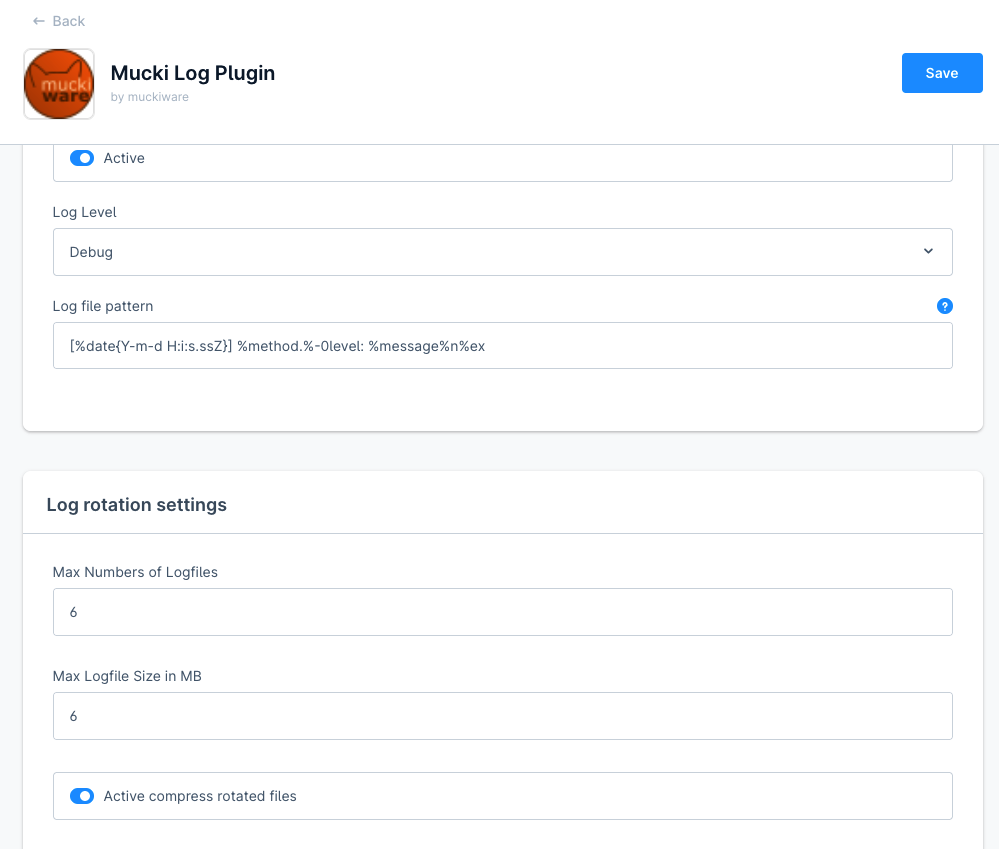
- Can send emails by log events
- Log viewer in the Administration — browse, search and download your log files directly from the admin, without shell access
- Outbound HTTP request logging (opt-in) — log every outgoing HTTP request made through Shopware's
http_clientand the Store-/FRW-API, including URL, method, query, body and response - Admin change log (opt-in) — audit log of who changed what and when, with a before/after diff per field

Installation
composer require muckiware/log-plugin
bin/console plugin:install -a MuckiLogPlugin
Log Viewer (Administration)
The plugin ships with a built-in log viewer in the Shopware Administration, so you can inspect log files without SSH or filesystem access to the server.
Where to find it: Settings → Plugins → Log viewer.
What it does
- File selection — lists every
*.logfile in the configured log directory, sorted by last modification (newest first) and annotated with the file size, so the most relevant file is easy to spot. - Tail view — shows the most recent entries of the selected file. By default the last 2,000 lines are loaded; the file is read backwards in chunks, so even very large log files open quickly without loading the whole file into memory.
- Load more — appends the next older block of lines on top of the current view (byte-based pagination), letting you step back through the history of a large file on demand.
- Refresh — reloads the tail of the current file to pick up entries written since it was opened.
- In-file search — a live search field highlights all matches in the loaded content, with a match counter, next/previous navigation (the view scrolls to the active match) and an optional case-sensitive toggle.
- Download — downloads the complete, unmodified log file as an attachment.
Security & access control
- All requests are protected by the ACL privilege
muwa_log_viewer:read; the admin module route requires themuwa_log_viewer.viewerprivilege. Assign it via a Shopware ACL role to control who may read logs. - File access is restricted to the configured log directory. File names are validated (must end in
.log) and resolved against the real path of the log directory, so directory-traversal attempts (e.g.../../) are rejected.
API endpoints
The viewer is backed by three read-only admin-API actions:
| Method & path | Purpose |
|---|---|
GET /api/_action/muwa-log-viewer/files |
List available log files (name, size, mtime) |
GET /api/_action/muwa-log-viewer/content?file=<name>&lines=<n>&before=<byte> |
Read the tail of a file (lines 1–20,000, default 2,000; before for pagination) |
GET /api/_action/muwa-log-viewer/download?file=<name> |
Download the full log file |
Outbound HTTP Request Logging
Besides logging what your application writes itself, MuckiLogPlugin can also log the HTTP requests your shop makes to external services — useful for debugging integrations with the Shopware Store, update checks or any other outbound call.
What is logged
For every covered outgoing request:
- the external URL and HTTP method
- query parameters
- the request body (if any)
- the response status code, headers and body (or the exception, if the request failed)
Coverage
| Source | Covers |
|---|---|
Symfony http_client (decorator) |
Store update checks, app downloader, SSO token service, S3 filesystem adapter, and any other service that injects Symfony\Contracts\HttpClient\HttpClientInterface (this also covers PSR-18 clients, which are a thin wrapper around http_client) |
| Store-/FRW-API (Guzzle middleware) | shopware.store_client and shopware.frw_client — plugin search, license checks, First Run Wizard |
Not covered: the App-System and Webhook Guzzle clients (shopware.app_system.guzzle,
shopware.webhook.guzzle) — some of their consumers require the concrete GuzzleHttp\Client class
rather than ClientInterface, which a decorator cannot safely satisfy. Also not covered: plugins
that call curl_* directly instead of going through Guzzle or the Symfony HTTP client (e.g. some
third-party translation/AI plugins) — those bypass the service container entirely, so no decorator
can intercept them.
Where the logs go
All sources write to a single shared log file, var/log/outbound-http.muwa.log, with a [http_client]
or [store_client] prefix per entry identifying the source. Like any other *.log file, it shows up
automatically in the built-in Log Viewer under Settings → Plugins →
Log viewer — no extra setup needed.
Enabling it
The feature is opt-in and disabled by default. Enable it in the plugin configuration under
Settings → System → Plugins → MuckiLogPlugin, card "Outbound HTTP logging settings", switch
Active outbound HTTP request logging (activeHttpLogging).
⚠️ Security note
There is no automatic masking of sensitive data. Authorization headers, API keys, tokens and
request/response bodies are logged as-is in plain text. Anyone with the muwa_log_viewer:read ACL
privilege can read them through the Log Viewer. Only enable this switch for targeted debugging, and
turn it back off once you are done.
Admin Change Log
An audit log in the style of a git log: every create, update and delete on tracked entities is stored as a "commit" with author, time, action and a before/after diff per field. It answers the question who changed what, when and how — without shell or database access.
The feature is opt-in and disabled by default.
Quick start
- Open Settings → System → Plugins → MuckiLogPlugin, card "Admin change log".
- Switch on Active (
activeChangeLog) and check the selection of Tracked entities. - Assign the ACL role Change log (
muwa_change_log.viewer) to the users who should see the log (Settings → System → Users & permissions → Roles, category "Settings"). - Save a product, category, order, customer or shopping experience — the change appears under Settings → Plugins → Change log.
Where to find it
- Central module: Settings → Plugins → Change log — all commits of all tracked entities.
- Change history tab on the detail pages of product, category, order and customer — the same list, filtered to the current record.
- Shopping experiences (CMS pages): the layout designer has no tabs, so the history is shown as a separate entry in the designer sidebar (compact layout, only for saved pages).
The tab and the sidebar entry are only shown if the user has the muwa_change_log.viewer role, the change
log is active and the entity is tracked.
The list view
| Column | Content |
|---|---|
| Date | Time of the save (stored in UTC, displayed in the browser's time zone) |
| Action | Badge created / changed / deleted |
| Entity | Root entity, e.g. product or "Settings" (hidden in the detail tab) |
| Record | Readable label at the time of the change (e.g. product name, order number), fallback: ID |
| Who | Admin user, integration, sales channel or "System", with the source type as subtitle |
| IP | Client IP of the request (hidden in the compact sidebar view) |
| Changes | Number of changed fields — click the row to expand the diff |
Filters above the table:
- Free-text search over record label, entity name, entity ID, user name and source name (debounced).
- Date from / to — whole days in the browser's time zone.
- Who — "All", "System" or a specific admin user, integration or sales channel. The options are only loaded for the sources the user may read.
- Entity — multi-select over the tracked entities plus every entity that already has entries.
The list is sorted by date (newest first) and paginated (25 entries per page).
The diff
Clicking a row expands a git-style diff per field: red − for the old value, green + for the new value.
Field labels carry their origin and context, e.g. "Name (en-GB)" for a translation or a hint for an
added/removed assignment. Inserts have no old values; deletes keep the old values, so you can see what
was deleted.
What is logged
-
Sources:
Source Detected by Stored Admin user AdminApiSourcewith user IDuserId(FK touser,ON DELETE SET NULL) and the user name as snapshotIntegration AdminApiSourcewithout user IDintegrationIdand the integration name as snapshotSales channel SalesChannelApiSourcesalesChannelIdand the sales channel name as snapshotSystem SystemSource(CLI, scheduled tasks, workers)source type only Snapshots keep the name readable after the user, integration or sales channel has been deleted.
-
IP address only if there is an HTTP request (empty for CLI, tasks, workers).
-
One commit per root record and save. Sub-entities are not logged as separate entries but as fields in the diff of the topmost tracked root record:
- translations, labelled with their language (e.g. "Name (en-GB)")
- owned child rows, including one-to-one associations and multi-level children
(e.g.
order_delivery_position→order_delivery→order) - mapping assignments (e.g.
product_category) as "assignment added/removed"
If a save only changes sub-data, the commit is "changed". If a sub-entity is tracked itself (e.g.
customer_address), it is still logged only once, under its topmost tracked root. -
Variants are products of their own and get their own commits.
-
Settings (
system_config) are written by Shopware via DBAL and bypass the DAL, so they are captured via a separate path (BeforeSystemConfigMultipleChangedEvent): one commit per save, domain (e.g.MuckiLogPlugin.config) and sales channel. Unchanged keys are omitted. Select "Settings" in the tracked entities to enable it.
Configuration
Plugin configuration, card "Admin change log" (keys under MuckiLogPlugin.config.):
| Key | Default | Meaning |
|---|---|---|
activeChangeLog |
off | Global switch, independent of active (file logging). Errors of the change log itself are only written to a log file if active is on as well. |
changeLogEntities |
["product","category","order","customer","cms_page"] |
Tracked root entities. All entities of the shop can be selected; system_config = "Settings". |
changeLogRetentionDays |
90 |
Retention in days, 0 = never delete |
Permissions
The ACL role Change log (muwa_change_log.viewer, category "Settings") grants read access to
muwa_admin_change_log plus user, integration, sales_channel and language (for names in the filters
and labels in the diff). It protects the central module, the detail tabs and the CMS sidebar entry.
The log is read-only in the Administration — entries cannot be edited, deleted or reverted.
Users with this role do not need system_config:read: the visibility of the tabs is read from a dedicated
endpoint.
Retention / cleanup
The scheduled task muwa.cleanup_change_log_task runs daily and deletes entries older than
changeLogRetentionDays, in blocks of 1,000 rows so the table is not locked for long. Nothing is deleted
if the change log is inactive or the retention is 0.
Data model & API
All entries are stored in the entity muwa_admin_change_log (table of the same name):
| Field | Meaning |
|---|---|
entityName, entityId, entityLabel |
Root entity, record ID and readable label at the time of the change |
action |
insert / update / delete |
sourceType |
user / integration / sales_channel / system |
userId (+ association user), userName |
Admin user and name snapshot |
integrationId, salesChannelId, sourceName |
Integration / sales channel and name snapshot |
ipAddress |
Client IP, if any |
changes |
JSON list of field changes: field, subEntity, context, old, new, masked |
createdAt |
Time of the save (UTC) |
Being a regular DAL entity, the log can be read via the Admin API, e.g.
POST /api/search/muwa-admin-change-log with the usual criteria (filters, sorting, term). In addition:
| Method & path | Purpose |
|---|---|
GET /api/_action/muwa-change-log/settings |
Returns active and the tracked entities (privilege muwa_admin_change_log:read) |
How it works
ChangeLogWriteSubscriberrequests change sets for tracked entities and their sub-entities onPreWriteValidationEvent(so Shopware provides the old values) and collects the write results onEntityWrittenContainerEvent.RootResolver/EntityGraphmap every sub-entity write to its topmost tracked root,CommitBuildergroups the results into commits andFieldChangeExtractorbuilds the field diffs.SourceResolverdetermines author and IP,EntityLabelResolverthe readable record label.ChangeLogWriterpersists all commits of a save with a singlecreate()call.SystemConfigChangeSubscriberhandles settings separately (old values are read raw from the database).- Errors of the change log never abort the actual write; they are logged with the context
muwa,admin-change-log. A context state prevents the log from logging itself.
Sensitive data
Secrets are never stored and appear as *** on both sides, also for nested keys (e.g. in JSON fields and
settings). A field counts as sensitive if it is a PasswordField, if its name contains password,
secret, token, accessKey, apiKey, privateKey, hash, credential, passphrase or hmac, or if
it ends in key (accepted false positives, e.g. sortKey).
Personal customer data (name, address, email) is logged as-is; the retention setting limits how long it is kept. Choose the retention according to your privacy requirements.
Known limitations
- Indexer-maintained / write-protected columns (e.g. order
amountTotal, productcheapestPrice) are not logged — their source fields are. Automatically maintained customer fields are ignored as well. - Writes via direct SQL are not captured (except
system_config). system_configentries are written from the before-event, so a failing save could still be logged.- Draft-version writes (e.g. order editing) are skipped; only the merged live change is logged.
- Text values are truncated to 255 characters in the label/name columns.
- With Shopware's
v6.8.0.0feature flag active the detail tabs (sw-tabs) are not shown. - On Shopware 6.6 (DBAL 3, no savepoints) a failing change log write inside a third-party outer transaction could mark that transaction rollback-only; normal core write paths are not affected.
- If
emz/admin-loggeris installed as well, changes are logged twice — deactivate one of them.
How to use
In order not to create dependencies from Muckilog to other plugins, the original Monolog interface can be used. Muckilog plugin will replace the monolog method by using a decorator.
<?xml version="1.0" ?>
<container xmlns="http://symfony.com/schema/dic/services"
           xmlns:xsi="http://www.w3.org/2001/XMLSchema-instance"
           xsi:schemaLocation="http://symfony.com/schema/dic/services http://symfony.com/schema/dic/services/services-1.0.xsd">
  <services>
     <service id="YourPlugin\Storefront\Pagelet\Header\Subscriber\YourHeaderPageSubscriber">
       ...
       <argument type="service" id="Psr\Log\LoggerInterface"/>
         <tag name="kernel.event_subscriber"/>
     </service>
  </services>
</container>
<?php
declare(strict_types=1);
namespace YourPlugin\Storefront\Pagelet\Header\Subscriber;
use Shopware\Core\Framework\Api\Context\SalesChannelApiSource;
use Shopware\Core\Framework\Context;
use Shopware\Core\Framework\DataAbstractionLayer\EntityRepositoryInterface;
use Shopware\Core\Framework\DataAbstractionLayer\Search\Criteria;
use Shopware\Core\Framework\Struct\ArrayEntity;
use Shopware\Storefront\Pagelet\Header\HeaderPageletLoadedEvent;
use Symfony\Component\EventDispatcher\EventSubscriberInterface;
use Psr\Log\LoggerInterface;
/**
 * Class YourHeaderPageSubscriber
 */
class YourHeaderPageSubscriber implements EventSubscriberInterface
{

    public function __construct(
        ...
        protected LoggerInterface $logger
    ) {
        ...
        $this->logger = $logger;
    }
    /**
     * @return array
     */
    public static function getSubscribedEvents(): array
    {
        return [
            // Subscribing to HeaderPageLetLoadedEvent
            HeaderPageletLoadedEvent::class => 'HeaderPageletLoadedEvent',
        ];
    }
    /**
     * @param HeaderPageletLoadedEvent $event
     */
    public function HeaderPageletLoadedEvent(HeaderPageletLoadedEvent $event): void
    {
        $this->logger->debug('Call HeaderPageEvent', array('myplugin', 'vendor'));
        ...

        $this->logger->info('debug', 'Call HeaderPageEvent', array('myplugin', 'vendor'));
    }
}
Loglevels
You have these kind of log levels
//Regular logger usage
$this->logger->debug('Call HeaderPageletLoadedEvent', array('myplugin', 'vendor'));
$this->logger->info('Call HeaderPageletLoadedEvent', array('myplugin', 'vendor'));
$this->logger->warning('Call HeaderPageletLoadedEvent', array('myplugin', 'vendor'));
$this->logger->error('Call HeaderPageletLoadedEvent', array('myplugin', 'vendor'));
$this->logger->critical('Call HeaderPageletLoadedEvent', array('myplugin', 'vendor'));

//logger with context setup object usage
$loggerContext = array(
    'myplugin',
    'vendor',
    array('setup' =>
        array(
            'notificationEmail' => true,
            'notificationEmailReceiver' => 'notificationEmailReceiver@example.com',
            'notificationEmailSender' => 'notificationEmailSender@example.com',
        )
    )
);
$this->logger->critical('Call HeaderPageletLoadedEvent with mail notification', $loggerContext);
Decorator Coverage
MuckiLogPlugin intercepts Shopware and Symfony log calls through two complementary mechanisms.
1. Psr\Log\LoggerInterface — via service decorator
The primary decorator (LoggerServiceDecorator) wraps the default Symfony/Monolog logger. Any service
that injects the logger via the standard PSR-3 interface is automatically covered:
<argument type="service" id="Psr\Log\LoggerInterface"/>
This is the recommended way to use the logger in your own plugins.
2. id="logger" — via DI CompilerPass
Many Shopware core services use the explicit logger service ID instead of the interface alias:
<argument type="service" id="logger"/>
The LoggerDecoratorCompilerPass runs at container compile time, traverses all service definitions
and replaces every id="logger" reference with a reference to the LoggerServiceDecorator — except
for services that are transitive dependencies of the decorator itself (those would create circular
references).
What this means in practice: Log calls from Shopware core services like ProductStreamProcessor,
StockUpdater, or ElasticsearchEntitySearcher are routed through MuckiLogPlugin automatically,
without any code changes in those services.
Why Monolog channel loggers (id="monolog.logger.*") are not auto-decorated
Shopware registers a dedicated Monolog logger per concern (monolog.logger.event,
monolog.logger.messenger, monolog.logger.request, etc.). Decorating these channels with a
service decorator is architecturally incompatible with the current plugin design:
LoggerServiceDecorator → MuckiLogPlugin\Logging\Logger → LoggingEvent
→ muwa_logging_event.repository → Shopware DAL → most Shopware services
→ those Shopware services use channel loggers → circular reference
The correct approach for intercepting channel loggers is a Monolog Handler (a handler is a leaf node in the DI graph and does not create cycles). This is documented as a future improvement.
Context array convention
The decorator reads the PSR-3 context array to determine which log file to write to:
// Writes to var/log/myplugin.myvendor.log
$this->logger->error('Something failed', ['myvendor', 'myplugin']);

// Writes to var/log/dev.sw.log (default fallback)
$this->logger->error('Something failed', []);

// Writes with email notification
$this->logger->error('Critical failure', [
    'myvendor',
    'myplugin',
    ['setup' => [
        'notificationEmail'         => true,
        'notificationEmailReceiver' => 'ops@example.com',
        'notificationEmailSender'   => 'shop@example.com',
    ]]
]);
Important: The context array must use numeric indices
0(vendor) and1(plugin name). Associative arrays passed by Shopware core services (e.g.['exception' => ...]) are handled gracefully — they fall back to the defaultsw/devlog file without errors.
CLIs
bin/console muckiware:logger:send
This command execute the sending of open logger events by email. Regular will this execution runs by Shopware schedules all 600 seconds.
bin/console muckiware:logger:check
This command tests the Psr\Log\LoggerInterface injection path and writes sample log entries
across all log levels.
bin/console muckiware:logger:check-sw
This command tests the id="logger" injection path (typical Shopware core pattern) to verify
that the LoggerDecoratorCompilerPass correctly routes those calls through MuckiLogPlugin.
The first output line shows the actual class injected — it should read
MuckiLogPlugin\Services\LoggerServiceDecorator, not Monolog\Logger.
Testing
phpstan
Install
Install phpstan, if required
cd custom/plugin/MuckiLogPlugin
composer install
Execute
cd custom/plugins/MuckiLogPlugin
composer run-script phpstan
Unit test
Execute first time
./vendor/bin/phpunit --configuration="custom/plugins/MuckiLogPlugin" --testsuite "migration"
Execute regular run
./vendor/bin/phpunit --configuration="custom/plugins/MuckiLogPlugin"
Changelog
See CHANGELOG.md