
nikolai-vysotskyi / lookout

Open-source, self-hosted alternative to Laravel Nightwatch for Laravel apps: requests, jobs, queries, exceptions, issues and an MCP server, on top of the NightOwl agent.
Requires
- php: ^8.3
- illuminate/console: ^12.0|^13.0
- illuminate/database: ^12.0|^13.0
- illuminate/http: ^12.0|^13.0
- illuminate/routing: ^12.0|^13.0
- illuminate/support: ^12.0|^13.0
- nightowl/agent: ^2.4
- open-telemetry/gen-otlp-protobuf: ^1.8
Requires (Dev)
- laravel/mcp: ^0.5|^1.0
- orchestra/testbench: ^10.0|^11.0
- pestphp/pest: ^3.0|^4.0
Suggests
- inertiajs/inertia-laravel: Answers Inertia visits (e.g. from the Nova sidebar) with a full-page load.
- laravel/mcp: Serves the Lookout MCP server for coding agents.
- laravel/nova: lookout.auth = nova reuses Nova's login and gate; Lookout\Nova\LookoutMenu adds a sidebar link.
Provides
None
Conflicts
None
Replaces
None
README

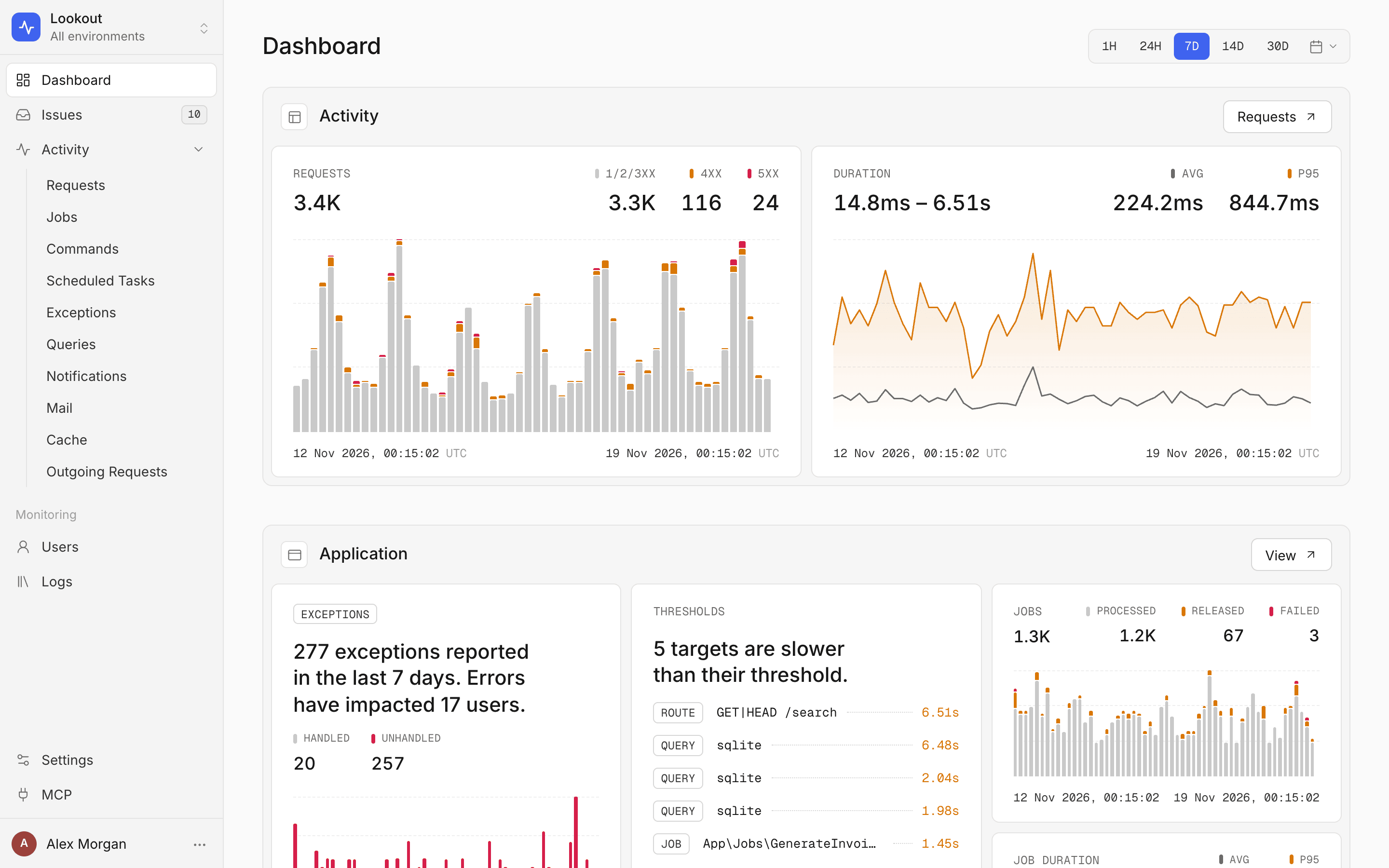
Lookout is an open-source, self-hosted alternative to Laravel Nightwatch. It is a monitoring UI that runs inside your Laravel app and reads the telemetry that the NightOwl agent (nightowl/agent, MIT) writes to your own PostgreSQL. You get requests with per-request traces, jobs, queries with N+1 detection, exceptions grouped into issues you can assign and comment on, logs, and an MCP server so coding agents can read the same data. The telemetry never leaves your servers, and there is no per-event bill.
Contents
- Features
- Why Lookout
- How it compares
- Requirements
- Installation
- Projects and connectors
- Configuration
- Telegram alerts
- MCP server
- Security
- Development
Features
 Requests and traces. Each route with its p95, error rate and slowest calls. A request opens as a trace: queries, cache events, outgoing HTTP calls, mail, logs and exceptions on one timeline. |
 Queries. The slowest and most frequent statements, per connection, with N+1 detection. |
 Issues. Exceptions and slow executions grouped into issues with status, priority, assignee, description, comments and an activity history. |
 Triage. Filters for open, unassigned and your own issues, bulk actions, and automatic resolve after 7, 14 or 30 quiet days. |
 Jobs, commands and scheduled tasks. Attempts, failures, releases and durations, plus every run of a command or task. |
 Logs. Filter by level, text and user. Each entry links to the request or job that wrote it. |
 Routes. Status codes, average and p95 over time, the threshold that applies, and the latest calls with their user and query count. |
 Users. Who is active, and who runs into errors or slow requests. One user opens with their requests, exceptions and logs. |
 Settings. Performance thresholds per route, job, query and other types. Alert channels: Telegram, webhook (HMAC-signed), Slack, Discord. |
 MCP server. Personal tokens and ready-to-paste setup for Claude Code, Codex, Cursor and VS Code. |
Also included:
- Dashboard. Requests, errors, latency (avg / p95) and throughput over 1 hour to 30 days, or a custom range, per environment.
- Exceptions (screenshot). Grouped by fingerprint, with the stack trace (your frames marked, vendor frames folded) and the requests or jobs they came from.
- Mail, notifications, cache and outgoing HTTP. Volumes, failures and timings.
- Nova mode. Reuse Laravel Nova's login and add a sidebar link.
- No build step. The SPA ships prebuilt. Your app needs no npm.
- Phone-friendly. The whole UI works on a small screen.


The screenshots come from a demo shop with generated traffic. No real users or data are shown.
Why Lookout
- Your data stays with you. Telemetry goes from your app to the NightOwl agent and into your PostgreSQL. Lookout reads it from there. No third-party service sees your requests, SQL or stack traces.
- No event quota. What you keep is limited by your disk and the NightOwl retention settings, not by a plan.
- Same instrumentation as Nightwatch. NightOwl builds on
laravel/nightwatch, so you get the same request, job, query and exception data. - Issues, not only charts. Errors and slow executions become issues with an owner, a priority and a history.
- Agent access on your terms. The MCP server runs in your app, behind your gate, with personal tokens that are read-only unless you give them write access.
- Small footprint. One Composer package, one extra table, no Node, no extra service besides the agent NightOwl already needs.
How it compares
Facts as stated in each project's own documentation, checked in November 2026. A dash means the linked documentation does not list the feature.
| Lookout | Laravel Nightwatch | Laravel Pulse | Laravel Telescope | Sentry | Flare | |
|---|---|---|---|---|---|---|
| Hosting | Self-hosted, inside your app | Managed service (FAQ) | Self-hosted, inside your app | Self-hosted, inside your app | Managed service, or self-hosted (docs) | Managed service |
| Source code | MIT | Agent package MIT; the service is not open source | MIT | MIT | Self-hosted edition under the FSL (docs) | – |
| Pricing model | Free | Free tier, then monthly plans by event volume (pricing) | Free | Free | Free tier, then plans by usage (pricing); self-hosted is free | Monthly plans by errors, spans and logs, with a trial (pricing) |
| Where data is stored | Your PostgreSQL | Nightwatch data centers in the US and EU (FAQ) | Your MySQL, MariaDB or PostgreSQL | Your database | Sentry's cloud, or your servers | Flare's cloud |
| Per-request traces | Yes | Yes | – (aggregated cards) | Yes (entries per request) | Yes | Yes |
| Exceptions | Yes | Yes | Yes (counts per class and location) | Yes | Yes | Yes |
| Issue workflow (status, comments) | Yes, plus assignee and priority | Yes (MCP docs) | – | – | Yes (docs) | Yes (docs) |
| Logs | Yes | Yes | – | Yes | Yes | Yes |
| MCP server for AI agents | Yes, self-hosted | Yes, hosted (docs) | – | – | Yes (docs) | Yes (docs) |
| Meant for production | Yes | Yes | Yes | Mainly local development (docs) | Yes | Yes |
Lookout and Nightwatch capture with the same laravel/nightwatch instrumentation. Pick Nightwatch if you want a managed service with nothing to run. Pick Lookout if the data has to stay on your servers or you want to avoid a per-event bill. Pulse and Telescope are free and complement both: Pulse for at-a-glance aggregates, Telescope for local debugging.
Requirements
- PHP 8.3+
- Laravel 12 or 13
- PostgreSQL for the NightOwl database
nightowl/agent2.4+, installed and running. It is a dependency of Lookout. NightOwl builds on thelaravel/nightwatchinstrumentation and stores what it captures in your database.- Optional:
laravel/mcpfor the MCP server,laravel/nova5 for Nova mode.
Installation
composer require nikolai-vysotskyi/lookout
-
Set up NightOwl as its documentation describes: a PostgreSQL database,
NIGHTOWL_ENABLED=true,NIGHTOWL_DB_*, thenphp artisan nightowl:migrateand a runningphp artisan nightowl:agent. Schedulenightowl:pruneso its retention settings apply. -
Publish the config (optional, the defaults work) and run the migration. It adds one table,
lookout_mcp_tokens:php artisan vendor:publish --tag=lookout-config php artisan migrate
-
Define who may open Lookout. Without this gate nobody gets in.
// app/Providers/AppServiceProvider.php
use Illuminate\Support\Facades\Gate;

public function boot(): void
{
    Gate::define('viewLookout', fn ($user) => $user->is_admin);
}
-
Open
/lookout. Lookout is on whilenightowl.enabledis on. It answers 404 otherwise.
Lookout keeps its own requests out of the telemetry: at boot it appends lookout, lookout/* and the MCP path (following path and mcp.path) to nightowl.ignore_routes, next to whatever you set in NIGHTOWL_IGNORE_ROUTES. See Security.
Reading connection
Lookout reads through the nightowl_read connection. If config/database.php does not define it, Lookout builds one from nightowl.database. Define it yourself to use a separate, less privileged role. That role needs:
SELECTon the NightOwl tables;UPDATEonnightowl_issuesandINSERTonnightowl_issue_activityandnightowl_issue_comments, for issue edits;- writes on
nightowl_settingsandnightowl_alert_channels, for the Settings page and the Telegram delivery progress.
Nova mode
If your admins already sign in to Laravel Nova, Lookout can sit behind Nova's own stack:
// config/lookout.php
'auth' => 'nova',
In Nova mode:
- Lookout uses
nova.api_middlewareonnova.domain, so it goes through Nova's login and gate. - Guests are sent to the Nova login.
- The user menu links back to Nova and signs out of Nova.
- The
viewLookoutgate still decides who gets in.
To add a sidebar link:
use Lookout\Nova\LookoutMenu;

Nova::mainMenu(fn () => [
    // ...
    LookoutMenu::make(), // or LookoutMenu::make('Monitoring', 'lightning-bolt')
]);
Assets
Lookout serves its prebuilt app.js and app.css from the package at /{path}/assets/*, behind the same access check. To serve them from public/ instead:
php artisan vendor:publish --tag=lookout-assets
The published copy in public/vendor/lookout wins while it exists. Re-publish after each update.
Projects and connectors
Use one Lookout instance and one PostgreSQL monitoring database for multiple projects and services. Keep your existing Laravel telemetry through NightOwl and connect Python workers or other services over OpenTelemetry. Filter Queries and Worker progress by project and service in Lookout, or use the same service keys in MCP.
See Projects and telemetry connectors to enable the feature, register a service and write an integration using a standard OTLP SDK.
Configuration
All keys live in config/lookout.php.
| Key | Default | What it does |
|---|---|---|
enabled |
null |
null follows nightowl.enabled. false closes Lookout (404) and pauses its schedule. |
path |
lookout |
URL prefix: /{path}, /{path}/api/*, /{path}/assets/*. |
domain |
null |
Restricts Lookout to one domain. In Nova mode, nova.domain is used. |
ignore_own_routes |
true |
Appends Lookout's web and MCP paths to nightowl.ignore_routes. LOOKOUT_IGNORE_OWN_ROUTES=false turns it off. |
auth |
gate |
gate uses middleware plus the gate. nova uses Nova's API stack plus the gate. |
middleware |
['web', 'auth'] |
The stack in gate mode. |
gate |
viewLookout |
The ability checked on every page and API call. |
connection |
nightowl_read |
The connection that reads the NightOwl database. |
user_model |
null |
Model behind assignees, comments and tokens. null means auth.providers.users.model. |
title |
Lookout |
Browser tab title. |
brand |
Lookout |
Name in the sidebar. null shows app.name. |
home, logout_url, login_url |
null |
User menu links outside Nova mode. |
storage_prefix |
lookout- |
localStorage prefix for theme, period and environment. |
auto_resolve.schedule, auto_resolve.at |
true, 03:40 |
Daily lookout:auto-resolve while Lookout is enabled. |
telegram.enabled |
true |
LOOKOUT_TELEGRAM_ENABLED. Schedules lookout:telegram-notify every minute. See Telegram alerts. |
telegram.api_base |
https://api.telegram.org |
LOOKOUT_TELEGRAM_API_BASE. The Bot API host, or a proxy in front of it. |
telegram.environment |
null |
LOOKOUT_TELEGRAM_ENVIRONMENT. Whose issues go to Telegram: null is this app's environment, * is every environment. |
mcp.* |
see below | The MCP server. |
To keep auto-resolve days, Telegram channels and their delivery progress next to your other settings, bind your own Lookout\Contracts\SettingStore. The default store uses nightowl_settings.
To narrow who issues can be assigned to, set a scope. The default is every user the gate lets in, checked one by one among the first 2,000 users by name, so set a scope on apps with large user tables:
use Lookout\Lookout;

Lookout::assignableUsersUsing(fn ($query) => $query->where('role', 'admin'));
Telegram alerts
Lookout can post new and reopened issues to a Telegram group, channel or forum topic. The NightOwl agent sends webhook, Slack and Discord alerts itself. It cannot send to Telegram, so Lookout does that part: the channels live in Lookout's setting store, and the lookout:telegram-notify command delivers them.
- Create a bot. Message @BotFather, send
/newbotand copy the token it gives you (123456789:AA…). - Add the bot to the chat. In a group, add it as a member. In a channel, make it an administrator that can post messages.
- Get the chat ID. For a public channel,
@channelnameworks. For a group, send a message in it, then openhttps://api.telegram.org/bot<token>/getUpdatesand readchat.id. Group and channel IDs are negative, for example-1001234567890. In a group with topics,message_thread_idin the same response is the topic ID. - Add the channel in Lookout under Settings → Notifications → Add channel → Telegram: a name, the bot token, the chat ID, an optional topic ID, and the events to send. Then press Send test: the test message is sent right away. If it fails, Lookout shows Telegram's own error, for example
Bad Request: chat not found.
How delivery works:
lookout:telegram-notifyruns every minute from Laravel's scheduler, sophp artisan schedule:runmust be running (cron orschedule:work). It runs withwithoutOverlapping()andonOneServer(); the latter needs a cache store that supports locks.- It reads NightOwl's own records. A new issue is one created since the last run. A reopened issue is one the agent reopened because it came back after being resolved; reopening by hand in Lookout sends nothing. These are the same two events the agent's own channels get.
- The first run only records the current time, so no history is sent. A channel added later starts when it is added, and a disabled channel gets nothing from while it was off. After that, each issue event goes out once per channel, oldest first. At most 20 messages go to one channel per run; the rest are counted in one "and N more" message.
- Only issues of this app's environment are sent (
nightowl.environment, elseapp.env).LOOKOUT_TELEGRAM_ENVIRONMENT=*sends every environment. - Each channel keeps its own position in the setting store (
monitoring.telegram_progress.<environment>). If a send fails, the error is logged without the token, that channel stops for this run, and its position stays at the message that failed: the next run retries from there, however long Telegram or the network was down. Messages that went out before the failure are not sent again. Delivery to the other channels goes on. - If your servers cannot reach
api.telegram.org, pointLOOKOUT_TELEGRAM_API_BASEat a proxy that forwards/bot<token>/sendMessage. LOOKOUT_TELEGRAM_ENABLED=falsestops the schedule and the command.
The bot token is stored in the setting store, as webhook secrets are stored in nightowl_alert_channels. After saving, Lookout shows only its last four characters. To keep the token, leave the field empty when you edit a channel. The token is part of the Bot API URL, so Lookout sends the request with Nightwatch recording paused and never logs the URL.
MCP server
With laravel/mcp installed, Lookout serves an MCP server at /mcp/lookout. Every credential can read. Changing anything needs write access, which is off by default.
Read tools (every credential):
| Tool | What it does |
|---|---|
list_issues |
Issues by status, type and environment, the most recently seen first. |
get_issue |
One issue with its counts and the stack trace of its latest occurrence. |
slow_routes |
Routes by p95, average, calls or error rate over a window. |
slow_queries |
Queries by p95, total time, average or calls. Accepts project, service and environment when projects are enabled. |
list_sources |
Projects and service keys with their connector and environment, when projects are enabled. |
worker_progress |
Successful worker cycles and grouped errors, when projects are enabled. |
failed_jobs |
Jobs with failures over a window. |
get_settings |
Thresholds, alert channels and auto-resolve, as the Settings page shows them: URLs cut to the host, secrets and bot tokens never returned. |
Write tools (only credentials with write access):
| Tool | What it does |
|---|---|
resolve_issue |
Marks an issue resolved. |
update_issue |
Sets an issue's status (open, resolved, ignored), priority (low, medium, high or none) and assignee (a user id or none). |
comment_issue |
Adds a markdown comment to an issue. |
set_threshold, delete_threshold |
Sets or removes the performance threshold of one type and target. |
set_auto_resolve |
Sets auto-resolve to 7, 14 or 30 days, or off. |
create_alert_channel, update_alert_channel, delete_alert_channel |
Manages webhook, Slack, Discord and Telegram channels. |
Scopes. A credential has the read scope or the write scope.
- A read-only credential does not see the write tools in
tools/list. Calling one anyway returns a JSON-RPC error that says the tool needs write access. - Write tools apply the same rules as the Settings page and the issue API: the same URL checks for Slack, Discord and webhooks, the same bot token and chat ID formats, the same assignee check. A refused value comes back as a tool error with the validation message.
- Issue changes are written to the issue's activity as the token's user, with an MCP badge (
actor_meta.via = mcp). MCP comments are stored withactor_type = mcp. - Settings changes are logged at
infolevel (Lookout MCP: …) with the user and what changed. Logs name the changed fields, never URLs, secrets or bot tokens. - Secrets are write-only. URLs, signing secrets and bot tokens can be set through MCP, but no MCP response returns them.
Access. Each user creates personal tokens on the MCP page in Lookout. The page also shows ready-to-paste snippets for Claude Code, Codex, Cursor and VS Code.
- A token acts as its owner while the owner passes
mcp.gate.nullmeans the app's gate (gate, i.e.viewLookoutby default); there is no separate MCP ability unless you set one. - A personal token is read-only unless its owner turns on Write access, when creating it or later on the MCP page. The token API takes
can_write. The old field namecan_resolveis still accepted, and the response carriesscope(readorwrite),can_writeandcan_resolve. The flag stays in thecan_resolvecolumn, so updating needs no migration. LOOKOUT_MCP_TOKENwithLOOKOUT_MCP_USER_IDis a shared token for automation. It acts as that user and is read-only unlessLOOKOUT_MCP_TOKEN_CAN_WRITE=true. Use a long random value (32+ characters, e.g.php -r "echo bin2hex(random_bytes(32));"); a shorter one still works but logs a warning once a day.- Tokens are sent as
Authorization: Bearer <token>orX-Api-Token: <token>. - Other credentials of your app (API keys, OAuth tokens) are refused.
- The server answers 404 while Lookout is disabled, like the web app.
- Failed token checks are limited per IP before any token lookup (
mcp.failed_per_minute, 30 by default): above that the IP gets 429 withRetry-Afterfor the rest of the minute. Successful requests are not counted. - Requests are limited per credential (
mcp.per_minute, 600 by default). To use your app's own limiter instead, setmcp.middlewareto the middleware that should run after the token check, e.g.['rate:mcp'];[]drops the limit.
Upgrading from 0.2. Before 0.3.0 the shared token could always resolve issues. It is now read-only by default: set LOOKOUT_MCP_TOKEN_CAN_WRITE=true if your automation resolves issues through it. Personal tokens keep their setting: a token that could resolve now has write access, so it can also use the new write tools. Turn write access off on the MCP page for tokens that should only resolve.
Tokens table. lookout_mcp_tokens is created on the default connection with a foreign key to the users table. Its user_id follows users.id: read when the migration runs, or set mcp.user_id_type to int or bigint (an INT UNSIGNED users.id on MySQL needs int, which the migration finds by itself). Set mcp.tokens_connection to keep the table elsewhere; on another connection than the users table it gets an index on user_id but no foreign key.
| Key | Default |
|---|---|
mcp.enabled |
true |
mcp.path |
mcp/lookout |
mcp.gate |
null (the app's gate) |
mcp.token, mcp.user_id |
LOOKOUT_MCP_TOKEN, LOOKOUT_MCP_USER_ID |
mcp.token_can_write |
LOOKOUT_MCP_TOKEN_CAN_WRITE, false: whether the shared token may use the write tools |
mcp.per_minute, mcp.rate_limiter |
600, lookout-mcp |
mcp.failed_per_minute |
LOOKOUT_MCP_FAILED_PER_MINUTE, 30 |
mcp.middleware |
null (ThrottleRequests with mcp.rate_limiter) |
mcp.tokens_table, mcp.token_prefix |
lookout_mcp_tokens, lookout_ (12 characters at most) |
mcp.tokens_connection, mcp.user_id_type |
LOOKOUT_MCP_TOKENS_CONNECTION (the default connection), null (read from users.id) |
mcp.server_name, mcp.client_name, mcp.app_name |
derived from app.name |
Security
Lookout's own traffic. Lookout's pages and API carry secrets: a new MCP token in the response that creates it, the shared token in X-Api-Token, webhook URLs, signing secrets and Telegram bot tokens in the alert channel requests. NightOwl records every request of your app, so without an exclusion every other viewer could read them on Lookout's request pages. That is why ignore_own_routes is on by default. NightOwl still keeps exceptions thrown on ignored routes.
- If you turn
ignore_own_routesoff, addplain_token,url,webhook_url,secret,bot_tokentoNIGHTOWL_REDACT_RESPONSE_FIELDSandNIGHTWATCH_REDACT_PAYLOAD_FIELDS, andX-Api-TokentoNIGHTWATCH_REDACT_HEADERS. - If the app also reports to the Laravel Nightwatch service (
NIGHTOWL_PARALLEL_WITH_NIGHTWATCH=true), Lookout's routes are not excluded there: addX-Api-TokentoNIGHTWATCH_REDACT_HEADERS(its default list redactsAuthorizationbut notX-Api-Token), or send MCP tokens asAuthorization: Bearer.
One access level. Everyone who passes viewLookout can also change settings: thresholds, auto-resolve, alert channels (including their URLs), bulk status changes, and write access of their own MCP tokens. A token with write access can change the same settings through MCP. Grant the gate only to people you trust with alerting, not for read-only triage.
Alert channel URLs. Slack channels must point at https://hooks.slack.com/, Discord channels at https://discord.com/api/webhooks/ or https://discordapp.com/api/webhooks/. Generic webhooks may not point at localhost or a literal private, loopback, link-local or reserved IP. Host names are not resolved, so a public name that resolves to an internal address still passes: restrict the agent's outbound traffic where that matters. Changing a webhook's URL drops its stored signing secret unless you send a new one.
What viewers see. Everything NightOwl captured: request headers, payloads and response bodies (as far as capture and redaction allow), client IPs, user names and emails, mail recipients and log context.
Middleware. If you replace middleware, keep web in the stack: it carries the session and CSRF protection of the state-changing routes. The Lookout page is sent with X-Frame-Options: DENY and Content-Security-Policy: frame-ancestors 'none'.
To report a vulnerability, see SECURITY.md.
Development
composer install
composer test        # Pest on Orchestra Testbench
sh bin/build.sh      # rebuilds dist/ from resources/js and resources/css
The SPA is plain JavaScript split into resources/js/01..09-*.js. bin/build.sh concatenates the files into dist/app.js, so no bundler is needed. Commit dist/ together with the sources: a test fails if they differ.
See CONTRIBUTING.md for pull requests and SECURITY.md for reporting vulnerabilities.
Supported by

Built by the team behind AssetFeed.
License
MIT. See LICENSE.
Lookout is not affiliated with or endorsed by Laravel. Laravel and Laravel Nightwatch are trademarks of their respective owners.