
ui-awesome / html-core

Core HTML tag rendering foundation for PHP: abstract bases for block, inline, input, and void elements, lifecycle hooks, simple factory, and application-scoped config recipes.
Requires
- php: ^8.3
- ui-awesome/html-attribute: ^0.8
- ui-awesome/html-contracts: ^0.2
- ui-awesome/html-helper: ^0.7
- ui-awesome/html-interop: ^0.4
- ui-awesome/html-mixin: ^0.8
Requires (Dev)
- infection/infection: ^0.34
- maglnet/composer-require-checker: ^4.1
- php-forge/baseline: ^0.1
- php-forge/coding-standard: ^0.3
- php-forge/support: ^0.3
- phpstan/extension-installer: ^1.4
- phpstan/phpstan: ^2.2
- phpstan/phpstan-strict-rules: ^2.0
- phpunit/phpunit: ^12.5
- yii2-extensions/scaffold: ^0.2
Suggests
None
Provides
None
Conflicts
None
Replaces
None
README

Html Core
A type-safe PHP library for standards-compliant HTML tag rendering
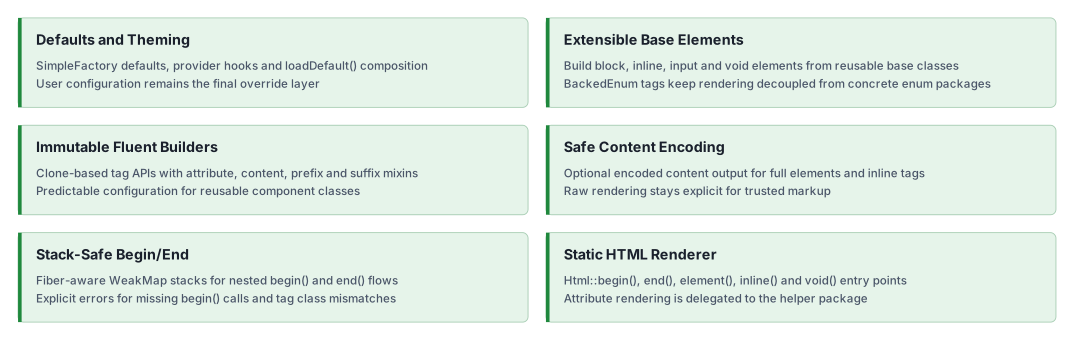
Build and render block, inline, input, and void elements with immutable fluent APIs.
Features
Installation
composer require ui-awesome/html-core:^0.8
Quick start
Rendering HTML tags with enums
Renders begin/end tags and full elements using standards-compliant tag enums.
<?php

declare(strict_types=1);

namespace App;

use UIAwesome\Html\Core\Html;
use UIAwesome\Html\Interop\{Block, Inline, Voids};

echo Html::begin(Block::DIV, ['class' => 'container']);
// <div class="container">

echo Html::inline(Inline::SPAN, 'Hello');
// <span>Hello</span>

echo Html::end(Block::DIV);
// </div>
Rendering a full element (with optional content encoding)
<?php declare(strict_types=1); namespace App; use UIAwesome\Html\Core\Html; use UIAwesome\Html\Interop\Block; $content = '<span>Test Content</span>'; echo Html::element(Block::DIV, $content, ['class' => 'test-class']); // <div class="test-class"> // <span>Test Content</span> // </div> echo Html::element(Block::DIV, $content, ['class' => 'test-class'], true); // <div class="test-class"> // <span>Test Content</span> // </div>
Rendering void elements with structured attributes
Void tags render without closing tags. Complex attributes (like class arrays and data arrays) are rendered via the
installed ui-awesome/html-helper dependency.
<?php

declare(strict_types=1);

namespace App;

use UIAwesome\Html\Core\Html;
use UIAwesome\Html\Interop\Voids;

echo Html::void(
    Voids::IMG,
    [
        'class' => ['void'],
        'data' => ['role' => 'presentation'],
    ],
);

// <img class="void" data-role="presentation">
Input elements with prefix/suffix templates
Input elements render the input tag with optional prefix and suffix segments through the same template primitives used by inline elements.
<?php

declare(strict_types=1);

namespace App;

use BackedEnum;
use UIAwesome\Html\Core\Element\BaseInput;
use UIAwesome\Html\Interop\{Inline, Voids};

final class SearchInput extends BaseInput
{
    protected function getTag(): BackedEnum
    {
        return Voids::INPUT;
    }

    protected function run(): string
    {
        return $this->buildElement();
    }
}

echo SearchInput::tag()
    ->type('search')
    ->name('q')
    ->prefix('Search')
    ->prefixTag(Inline::LABEL)
    ->render();

// <label>Search</label>
// <input name="q" type="search">
Building custom elements with immutable fluent APIs
Create your own element classes by extending the provided base elements.
<?php

declare(strict_types=1);

namespace App;

use UIAwesome\Html\Core\Element\BaseBlock;
use UIAwesome\Html\Interop\Block;
use BackedEnum;

final class Div extends BaseBlock
{
    protected function getTag(): BackedEnum
    {
        return Block::DIV;
    }
}

echo Div::tag()
    ->class('card')
    ->content('Content')
    ->render();

// <div class="card">
// Content
// </div>
Nested rendering with begin() / end()
BaseBlock supports stack-based begin/end rendering, with protection against mismatched tags.
<?php

declare(strict_types=1);

namespace App;

use UIAwesome\Html\Core\Element\BaseBlock;
use UIAwesome\Html\Interop\Block;
use BackedEnum;

final class Div extends BaseBlock
{
    protected function getTag(): BackedEnum
    {
        return Block::DIV;
    }
}

echo Div::tag()->begin();
echo 'Nested Content';
echo Div::end();

// <div>
// Nested Content
// </div>
Inline elements with prefix/suffix and templates
Inline elements can render prefix and suffix segments, optionally wrapped in their own tags.
<?php

declare(strict_types=1);

namespace App;

use UIAwesome\Html\Core\Element\BaseInline;
use UIAwesome\Html\Interop\Inline;
use BackedEnum;

final class Span extends BaseInline
{
    protected function getTag(): BackedEnum
    {
        return Inline::SPAN;
    }

    protected function run(): string
    {
        return $this->buildElement($this->getContent());
    }
}

echo Span::tag()
    ->content('Content')
    ->prefix('Prefix')
    ->prefixTag(Inline::STRONG)
    ->suffix('Suffix')
    ->suffixTag(Inline::EM)
    ->render();

// <strong>Prefix</strong>
// <span>Content</span>
// <em>Suffix</em>
Application-scoped config recipes
Use an immutable Config instance to apply a design-system recipe without global mutable state. Multiple configs can be
used in the same process, and fluent calls made after config() are local overrides.
<?php

declare(strict_types=1);

namespace App;

use UIAwesome\Html\Core\Config\{Call, ComponentContext, Config, Cookbook, Recipe};
use UIAwesome\Html\Core\Element\BaseInline;
use UIAwesome\Html\Core\Theme\ThemeInterface;
use UIAwesome\Html\Interop\Inline;
use BackedEnum;

final class Span extends BaseInline
{
    protected function getTag(): BackedEnum
    {
        return Inline::SPAN;
    }

    protected function run(): string
    {
        return $this->buildElement($this->getContent());
    }
}

final readonly class FlowbiteTheme implements ThemeInterface
{
    public function getName(): string
    {
        return 'flowbite';
    }

    public function getRecipes(ComponentContext $context): iterable
    {
        if ($context->component === 'badge') {
            yield new Recipe(
                'flowbite.badge',
                new Cookbook(new Call('class', 'rounded text-sm')),
            );
        }
    }
}

$config = new Config(new FlowbiteTheme());

echo Span::tag()
    ->config($config, new ComponentContext('badge'))
    ->id('badge-1')
    ->content('New')
    ->render();

// <span class="rounded text-sm" id="badge-1">New</span>
Application-scoped theming
Theming is dependency injection, not global state. Build one Config in the application container from the theme
and the applier, inject it where components are created, and apply it per component with a ComponentContext. The
library holds no static or global theme registry, so parallel tests, multiple tenants, and several design systems can
coexist in the same process.
<?php

declare(strict_types=1);

namespace App;

use UIAwesome\Html\Core\Config\{ComponentContext, Config, ConfigApplier};

// Container definition, built once per application.
$container->set(
    Config::class,
    static fn(): Config => new Config(new FlowbiteTheme(), new ConfigApplier()),
);

// Consumer, receiving the config by injection.
final readonly class Badge
{
    public function __construct(private Config $config) {}

    public function render(string $label): string
    {
        return Span::tag()
            ->config($this->config, new ComponentContext('badge'))
            ->content($label)
            ->render();
    }
}
Fluent calls made after config() are local overrides, and each Config instance applies only its own recipes.
Class-level defaults with loadDefault()
For a simpler approach without a theme, override loadDefault() in your tag class. These defaults are applied
automatically when tag() is called.
<?php

declare(strict_types=1);

namespace App;

use UIAwesome\Html\Core\Element\BaseBlock;
use UIAwesome\Html\Interop\Block;
use BackedEnum;

final class Container extends BaseBlock
{
    protected function getTag(): BackedEnum
    {
        return Block::DIV;
    }

    protected function loadDefault(): array
    {
        return [
            'class' => 'container',
        ];
    }
}

echo Container::tag()->render();
// <div class="container">
// </div>

echo Container::tag(['class' => 'container-fluid'])->render();
// <div class="container container-fluid">
// </div>
Configuration priority (from weakest to strongest):
- Class defaults from
loadDefault() - Defaults passed to
tag() - Application-scoped recipes applied by
config() - Fluent local overrides called after
config()
Extensibility
This library is agnostic and designed to be extended. You can define your own tag collections (for example, for SVG, MathML, or Web Components) with custom string-backed enums.
Html::element()handles generic open/content/close rendering.Html::inline()handles inline rendering.Html::void()handles void rendering.
You can create a custom enum for your specific domain and use it with html-core.
enum SvgTag: string
{
    case SVG = 'svg';
    case G = 'g';
    // ... add other SVG block tags as needed
}

// now you can use it with the Html renderer or your custom classes
echo Html::element(SvgTag::G, '...');
// <g>...</g>
Documentation
For detailed configuration options and advanced usage.
Package information
Project status
Our social networks