
wapplersystems / ws-slider
universal slider extension for tinyslider, swiper, flexslider, ...
Maintainers

Package info
github.com/WapplerSystems/ws_slider
Language:JavaScript
Type:typo3-cms-extension
pkg:composer/wapplersystems/ws-slider
Requires
- typo3/cms-core: ^14
This package is auto-updated.
Last update: 2026-06-27 09:01:05 UTC
README
Universal slider / carousel extension
A TYPO3 content element that provides a configurable slider/carousel with support for multiple rendering engines. Each renderer has its own FlexForm settings and TypoScript constants, allowing global defaults that editors can override per element.
Supported renderers
| Renderer | Library | Site Set name |
|---|---|---|
| Swiper | Swiper.js | wapplersystems/ws-slider-swiper |
| FlexSlider 2 | FlexSlider | wapplersystems/ws-slider-flexslider |
| TinySlider 2 | Tiny Slider | wapplersystems/ws-slider-tinyslider |
| Slick | Slick | wapplersystems/ws-slider-slick |
| Bootstrap | Bootstrap 5 | wapplersystems/ws-slider-bootstrap |
Requirements
- TYPO3 v14
- PHP 8.2+
fluid_styled_content
Installation
composer require wapplersystems/ws-slider
Configuration
1. Include the Site Set
Add the base Site Set wapplersystems/ws-slider and the Site Set for the renderer(s) you want to use (e.g. wapplersystems/ws-slider-swiper) in your site configuration.
2. TypoScript constants
Each renderer ships global TypoScript constants (e.g. plugin.tx_wsslider.settings.renderer.swiper.*). These serve as default values for all slider elements using that renderer.
3. Per-element settings
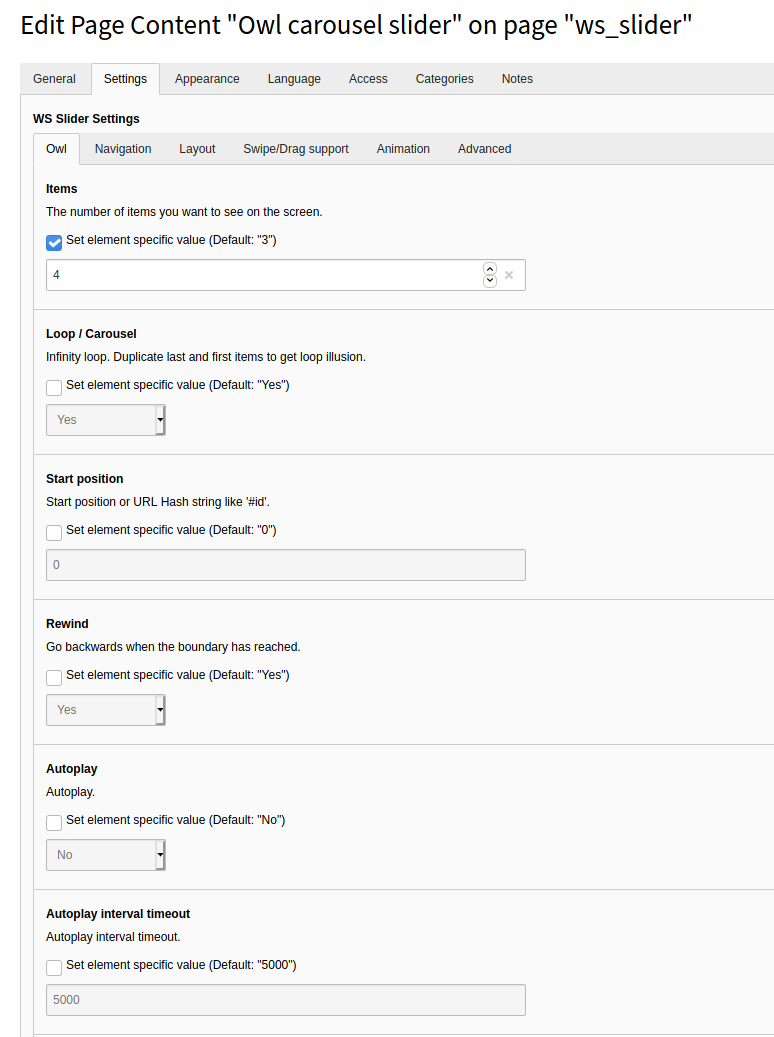
Editors can override any constant via the FlexForm settings of the content element. A checkbox controls whether the global default or a custom value is used. The current default value is always visible as a placeholder.
4. Presets
Presets allow storing a named set of slider settings in the database (tx_wsslider_domain_model_preset). Editors can select a preset instead of configuring each option individually.
Templating
Override the Fluid templates located in Resources/Private/Templates/ via TypoScript templateRootPaths as usual.
Video tutorial
A German video tutorial on installation and configuration: YouTube
Authors
- Sven Wappler
- Contributors